For those who might have missed this new feature of QTP 9.x series…
QTP’s “Keyword View” provides a tab called “Documentation”. As the name suggest this option generates auto-documentation for whatever is recorded in expert view. Now you may want to export this documentation and use it as your manual test cases.
Go to keyword view > Right click on Documentation tab > Click Copy Documentation to Clipboard > Paste in to notepad or MS word.
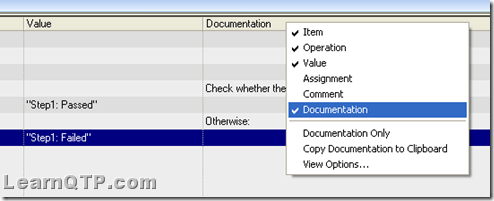
Although copying documentation was possible with QTP 8.2 also but there was no direct way through IDE itself. You need to tweak registry to get this in 8.2
If you want to keep track of further articles on UFT (QTP). I recommend you to subscribe by email below and have new UFT articles sent directly to your inbox.



Siva says
how to automatically copy description of keyword view to excel using automation object
Andrew Sliwkowski says
FYI,
Copy Documentation to Clipboard button used to be available
in the Edit Pull down via QTP, in HP UFT is only available in the Keyword View (as shown above) when you right mouse button.
A
shyamala says
I am anBeginner of this qtp..I would like to write the script in qtp..can u send the models pls..
yogi says
hi,
this yogi ,
iam not having knowledge on vb script.
is ti mandatory to learn vb script to learn qtp .
Sheetal says
Well Sathya, this feature is only for 9.x versions as specified in the post
Anonymous says
hi,
this is sathya.i m using qtp 8.2 version.i m not having this copy documentation to clipboard option in that.wat may be the reason?