QTP doesn’t provide a native support for Adobe pdf. So when comparing two pdf files, I would prefer other tools than can do a much better job. But if you are very sure to use QTP only for this effort, here are some of the broad guidelines to follow:
This sequence is for Adobe Reader 7.0. The steps may vary with other versions.
1) Open the pdf file in selection mode
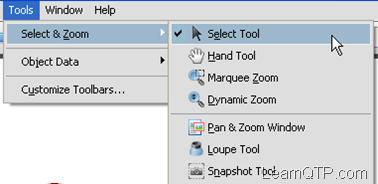
2) The opening of pdf file in selection mode can be automated by the following combination of key strokes. Alt+t+s+Down Arrow Key +Enter. Automation equivalent:
Window("regexpwndtitle:=Adobe Reader","regexpwndclass:=AdobeAcrobat").Type micAltDwn + "t" + micAltUp
Window("regexpwndtitle:=Adobe Reader","regexpwndclass:=AdobeAcrobat").Type "s"
Window("regexpwndtitle:=Adobe Reader","regexpwndclass:=AdobeAcrobat").Type micDwn
Window("regexpwndtitle:=Adobe Reader","regexpwndclass:=AdobeAcrobat").Type "Enter"
3) Select the whole text using “Select All”. Automation equivalent:
Window("regexpwndtitle:=Adobe Reader","regexpwndclass:=AdobeAcrobat").Type micCtrlDwn + “a” + micCtrlUp
4) Copy the whole selection to the clipboard. Automation equivalent:
Window("regexpwndtitle:=Adobe Reader","regexpwndclass:=AdobeAcrobat").Type micCtrlDwn + "c" + micCtrlUp
5) Using FSO with QTP write content to a text file, name it as text “File-1”
6) Repeat the above steps with second file also. name it as text “File-2”
7) Now, using File System Object with QTP –yet again-compare two files line by line. Go through the How to read content from a file? section on the given link.
You might need to create some functions above to save yourself from repeated tasks. If you have any other idea (or a better idea) to compare two pdf files, do let me know through the comments below.
If you want to keep track of further articles on UFT (QTP). I recommend you to subscribe by email below and have new UFT articles sent directly to your inbox.



Sreekanth B says
Hi Ankur,
Could you please suggest on my requisite…
I need to Set the values in a pdf again i need to validate the same pdf.
Installed ATT S/W & Pdf (10.1.4).
But qtp(11.0) unable to identify the objects in the pdf.
How to overcome this issue?
Dev says
Please let me know how to compare the PDF’s file by using the VB script.
sandeep says
Hi,
I currently use UFT 11.5 (Higher version of QTP)for one of the .NET based desktop application. I need to perform image comparison in 2 PDF files. I thought of using “File Content Checkpoint”, but it only does text comparison & not image comparison. Could you please suggest me on how to perform this operation?
Regards,
Sandeep
ron says
Hi Vasu,
The error you mention here that the ‘file could not be found'(even though the file exist). I think thids error is due to the corrupt file in microsoft excel , i think there is nothing wrong in your script. You can reinstall your excel or scan and fixed it. after that i hope it will work.
Bikash chakrabarty says
Hi Ankur,
Its mentioned that while comparing two pdf files ,we need to copy the text from pdf file and paste in text file.
But when the pdf file contains some images like arrow mark to show direction,buttons imagesetc.Can it be possible to test with QTP?
Ralph Longobardi says
I use a tool Nuance PDF Professional. It my case I am trying to compare report files–my reports contain “font subsetting” in the PDF report files. Nuance was the best tool to convert PDF files to text files that preserves the “report integrity”–lines of the original PDF report are changed to lines in a text file report and white space is reduced–text file versions of the report are smaller and easier to compare. I then use QTP pattern matching to change text values that don’t need to be compared (eg. a date is changed to mmddyy, an account number is changed (1234 becomes aaaa). I keep only original numeric string values that should be compared–in my case this is payroll money values. After the cleaning step, the files are ready to be compared (older reports of the same type are compared with newer reports–the older reports were saved from a previous time and have gone through the same process steps:
PDF->Txt–>Clean values that should not be compared)
Shilu says
Hi Ankur,
You have mentioned how to copy the content from PDF. but its not mentioned properly how to paste it in the text file.Its just mentioned about the FSO. but Using FSO we can only write the contents.
So Can you please help me to explain how to paste the content to the text file?
Thanks,
Shilu
RICK says
Hi,
Is there is any way to compare the pdf file with the online web-page, using VBScript or any other.
Please reply.
Vasu says
Hi,
I am using below code to compare Excel FIles. But when i am running, it comes yup with Error message ‘File location not found’ (even though file exists in the location). Could you please help me.
I have copied below code in QTP >> File ‘Test’ and changed the location paths and try to run.
Please help, do i need to do any thing else before?
Set objExcel = CreateObject(“Excel.Application”)
objExcel.Visible = True
Set objWorkbook1= objExcel.Workbooks.Open(“C:\result\lotexpt.xls”)
Set objWorkbook2= objExcel.Workbooks.Open(“C:\result\lotact.xls”)
set newWorkbook=objExcel.Workbooks.Add
Set objWorksheet1= objWorkbook1.Worksheets(1)
Set objWorksheet2= objWorkbook2.Worksheets(1)
Set objNewWorksheet= newWorkbook.Worksheets(1)
For Each cell In objWorksheet1.UsedRange
If cell.Value objWorksheet2.Range(cell.Address).Value Then
objNewWorksheet.Range(cell.Address).Value=cell.Value
objNewWorksheet.Range(cell.Address).Interior.ColorIndex = 3′ Highlights in red color if any changes in cells’
else
objNewWorksheet.Range(cell.Address).Interior.ColorIndex=0
End If
Next
set objExcel=nothing
Anunay Kumar says
The best way is to use the API. The API comes free with the reader version, the only difference being that you can just perform readonly functions with this API while for editing functions you need the full version Adobe API. The declaration for this reader API is different from the one for full version API i.e “acroexch.app”. The API declaration for the reader API can be found on Adobe’s site. I am not able to recall it right now.
Chandrakant Dhutadmal says
How do we compare two pdf files containing Devnagari Text ? or for that matter containing Text other than English ? How will QTP recognize these characters ?
Ralph Longobardi says
We regularly compare over 150-175 .pdf reports daily.
The .pdf reports are converted to .txt documents using PDF Converter tool (needed to overcome .pdf reports font subsetting). The .txt files are “cleaned” removing dates, times, user information using QTP (“Search and Replace”). When QTP is used, .txt files become Unicode format. Notepad is used to convert .txt files to ANSI format. Then .txt files are compared using QTP. Differences are reported line by line.