QTP 9.x and earlier versions provides the native support for exporting your test results to HTML. What will you do if you need to export it in a pdf format?
Though there are many commercial tools in the market to do this, here I would like to give a free desktop based solution for exporting your results to PDF format:
- Download PDF Creator from PrimoPDF. [17.8MB, FreeWare]
- Run the set up program, follow the instructions on the screen and install Primo PDF creator.
- PrimoPDF is installed and can be accessible from File > Print (printer) option menu.
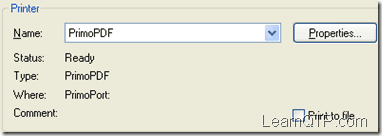
- Click OK and you will get this screen.
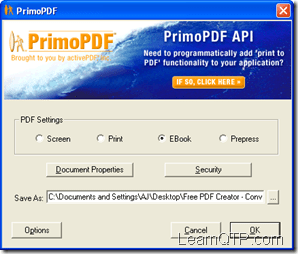
- Select the radio button “EBook”. Use Save As button to save the pdf in your desired location. Click OK
- Your report in pdf format is ready. Cheers!
How do you convert your QTP reports to other formats? Do let us know through the comments below.
If you want to keep track of further articles on UFT (QTP). I recommend you to subscribe by email below and have new UFT articles sent directly to your inbox.



RAVI KANT SHARMA says
Hi Ankur,
I am presently using QTP 10.0 and HP-ALM 11.0.
Thesedays we are facing a very unusual issue with ALM.
We have used Modular-Hybrid Methodology for our project. Here we are saving all our Test Cases in a Share Drive and each Test Case is mapped to ALM\QC through a portable approach through a call to external action.
All of our tests are available in discrete actions and then called up through a up in a Driver Action. Thus we have one driver for each script and this Driver is then called as external action to a test in HP-ALM.
Problem :
When we try to run a test which is mapped to ALM :
1. Sometimes ALM takes a considerable time and then throws a pop-up message that “Test does not exist.” Although Test exists there.
2. If ALM opens that Test in QTP then we find that all actions are missing from the hierarchy in Test Flow pane. Hence it is not able to execute test with the help of ALM.
But all the Tests that we have automated before QC to ALM migration: -> ALM is able to run them successfully.
Infact I have raised this issue to HP-Support Team but they have not come up with any specific solution for this and told us to install patch 28 for ALM.
Hence we need your help on this………
raji says
hi ankur, what is meant by cyclomatic.
How to create Collapsable HTML report using QTP says
How to create Collapsable HTML report using QTP
Rahul says
How to get reference (address) of a varient using VB Script?
miranky john says
Hi everybody,
When I run a set of tests using Test Batch Runner, I will need to go through each test separatly to check the result. My question is : is there any way to generate one report that describes all the test results, instead of going trhough each test.
Thanks in advance,
😉
John
Ankur says
@John: There is no straightforward way. Probably I “ll develop a utility for it some time.
Anonymous says
Hi,
How can I code the primopdf to generate my qtp resultset into a pdf file after test execution has completed?
Is this done within QTP code?
Can it be done within QTP code?
Any code example?
🙂
Roy
Anonymous says
How did you incorporate primopdf into your QTP script? OR is this not the approach to using it?
I will have a QTP Resultset and simply want the pdf to be generated at the end of the Test Execution cycle.
Any comments/help welcome?
Code example would be nice. ; )
Roy
Joy says
I tried primopdf. But i didn’t get the screenshot in the pdf file which was there in my QTP Resultset
pls help…
Stefan says
QTP native report has one major design mistake…the result is not available until after a test! Therefore I use custom reporting to a database and the results are available during run-time via a web page: http://abouttesting.blogspot.com/2008/06/test-automation-report-source-code.html