While working on a web applications using QTP, you may have noticed most of the time QTP runs too fast in comparison to the application. Moreover QTP would not perform any operation on a particular page unless that page has loaded completely (100%). You may wonder in bewilderment about what to do to make the application (web page) load faster.
Here I would like to give you a simple tip to alleviate your pain (and waiting time) a bit.
If you will notice carefully, most of the times text on a web page renders very quickly. It is the images that creates problem and increases the web page loading time. What if we can stop the images from loading altogether?
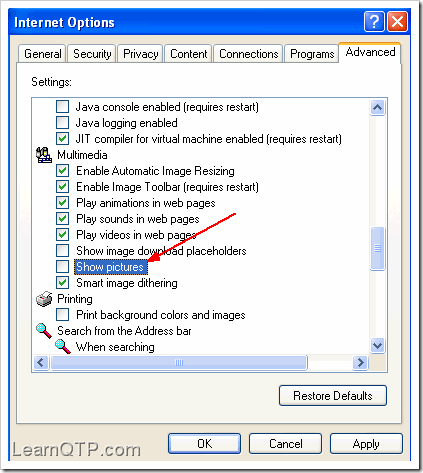
All browsers provides this facility whereby you can stop pictures from showing. To do this in IE6, go to Tools > Internet Options > Advanced tab. Scroll down to ‘Multimedia’ section and uncheck ‘Show pictures‘.
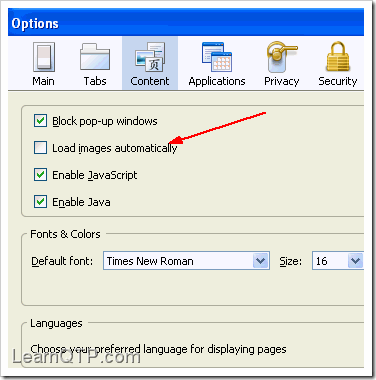
To do this in Firefox, go to Tools > Options > Content. Uncheck ‘Load Images automatically‘
Run your script now and let us know if this tip helped you. [For obvious reasons, this tip won’t be of any use when you have to work on image/bitmap checkpoints.]
Related: 10 Tips to enhance the performance of QTP scripts
If you want to keep track of further articles on UFT (QTP). I recommend you to subscribe by email below and have new UFT articles sent directly to your inbox.




kotla says
well,,,what is the usability to avoid images in a page…i don’t understand…it’s just written that ,it increases the performance for QTP to run the script fastly…at what scenarios ,this thing is used ,it doesn’t mentioned…
Ankur Jain says
@Kotla: In case you’re running multiple iterations on an image heavy page, this top may help you.
Nisha Radha says
how can we improve the qtp script for testing webservices using web service add in.
Please help.
Dharan says
Nice idea but if the link on the webpage is embedded within an image and image was not loaded means it will be a problem
ashwini says
But is there is any necessity of keeping the system unlock. As the exeution keeps going even the qtp is locked.
Thirupathi Gangula says
You can use below script
Before the script
SystemUtil.BlockInput
End of the Script
SystemUtil.UnBlockInput
System can not unlocked .
Prabir says
While excuting the script for a longer duration, my system is getting locked. Is there any way to keep the system unlocked whle executing the script. I do not want to violate any security policy. Can anyone suggest me a solution?
to_saswati says
I am getting tdclient.dll initialization issue while launching the QC from QTP.Anyone can help me?
karthik says
I must say, you are providing great services to qtp users.
Can u discuss abt qtp 10, and its features
I anticipate the reply from u..
Thanks
Navin says
Thx a lot for sharing information
Jenny says
Pretty nice post. I just found your blog and wanted to say
that I have really enjoyed reading your blog posts. In any case
I’ll be subscribing to your feed and I hope you post again soon!
she says
Cool!
Why I can’t think this solution before you?
Uday says
Thanks for the tip. Can we change the setting via the QTP script itself ?