This post refers to a thought provoking question which was asked on QTP forum. In this query jp@QTP is looking for ways to optimize UFT/QTP scripts for best performance. As you are aware, we use automated testing tools to optimize our testing process. Unless we make full use of the capability of the tool and unless a tool is used sensibly and with proper planning, it would not yield any results. Just record-and-playback is never the solution for any project. We need to go deep inside to understand the intricacies of any tool.
Any software testing tool is only as good as the test engineer using it. On those thoughts, I feel this was one of the best questions asked in the forums of late.

Well, here are some of my tips and tricks to optimize UFT/QTP scripts and make them run faster:
- Launch UFT/QTP using a
.vbsfile and not the UFT desktop icon. You will notice a substantial increase in speed. [Refer the earlier post on How to launch QTP using vbs file? ,you just need the 1st point of that post] - Load only the add-ins that are required for your Application Under Test – don’t load unnecessary add-ins in the Add-in Manager when UFT/QTP starts. This has an effect on record time as well as run time performance.
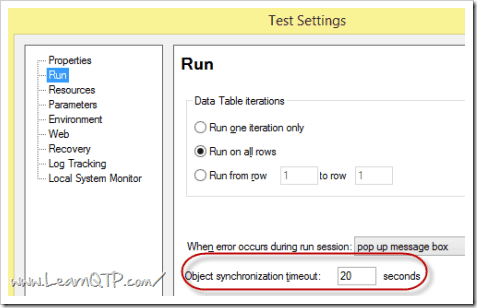
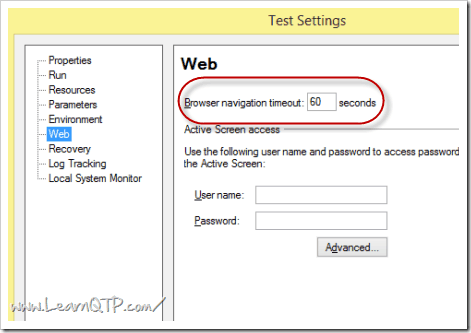
- Reduce default time-out settings for Object synchronization timeout and Browser navigation timeout.
- For large tests, always define variables, function in an external
.vbsfile and not inside a reusable action. Attach these files with your test scripts. If you define a variable or a function in an action, on every iteration of your test run, memory(RAM) will be allocated to those variables/functions and would not be released. Now as your script starts consuming more and more RAM, your System Under Test (SUT) will tend to become slower. - Disable Smart Identification for production environment. Smart identification can be used effectively at script creation time where you can use it for object identification issues. Once all object identification issues are sorted out, disable Smart identification from
File > Settings > Run. - When using a concurrent license server, create the variable
LSFORCEHOSTto force UFT/QTP to search the license in a specific machine. This will stop UFT/QTP from searching for license machines every time you launch UFT. Read more on LSFORCEHOST and QTP licensing issues. - While running, UFT/QTP consumes a lot of memory by itself. It is always advisable to have lots of available RAM (much more than what is recommended by Micro Focus) and good processor speed on a system where you intend to install UFT/QTP. When you have tests running for a prolonged period if time, there are chances of memory leaks. To avoid memory leakage always restart QTP at some intervals of time. Using AOM you can automate this process. [If you want to go into details of effect of RAM on speed of computer read the post on RAM, Memory Usage thoroughly]
- Avoid using hard coded
Wait(x)statement.Waitstatement waits for full x seconds, even if the event has already occurred. Instead use.syncor.existstatement. While using.existstatement always have a value inside it.
For example: .Exist(10) Here UFT/QTP will wait maximum for 10 seconds and if it finds the object in (say) 3 seconds , it will resume the execution immediately thereby saving your precious test execution time. On the other hand if you leave the parenthesis blank, QTP would wait for object synchronization timeout you have mentioned underFile > Test Settings > Run Tab. - Make full use of what UFT/QTP has provided you in the tool’s IDE. Use Automatically Generate “With” statements after recording option present under
Tools > Options > General Tab. This will not only make your code look neater but also make your scripts perform better. - Make your own judgment whether you want to go for Descriptive Programming or Object Repository or mixed approach. Each approach has it own pros and cons that in turn is related to UFT/QTP performance.
- Unless absolutely required, uncheck the options Save still image capture to results and Save movie to results present under
Tools > Options > Run tab. These options definitely have some bearing on UFT/QTP run time performance. - To prevent unnecessary bloat of your results folder while debugging scripts, save the run results to a temporary folder. Disk space tends to fill up fast when you debug scripts.
- Make the Run Mode as “fast”. This setting is present under
Tool > Options > Run tab. Note: If you intend to run your scripts from ALM/QC no need to worry about this option, as the scripts WILL run in fast mode whether you want or not. - Micro Focus recommends not more than a few dozen actions per test. You go more than that and your UFT/QTP scripts performance may suffer.
- Pure functions (that is the functions which doesn’t contain any call to object repository or objects) should be stored in a function library and not in reusable actions.
- Hiding Active Screen (by right clicking the Active Screen pane > Hide) may help with editing response time.
- If you are new to automation or UFT/QTP. Read this beginner article on Automation Object Model (AOM). AOM simplifies many aspects of QTP scripting. It can help you in controlling QTP from an external file.
- As far as possible, save your UFT/QTP tests on a file system instead of a network drive.
- Make use of relative paths while calling reusable actions in your script. Using relative path would make your script portable and easy to manage. We have covered in detail how to’s and why’s of using relative paths in this post.
So what do you do to optimize your scripts? Let us know through the comments below.
If you want to keep track of further articles on UFT (QTP). I recommend you to subscribe by email below and have new UFT articles sent directly to your inbox.




uma says
hi thanks
Sushant says
Hi Ankar,
I want to configure QTP in QC .How to proceed with that .
sonu says
Hi,
Iam plannning to learn QTP, can some one make me clear about how to create test scripts using Qtp. Eg: I have 5 manual testing scenarios (a) Login to viewer
(b) select the template
(c) Enter the credentials to login to particular template
(d)view the images
(e) click on close Using Qtp: Should i first record the steps from a to e and introduce the objects to object repository and then modify the script???? what should be i modifying . Please respond
vikas says
hi,
i need help regarding wait statement, i want to wait 14 sec * no of iterations so if 10 iterations wait 14 * 10 how can i define it.
help is much appreciated can any one please reply me back on vicky.phd@gmail.com
Regards,
Vikas
kiran says
Good post, it’s seems to learn easily.
prasanna says
Hi, I am new to QTP. I looked at all your solutions and they are really well explained and clear.
I have a question, hope you have a solution.
I am using systemutil.run to invoke an application from the server. This app displays a shockwave movie. Sometimes it takes time to display and sometimes it doesnot. if movie is displayed i capture some text and use it for a match in some other file.
now prob is , when it is displayed, it captures , test is passed.
but when it delays in displaying, text is not captured and it fails. I want it to pass. how do i make it.. tht movie is surely going to display. if not displayed it should say it doesnot exist.
how to write script for it?
vijay says
Hi Anukar,
I write function for launching the web based application. It works fine when the Qtp tool position is changed(When tool is in minimized state , I changed tool to maximized ). When we cant change the state the tool rises an error like “Invalid procedure or arguments”.Please give to reply how to rectify this problem.
Function which i had written is given below
Function openapp ()
‘apath = “http://devtest.metaehr.com:8080/ehrgwt.html”
SystemUtil.Run “http://devtest.metaehr.com:8080/ehrgwt.html”,””,”http://devtest.metaehr.com:8080/”,”open”
openapp = “Web site Opened”
End Function
Johnny says
Hi Ankur,
I had a doubt , my scenario is .
1. I had an Existing Xml file.
2. I need to change some particular value in that file using data table .
3. I will use multiple itreations to change tha value for 10 times.
4. My doubt is how we can open an existing Xml file and how can we find the value inside it and how we can attach the particular fiel to our script?
5. so please help me out in this scenario..please mail me if any answer with you @ raj.nunna@gmail.com
ramu says
how to send the log file to the mail
ram says
hi vini,
if u want export all the automation scripts
1.Go to QTP/options/run/select allow the other HP products
2.Go to file/Quality center connection/connect server “http://server/qcbin” click on connect server
3.After connection create folders there only or in test plan
4. Click on save AS
5.scripts saved in your testplan with all attachments
6.You have to the variables also and associated all rep,rec,lib,env
7. Open QC and Click on Lunch.
8.Tool will be luanch with scripts
9.Click on run
10.Generate the results in defects folder
regards,
Ram.I
ram says
hi ganesh
You said,Each page contain common text the we have to go for descriptive program.Just you have to take that text unique property values and write script.that script will be reusable for all pages.just copy paste that where you need.
regards
Ram.I
ram says
hi,sharan
if u want use keyword frame work,u have create folders like rep,rec,lib,log,env,scripts.By use all these u have to maintain run overall scripts like as setup.which automation scenario do want execute just call that module by use functions.under that module all scripts should executed and give reports into log files.
1.Generat the script by adding all the objects into object repository
2.Save the repository with .tsr extension
3.Create the function for that scipt and save .vbs extension or qfl
4.Create Xml file for standard variables (environment variables) .xml
5.recovery .qrs while running scripts get unhandeled exceptions to recover by use recovery
6.rename the all excel sheets,add modules
7.Crate a action template in main test
8.select that module and write some scenarios
9.writ steps under scenario
10.Associated recovery,rep,lib,env for that test by using navigation or scripts
11.this is for all the scripts in u r project
12.u have to run all th scripts nothing a frame
13.what are the scenario we have to execute just call key word instead of that function
14.all the scripts will be run based on calling the keyword
15.i will explained clearly latter
sharan says
Hi ankur, I need to use a keyword frame work using QTP, I am biginer of this QTP, could u please help me that how will I start with this framework, plz explain by taking very simple and sample scripts, so that I can understand easily.
prasad kumar says
sir,
i want some qtp scripts
rich says
very nice place to communicate qtp tech. thank ankur and will for share
santhosh says
i want some qtp script examples can you please send me any one
Sam says
@ Rahul,
U need to create an AI enabled automation testing tool.
It is not available yet. But it will be lovely to have a program that itself can create code …
Rahul says
Is there an process to automate the Login functionality of my site.
I dont want to create any function, if i create that it means manual automated testing rather that automated testing
Please let me know if i can automate the process by only getting the Link ?
Thanks
Prasad says
Ankur,
I am Prasad from mumbai working in Tech. ahindra.
Are u still monitor this links and forum?
I want to have a talk to you. Can you please connect me +91-9867338664.
– Regards
Prasad
Sri says
Hi Ganesh,
make sure that you have unchecked the smart identification for that particular object in object repository and select “Different test objects descriptions” radio button in “Tools>Options>Web>Page/Frame Options”. I am sure this will solve your situation, if not let me know.
Thanks,
Sri.
Thy Nguyen says
Hi,
How ways do we get current driver of appliction in system?
Example: Get current driver (or path) of calc.exe program. Please help me. Thanks
Ganesh says
Hi Ankur,
Hope you can help me out in finding a solution for the below question.
My application has several pages and each page has some common text. I wanted to perform an action only when that text is shown. I added that WebElement into the object repository and moved it under the root. I scripted such that if the WebElement object exist then pass the script othewise fail. But sometimes the script recognises the WebElement and sometimes it won’t. Not sure why? I have used regular expression for that web element. Is there any way that I can do rather than adding that web element to each and every page of the object repository?
Looking forward for your reply.
Thanks,
Ganesh
manjunath says
can you please let me know how to capture the data in web application and storing in the qtp excel sheet
Vini says
Hi,
How do we convert our test cases in QC to Automated scripts in QTP? Please explain.Thanks .
Prasad says
Hi Ankur,
My question is related to child object. In http://newtours.demoaut.com/ site there are two edit field. Username and Password. I have written following code.
Set objDescriptive = Description.Create()
objDescriptive(“micclass”).value = “WebEdit”
Set editFieldObject = Browser(“title:=Welcome:.*”).Page(“title:=Welcome: .*”).ChildObjects(objDescriptive)
msgBox editFieldObject.Count
If editFieldObject.Count 0Then
For i =0 to editFieldObject.count -1
If editFieldObject(i).GetRoProperty(“name”) = “user.*” Then
editFieldObject(i).Set sUsername
msgBox editFieldObject.GetRoProperty(“value”)
End If
If editFieldObject(i).GetRoProperty(“name”) = “pass.*” Then
editFieldObject(i).Set sPassword
End If
Next
Else
msgBox “No edit field found”
End If
Does the above code work? If not then how can i use a generic code so that QTP will put the data on Username and Password field using child object?
LalMohan says
What Is MicClass And MIcFail
nandu says
Hi..
it’a very nice web site..
it really helps me ..
i am begginer to qtp..
already i subscribed in this web site..
but i have one doubt..
how can i post my questions..
please help me..
kanchan says
I am novice user.I started learning QTP.
I have found it a very usefull site .Thanku very much all of you..
LalMohan says
Good Work Ankur….Thanks for your nice cooperation to learn QTP from Basic…
chitra says
ya i have also tried by using with statement
but instead of using timer i have added transactions to watch difference in performance
and yes it worked
Karun Kumar says
I was helped by this site a lot in my carrier. Thank u very nuch all of you.
Ankur says
PS – This was executed on a Dual Core E6750 @ 2.66GHz with 4Gb of RAM.
4GB RAM. This makes all the difference.
Aparna says
Hiii,
“How can i write a script to select the last row(latest tow) on the grid and right click and select the option which ever i want to”
Marco says
RE: QTP 9.5 “With” Statements:
oops.. I did a cut paste error in my previous post, however the times are still identical
Using With:
Time A 55.27734 Passed 2/18/2009 – 14:46:21
Not Using With:
Time B 55.27734 Passed 2/18/2009 – 14:47:20
PS – This was executed on a Dual Core E6750 @ 2.66GHz with 4Gb of RAM.
Thanks
Marco
Marco says
Hi Ankar
Nice site and thanks for your efforts!
Just an FYI/comment – I re-ran the “With” statements test with QTP 9.5 and modified the results to go the reporter.ReportEvent instead of a msgBox and both methods (With or Without With) produce identical results.
————————
Dim StartTime, EndTime, StartTime1, EndTime1
SystemUtil.Run “C:\Program Files\HP\QuickTest Professional\samples\flight\app\flight4a.exe”,””,”C:\Program Files\HP\QuickTest Professional\samples\flight\app\”,”open”
With Dialog(“Login”)
.WinEdit(“Agent Name:”).Set “mercury”
.WinEdit(“Agent Name:”).Type micTab
.WinEdit(“Password:”).SetSecure “499af5d7e12e9715f08b3ff38567770ad5447b4b”
.WinEdit(“Password:”).Type micReturn
End With
StartTime = Timer
With Window(“Flight Reservation”)
For i=1 to 1000
.WinEdit(“Name:”).Set “Ankur”
Next
End With
EndTime = Timer
reporter.ReportEvent micPass, “Time A” , EndTime – StartTime
‘Time B 55.27734 Passed 2/18/2009 – 14:47:20
Window(“Flight Reservation”).Close
SystemUtil.Run “C:\Program Files\HP\QuickTest Professional\samples\flight\app\flight4a.exe”,””,”C:\Program Files\HP\QuickTest Professional\samples\flight\app\”,”open”
With Dialog(“Login”)
.WinEdit(“Agent Name:”).Set “mercury”
.WinEdit(“Agent Name:”).Type micTab
.WinEdit(“Password:”).SetSecure “499af5d7e12e9715f08b3ff38567770ad5447b4b”
.WinEdit(“Password:”).Type micReturn
End With
StartTime1 = Timer
For i=1 to 1000
Window(“Flight Reservation”).WinEdit(“Name:”).Set “Ankur”
Next
EndTime1 = Timer
reporter.ReportEvent micPass, “Time B” , EndTime – StartTime
‘Time B 55.27734 Passed 2/18/2009 – 14:47:20
——————-
I’m guessing object handling has been improved in 9.5?
Either way… using “With” statements provides cleaner more readable code.
Thanks
Marco
Sashi says
Really very helpful and good post.
Now i have really good experience on QTP and few of the things i knowpreviously but few are really new and good one.
Hey Ankur..
I am facing a problem in dealing with ActiveX.
I am trying to automate QC but its not really working.
The script is as follows:
Browser(“Name of the browser”).Page(“name of the page”).ActiveX(“name”).WinObject(“name”).Type “name”
This code is generated when i am recording it. But when i am running it again, its not taking the values i give.
Getting an error “Object not found”
It would be really helpful if you help me on this.
PRIYA says
Hi Ankur,
Can u help me to right a scrpit in QTP.
pranati says
How can we convert Shared repository to XML repository??Plz tel me.
Gopi says
Very useful tip! Appreciate your efforts!
srikanth says
1) how to count column in web table like yahoo inbox by using QTP
2) From 3rd column i want to fetch data from webtable
3) how to count read message and i want to fetch 2 mail from inbox
3) and i want to delete the same 2nd mail.
Anonymous says
i want to recommend a good piece of software that has always helped me code better with QTP .
i work on other people’s code and they dont care on script’s readability .
But i do , i shift everytime from QTP ide to VBSBeautifier , http://www.daansystems.com/vbsbeaut/ which pretty prints the code and makes it ready for the show .
Hope that helps ,
Deepan Prabhu
Ankur says
@Anon: As mentioned earlier,in an external vbs file
Anonymous says
Hi,
If you not declared function and variables in the action where exacly you write the functions and declarethe the variables?
do you use global variables?
Sunil Goswami says
Great post!
swami says
Will and Ankur….
really a very good comparison….!!!!
this was really a new thing for me…
Thanks,
Swami
Jagrut says
Thanks Ankur and Will for your opinions. I am new to QTP so I may be wrong but this is only one of the few posts that discuss about optimizing QTP scripts.
I have one question. I need to understand what does ExecuteFile do internally? Does it load the specified file in memory? Is it true that larger the file more will be the memory consumption? Is there any way to unload the file from memory?
Ankur says
Yes, so it boils down to the fact that lesser the function calls to the Object Repository more optimized is our code.
As you rightly pointed out, With Set statement above you have reduced one more function call and hence the time diff.
Will Roden says
Now I see what you mean. I tried the same code on my laptop, and the performance difference was more pronounced. 43.26563s and 68.92188s respectively.
Then I tried it the way that I would normally handle this situation:
Set oWinEdit = Window(“Flight Reservation”).WinEdit(“Name:”)
For i=1 to 1000
oWinEdit.Set “Ankur”
Next
This took only 15.48438s, but I immediately realized it wasn’t a valid comparison. It was faster because it set an object for the WinEdit and didn’t have to find it each time. So I changed it to this:
Set oWindow = Window(“Flight Reservation”)
For i=1 to 1000
oWindow.WinEdit(“Name:”).Set “Ankur”
Next
This took 41.84375s. A slight improvement over the with statement, but close enough to not make a big difference.
Ankur says
Thanks Will.
>>One point I have a question about is the With statements. That is a feature I haven’t used and know almost nothing about. Can you explain how it improves performance?
Here is a small experiment with windows based flight reservation sample application.
*************************************
Dim StartTime, EndTime, StartTime1, EndTime1
SystemUtil.Run “C:\Program Files\Mercury Interactive\QuickTest Professional\samples\flight\app\flight4a.exe”,””,”C:\Program Files\Mercury Interactive\QuickTest Professional\samples\flight\app\”,”open”
With Dialog(“Login”)
.WinEdit(“Agent Name:”).Set “mercury”
.WinEdit(“Agent Name:”).Type micTab
.WinEdit(“Password:”).SetSecure “4864ede3f3f8f30757cf694e3e100d29bf1ea9b9”
.WinEdit(“Password:”).Type micReturn
End With
StartTime = Timer
With Window(“Flight Reservation”)
For i=1 to 1000
.WinEdit(“Name:”).Set “Ankur”
Next
End With
EndTime = Timer
msgbox EndTime – StartTime
‘result: 41.71875
Window(“Flight Reservation”).Close
SystemUtil.Run “C:\Program Files\Mercury Interactive\QuickTest Professional\samples\flight\app\flight4a.exe”,””,”C:\Program Files\Mercury Interactive\QuickTest Professional\samples\flight\app\”,”open”
With Dialog(“Login”)
.WinEdit(“Agent Name:”).Set “mercury”
.WinEdit(“Agent Name:”).Type micTab
.WinEdit(“Password:”).SetSecure “4864ede3f3f8f30757cf694e3e100d29bf1ea9b9”
.WinEdit(“Password:”).Type micReturn
End With
StartTime1 = Timer
For i=1 to 1000
Window(“Flight Reservation”).WinEdit(“Name:”).Set “Ankur”
Next
EndTime1 = Timer
msgbox EndTime1 – StartTime1
‘result1: 45.85938
******************************
This experiment was carried out on my machine which has 2GB RAM. With 1000 iterations the diff is > 4 secs. I think the effect (performance degradation) should be much more pronounced on larger tests and if it is carried out on machines having configuration just on threshold (512MB- one which is min RAM recommended by HP).
In case of With statement, the ref to the function Window() is getting stored at one place(RAM) and it gets referenced (w/o going to OR on each iteration) while without With the function Window() and WinEdit() both are called on each iteration and probably that is responsible for the delay.
Please don’t get annoyed for my excessive usage of the term “RAM” 🙂 I have been reading a lot on performance testing, memory leakage etc these days.
Will says
This is a good post. For a while now, I have been meaning to write a post on optimizing execution speed, and you hit on most of the points I intended to include.
One point I have a question about is the With statements. That is a feature I haven’t used and know almost nothing about. Can you explain how it improves performance?