
Today we will see a less talked about and not so often used ‘Dictionary Object‘ in UFT/QTP. Note that, this is not something very QTP specific. Dictionary object was developed by Microsoft and is part of VB Scripting.
What is Dictionary Object?
In simple terms, Dictionary object is similar to a typical array. The difference between a dictionary object and an array is that there is a unique key associated with every item of dictionary object. This unique key can help you in calling that item as and whenever required.
What is the syntax and how can we use dictionary object?
Shown below is a typical script.
Dim dict ' Create a variable.
Set dict = CreateObject("Scripting.Dictionary")
dict.Add "Company", "HP" ' Adding keys and corresponding items.
dict.Add "Tool", "QuickTest Pro"
dict.Add "Website", "LearnQTP"
dict.Add "Country", "India"
dict is an object of class Scripting.Dictionary.
Company-HP
Tool-QuickTest Pro
Website-LearnQTP
Country-India
are key-item pairs that were added using Add method on dict object.
Other methods available for dictionary object are Exists Method, Items Method, Keys Method, Remove Method, RemoveAll Method
Using Exists Method to check whether the key Country exists?
If dict.Exists("Country") Then
msg = "Specified key exists."
Else
msg = "Specified key doesn't exist."
End If
Using Items and Keys method to retrieve ALL items and keys respectively from inside dictionary object.
i = dict.Items ' Get the items.
k = dict.Keys ' Get the keys.
For x = 0 To dict.Count-1 ' Iterate the array.
msgbox  i(x) & " :" & k(x)
Next
Using Remove method to remove Website – LearnQTP pair from the object.
dict.Remove("Website")
Using Remove all method to clear the dictionary
dict.RemoveAll ' Clear the dictionary.
Count the number of occurrences of a character in a given string
How will you count the total number of occurrences of all characters in a given string?
So, if a string is Community. The output should be C:1, o:1, m:2, u:1, n:1, t:1, y:1
Here is the solution using Dictionary approach
Dim Str, ChkDup,Cnt,d
Set d = CreateObject("Scripting.Dictionary")

Str = "Community"

For i = 1 to Len(Str)
temp = 0
'Check if the key already exists
If d.Exists(mid(Str,i,1)) Then
	temp = d.Item(mid(Str,i,1)) 'Assign item to temp
	temp = CInt(temp) + 1 'Since temp is string convert to integer
	d.Item(mid(Str,i,1)) = temp 'Update the key
else
    d.Add mid(Str,i,1), 1 'if key doesn't exist, add it
End If
Next

sCharacters = d.Keys ' Get the keys.
iOccurrence = d.Items ' Get the items.
For x = 0 To d.Count-1 ' Iterate the array.
msgbox  sCharacters(x) & " :" & iOccurrence(x)
Next
What are the places where it can be used?
When you want to share data between different actions in a test, dictionary object can be used. To do this you should create a reserved test object for the Dictionary object. Here is a process to set up a reserved dictionary object. [Source]
- Open Window’s registry by opening a Run window and entering regedit.
- Navigate to HKEY_CURRENT_USERSoftwareMercury InteractiveQuickTest ProfessionalMicTestReservedObjects.
- Create a new key (folder) named GlobalDictionary by right-clicking on the ReservedObjects key and selecting New -> Key.
- Under the new key, create a String value named ProgID by right-clicking on GlobalDictionary and selecting New -> String Value.
- Assign “Scripting.Dictionary” to the new ProgID string value by right-clicking on ProgID and selecting “Modify.”
- If QTP window is already open you need to close and restart it.
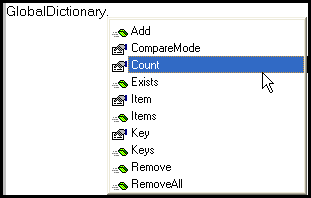
- Now to check whether dictionary object was installed successfully in registry, simple write GlobalDictionary. (don’t forget the dot) and you should see a drop-down containing all methods and properties associated with dictionary object.
Why dictionary object and why not array only?
As shown in the example above, dictionary object was used with the index (key) being string. In the case of array, the index can be ONLY numeric. Then of course we have some obvious advantages like referencing a value with a meaningful keys etc.
Over to you. Have you used dictionary object in the past? Why?






Can we store objects in a array?
Can we create dictionary objects array??
Good article Ankur, Thank you for the post.
do we have any option to arrange an array in ascending or descending, deleting duplicates
Please help regarding this.
Regards
Uma Mahesh
Nice
Hi Ankur,
I want to compare 2 text files using QTP. Also it should be line by line comparison.
Could you please help me on the same?
Thanks & Regards
Why can’t you use file system object, and capture each line from file1 and file2, and compare the same. Then continue to do the same till you reach the end of the file.
where exacatly we use dictioanry objects in frame work and moreover i never use Actions I always prefer functions so can anyone give me the real scenario where we use dictionary objects?If possible kindly explain me in relation with framework?
If we are using descriptive programming instead of OR, the object descriptions can be stored in a dictionary object – So just by using na object name(Key), its discription can be accessed.
Kiran: http://bit.ly/QJW6YA
-Scott
Please Tell Me Hot to Retrieve (Return) Keys And Items From Dictionary Object. I Want to print all values of Keys and Items using Print or Msgbox
Its already there in the above blog:
i = dict.Items ‘ Get the items.
k = dict.Keys ‘ Get the keys.
For x = 0 To dict.Count-1 ‘ Iterate the array.
msgbox i(x) & ” :” & k(x)
Next
Removing duplicates is easier with the .Item method rather than messing with .Exists. Just call:
myDict.Item(“keyname”) = “value”
If the keyname does not exist, it will be added, otherwise the value will be updated.
I AM HAVING PROBLEM,
IS IT POSSIBLE TO STORE COLLECTION INTO DICTIONARY
IF YES THEN,WHAT IS PROCEDURE FOR STORING COLLECTION IN TO DICTIONARY AND RETRIEVING IT
good one
Hi All,
I have used dictionary object to remove duplicates in an array. I ll paste the code here. I hope it helps.
here, I have 2 arrays, TC() and Status()
TC contains test case IDs and Status contains their respective status. Of course, a TC ID can be repeated multiple time having multiple statuses like “Test Passed” or “Test Failed”.
My objective was to create a file that has the final status. If all the statuses for a test case is “Test passed”, it passes. Else, it is failed.
The following function converts the array to a dictionary object and removes the duplicated and also consolidates the status holding only the final status.
Thus, it is ready to be pasted to an excel file and sent to the manager.
Public Function converToDictionary( TC, Status)
Dim dict, j, k
k = Ubound(TC)
msgbox k
Set dict = CreateObject(“Scripting.Dictionary”)
For j = 0 to k
If dict.Exists(TC(j)) then
If dict(TC(j)) = “Test Passed” then
dict.Remove(TC(j))
dict.add TC(j), Status(j)
End If
Else
dict.add TC(j), Status(j)
End If
‘strMsg = strMsg & TC(j)& ” : “& dict.Item(TC(j)) & vbcr
Next
Set converToDictionary = dict
End Function
hi,
How do companies go for selecting the framework, what factors do they consider seleting a framework.
Hi Friends,
Please suggest How to select Automation framework? Which factors we need to consider while seleting Automation framework?
Does it decrese performance of system ?
Please ignore my above comment. Analyzed a little bit and found out that arrays can be used for sharing data between Actions.
Instead of using ProgID as “Scripting.Dictionary”, use ProgID as “System.Components.ArrayList”.
This will work only if you have .Net Framework installed on your comp.
I dont think you can get similar functionality (in terms of sharing values between action) using arrays.
Getting all keys/values is a bit cleaner with a For Each loop:
Instead of:
i = dict.Items ‘ Get the items.
k = dict.Keys ‘ Get the keys.
For x = 0 To dict.Count-1 ‘ Iterate the array.
msgbox i(x) & ” :” & k(x)
Next
Try:
For Each key in dict.Keys
msgbox key & ” : ” & dict(key)
Next
@Scott: Agreed. In fact while working on arrays this looks cleaner, just a matter of habit.
Hi,
Ankur Suppose on a particular PC I create the reserved
Object as specified by u.
Suppose I try to Run the script on Some other PC Where this object is not created wheter my script will run? I doubt require comments from u
Hi Ravi,
You get a Dictionary object in return.
Set myDictionary = GetDataAndReturnDictionary (…)
msgbox myDictionary(“myDataBaseField”)
Stefan, Thats a good concept to use. But I doubt on how to receive the return values from that function. Do I need to create an object of type dictionary and get the values from it.
will the bitmap checkpoint returns any value ie if the result is pass then it should return one value else it should return other value
The article by Alex is very nice and informative. But I can’t image he used the .Add method for all 300k items. Could someone explain what method is used because his examples show it as a hard coded method.
Thats a good concept Ankur…
Good one Stefan. That’s another nice use.
Hi,
Here is an example of creating a Dictionary out of a DB record set: http://abouttesting.blogspot.com/2008/01/create-dictionary-object-from-record.html
In case you want to extend the capabilities of Dictionary object the below article demonstrates the same