
What is Document object Model?
Wikipedia defines Document Object Model(DOM) as:
A platform- and language-independent standard object model for representing HTML or XML and related formats.
For QTP’s sake, I would redefine it to make it simpler. DOM is a method for QTP engineers to access the source (IE –> View –> Source) of any webpage direct through VB Scripting.
When can we use DOM?
One of the very important places you can use it is when a QTP web table checkpoint doesn’t show you the desired content in a cell. I mean the content in the cell is in a format that is not supported by the web table checkpoint. Another use can be when you want to access all the HTML tags used in a webpage. You can get the names, the innertext, innerHTML property of all these tags. The possibilities are endless.
How can we use DOM to access the source page?
We can access the source page of any webpage using .object notation.
Any practical example of using DOM?
I have created a demo web page to show you document object model in action. Say you want to find the font color used for writing Happy Holidays Everyone in cells of the webtable given on this page. The algorithm would be:
- Access the DOM of webtable using .object notation.
- Access the tagname corresponding to the property you wish to find out. In our case tagname is “font” and property to be explored is “color”.
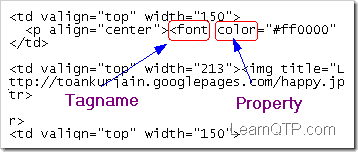
- Find the count of total number of tags and loop it find out the font-color.
The corresponding VB script would be:
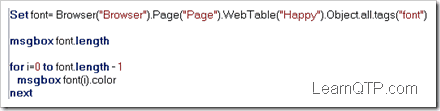
Now it’s quiz time. On the same page find out the src of all the images used in the table. Let me know your script through the comments below.
[Also note that src won’t show up in the webtable checkpoint (for obvious reasons!)]
So, what does src say to you?
I wish you Happy Holidays 2009! 🙂




‘sorry here is the right code which is using for clicking on “OK” button on sap web application but it is not working, Please ignore which I have posted earlier.
Set PageObject = Browser(“browser”).Page(“page”).object
set ButtonObjects=PageObject.getElementsByTagName(“type”)
For each button in ButtonObjects
If lcase(button.type)=”button” Then
button.click
Exit For
End if
Next
HI, can u give the correct method to identify an object from google map. like i want to fetch one location from map by using uft
Set PageObject = Browser(“browsername”).Page(“pagename”).object
set ButtonObjects=PageObject.getElementsByTagName(“type”)
For each button in ButtonObjects
If lcase(button.id)=”button” Then
button.click
‘Exit For
End if
‘ End If
Next
note: working on sap web application
question: I am working on sap application and I want to click on “OK” button by using DOM.
Tool: Using UFT 12.02
below html code for the “OK”
OK
I have used several DOM codes but its not working if you have any idea on the same kindly help
u can try the below given code…
Set Links = Browser(“Browser”).Page(“Google”).Object.all.tags(“a”)
linksCount = Links.length
‘print number of links in the page
msgbox linksCount
Hi Ankur,
i am not able to find the index of the webtable which is changing the index dynamically .
Hi Ankur,
I have a samll query, Is that possible to get all the web elements(textbox, button) present inside a particular DIV?. If so, Can you please tell me how to do that?
Thanks in Advance
to use the tag to identify the object you must know what hml tags are presen in a web page.plz any one can say how to see html code so that it can be used in witting the script .
thanks in advance
Roli
Hi,
I want to read the value from the application by passing the Label .
Say suppose i create an account by entering all the data and click on create, It navigates to View account page. The data is displayed as follow
Label Value
Account Name actName1234
System Account ID 7124712
The Html look like this
Account ID
INTRAWARE
System Account ID
7124712
Account Name
Intraware, Inc
Account Status
ACTIVE
Account Note
Content
Number of Active Members
79
I want some generic function where i would pass “Account Name”, It should return me “7124712”
Regards,
Gajendra
How can we change front color of a text at run time?
I want to know the color of error message font color
HI ,
When are the situation go for Dom Object model apart from the childobjects normal model….?
And also please provide the any methods are there to identify the Back Ground colour and Highlighted with the Different colrs of perticular elements
Thanks
Mahesh,
try this…
Set Links = Browser(“Browser”).Page(“Google”).Object.all.tags(“a”)
linksCount = Links.length
‘print number of links in the page
msgbox linksCount
Hi
I have one query .
How to find the no of links in Webpage.
There is two approach for this
1. browser(“Google”).Page(“Google”).Object.links.length
2. To Create the DOM object
Set oDesc = Description.Create()
oDesc(“micclass”).Value = “Link”
Set Links = Browser(“Browser”).Page(“Google”).ChildObjects(oDesc)
NumberOfLinks = Links.Count()
Msgbox NumberOfLinks
From the above 2 code .Im getting different answer after execution.Please let me know what is difference between link.lenght and link.count.
Thanks in advances
I want to check a text in source code of a web page.How to do that?
how to use DOM in a windows based applications(like Delphi, SAP, etc) or we cant use DOM in Windows ased applications
can we add objects to object repository at run time in qtp?
thnx in Advance
how to get the innerText of a div(html tag) using VBScript?
Hi.. Can any one tell me how to test the Maps (ex:google earth)
How to verify whether a webelement is enabled or not using view source?
Hi….can somebody help in GIS application automation using QTP.This is a web application and uses Google map. QTP is not identifying any objects in on the MAP and we have to details with various map events like Zoom in, Zoom out, selecting an area on the map etc like we do in Google map.
its working fine
Hi, when im run the below query, Im getting the output as “[object]“, Pls help me how to get the ‘style’ value in “img” tag in html.
set font = Browser(“Browser”).Page(“Page”).WebTable(“Happy”).Object.all.tags(“img”)
For i=0 to font.length-1
set a = font(i).style
msgbox a
Next
I am relatively new to QTP and I am having issues identifying objects on a specific webpage. The object spy displays editable fields in the page as WebEdit fields and I am able to Set the values in these fields when I have the object in the repository and in my script set to the proper heirarchy values. When a given field is entered, the screen dynamically adds fields and these new fields are identified as WebElements. If I set up my code and the object repository to recognize these fields as WebElements, then I can not use the .Set method, becaus this method is not supported for WebElements. Is there a general way of identifying the heirarchy of elements in a web page that actually works and provides the user with a recognizeable object that can be set to a specified value?
Hi Ankur,
your efferts are fabulous.
could you please suggest me how to handle this,
i have a webtable,the cells in which some times identifying as webelement and some times as webedit , so i am not able to handle the situation, could you please send me any suggestions that helps me.
Ankur,
Continue your nice work.
@SanMan
Found it…”innertext” does the trick
MsgBox objName(i).innertext
If i have a tag like tagval how could I retrieve the “tagval” ??
Set objname = Browser(“..”).Page(“…”).Frame(“…”).Object.all.tags(“sometag”)
For i =0 to objname.Length -1
MsgBox objName(i).
Next
Thanks in advance…
The actual other code is..like so…
Browser(“hwnd:=” & hwnd).object.document.getElementsByTagName(“meta”)(i).content
i am trying to capture the contents in in the tag…and not its properties…
was trying another method using getElementsByTagName…
Please adivce…
Thanks that worked!! 🙂
one more thing…
Browser(“hwnd:=” & hwnd).object.document.getElementsByTagName(“meta”).length
Why do i get General run error for this? and how do i fix it.
Hi Genius minds,
I have a small question. How I can check format of specific cell in webtable.
For Example, I have a table with 3 row and 3 column.
I want to check what is the cell (2,3) format for 2nd row and 3rd column. I want to verify if its plain text or link.
I hope I will get the answer. 🙂
Thanks,
KD
@Kenneth
Try this instead…
For i = 0 to a.Length -1
myString = a(i).name
print myString
Next
Hi when i use the below code it crashes QTP…can you tell me why?
The goal of this code is to capture the name of all the links on the page…
Set a = Browser(“title:=.*”).Page(“title:=.*”).Object.Links
For i = 0 to a.Length -1
print a(i).name
Next
If you want to get name of the object then use GetRoProperty(“name”) then you will get the name of the object.
Set a = Browser(“title:=.*”).Page(“title:=.*”).Object.Links
For i = 0 to a.Length -1
print a(i).GetRoProperty(“name”)
Next
Perfect!. Very simple but more effective
Can neone helpme out by telling the link of the website containing all the methode nd properties that can be used / applied in the DOM method.
Hi
i have one query ,
in my assignment i have the following code
‘
here the tag name is ‘INPUT’
i want to retrieve the attribute ‘checked type’ s value ..
in qtp if place the statement msgbox font(i).checked type
QTP throws syntax error, since ‘checked type’ has a space between ‘checked’ & ‘type’ .
Can any one help me how to retrieve the ‘checked type’ value?
Hi,
Is it possible to use DOM to get any string within the view source of a web page? I’m trying to target just specific strings and put them into an excel sheet.
Any help appreciated,
K
please explain in detail
set img_no=Browser(“Browser”).Page(“Page”).WebTable(“Happy”).object.all.tags(“img”)
for i=0 to img_no-1
print img_no(i).src
next i
How would you use the same approach if you need to find all images with a particular name? img_expand_node.gif for example?
Ankur,
Thanks for sharing this info abt DOM. I was doing something wrong with src. It is clear now.
Thanks,
~P
Thank you so much..
DOM concept is quite interesting
How to get font type weather it is bold or italic etc?
‘ To get the Source of images for this webpage “http://toankurjain.googlepages.com/DOM.html”
‘Regular method
Dim img
Set img=description.Create
img(“micclass”).value=”Image”
Set brimg=browser(“Browser”).Page(“Page”).ChildObjects(img)
msgbox brimg.count
For i=0 to brimg.count-1
print brimg(i).getroproperty(“src”)
Next
‘ DOM Method
Dim obj
Set obj=browser(“Browser”).Page(“Page”).WebTable(“Happy”).Object.all.tags(“img”)
msgbox obj.count
For i=0 to obj.count-1
sourc=obj(i).src
print sourc
Next
Set obj_link = Browser(“ClientLink Cash Entry:”).Page(“ClientLink Cash Entry:”).WebTable(“State”).Object.cols
msgbox obj_link.count
help me this code is not working !!!
Super sir,keep going 🙂
@Ajay: For questions not related to post, please use QTP forums.
Hi Ankur,
Your articles are so helpful.
Could you explain about What DOM is all about. And also the code that u gave for comparison of 2 Excel sheets cell by cell, in that u used code like ” For each cell in WorkbookSheet1.usedrange ”
How to use this code and same sort found in finding the names of subfolder. Could explain about this plzz…
Thanks in Advance.
Regards,
AjayKumar
The concepts explained for DOM are quite interesting.
Good to know about DOM use in QTP.
here is the script to find the src of the images in the given web table “Happy Holidays Everyone!”
Set img = Browser(“Browser”).Page(“Page”).WebTable(“Happy”).Object.all.tags(“img”)
msgbox img.length
For i=0 to img.length-1
msgbox img(i).src
Next
nice work ankur
good.
Hey it was very simple…. But thanks for your inputs on the DOM since we use the webtables to a very great extend here also with the lot of combination. thoguh I have not tried implementing it on my app I am sure this one will make our life easy.
Set Font = Browser(“Browser”).Page(“Page”).WebTable(“Happy”).Object.all.tags(“img”)
msgbox Font.length
For i =0 to Font.length -1
msgbox Font(i).src
Next