
One of the most challenging problems while performing automated software testing is of getting test data. Many a times client is slow(should I say unwilling?) to provide it, which unnecessarily slows down your testing speed. Wouldn’t it be easier if there is a tool that can generate test data in your preferred format?
Welcome GenerateData.com
This is a free online tool that can be used to generate data in XML, Excel, HTML, CSV or SQL format. There are a number of data types available like names, phone numbers, email addresses, cities, states, provinces, countries, dates, street addresses, number ranges, alphanumeric strings. It also allows you to provide your own custom data type.
- To start generating test data, go to Data Generator.
- Start filling in Column title, data type etc.
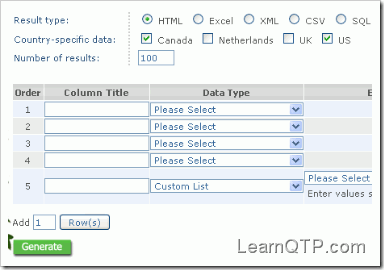
- You also have the option to produce country specific data for Canada, Netherlands, UK and US. This can be particularly useful for applications which accept data in some particular format only. For instance: US/Canada phone numbers.
- Fill in the number of records(rows) you want. Default is set to 100, you can increase it to 200. Click on Generate Data button to get the results.
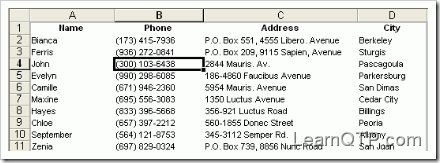
For more data needs you have to make a donation of $20 which would enable you to generate test data containing as many as 5000 records. This would also give you the option to save your generated data for later use. I think for automated testing purposes the free option of 200 rows should be fine. Moreover you can keep generating sets of 200 rows and combine them for large data needs.
While using this tool just make sure that your browser has JavaScript enabled as it seems to be heavily dependant on JS.





hello , do you have some solutions about using QTP 9.5 to spy the java 6 swing UI? our project previously using 1.5 could be use ? the update to 1.6 QTP couldn’t recognise it , whatever , thank you for your attention !
The Data Generator is a nice free utility that allows one to quickly design the test data and generate it automatically.
Inder P Singh
Except doesn’t work for US cities and states..