
First of all, I would like to thank all the readers of LearnQTP and forum members for their great patience reading out my series of posts on DotNetfactory and Databases in QTP and for their valuable comments in each post. Special Thanks to Ankur, for giving me the exceptional opportunity to share my experience to the community. Once again I am here with a new series of posts which will focus on Web Services Testing using QTP.
The series is divided in four parts
- Testing Web Services – Key Concepts
- Web Service Testing Wizard
- Adding Web Service Test Object to Object Repository
- Testing Web Services without enabling Web Services Add-in
In this first article I will focus on important key concepts of web services that you should know before start testing Web Services.
Web service is the way to connect different services together into a Service Oriented Architecture (SOA). Web services provide an application integration technology that can be used over internet and take Web Application to the next level.

HP Service Test and QTP Web Services Add-in are great solutions for Web Services testing. HP Service Test Management module plugs into Quality center. We need QTP Web Services add-in in order to work with web services which can be downloaded from HP Download Center.
Let us first understand web services key points need to know before delving into testing with QTP. Typically a Web Service is a set of all related functions which are invoked to other application or services over the Internet. The information to programmatically invoke a Web service by an application is given by a Web Services Description Language (WSDL) document. Web Services Description Language (WSDL) is an XML-based language for locating and describing Web services. Now as the Web Service is powered by the web application server that uses SOAP to understand and speak with web services and delivers information in XML. Simple Object Access Protocol (SOAP) is XML based protocol to exchange information over HTTP. To locate the web services WSDL documents are indexed in searchable Universal, Description, Discovery and Integration (UDDI) business registries.
“inurl:wsdl site:w3schools.com”
you will find the public example web service provided by W3C. On accessing the WSDL (http://www.w3schools.com/webservices/tempconvert.asmx?wsdl) you will come to know about the access points and interfaces available for the web service. Something like the snapshot below –
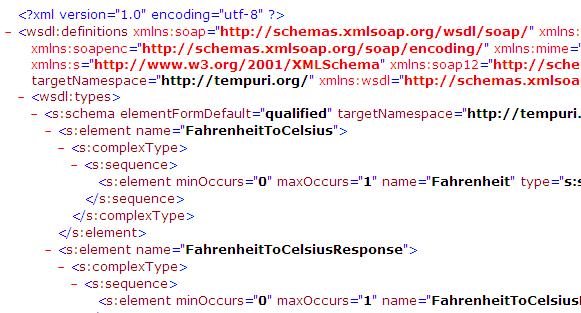
This web service has two methods ‘CelsiusToFahrenheit’ and ‘FahrenheitToCelsius’ and simply takes the temperature and converts it to the required.
There is one most important element in WSDL, which is Port. WSDL Port defines the connection point to a web service. It can be compared to a function library or a module or a class in traditional programming language. You can find the service name and port in below section of WSDL.
 You can understand this Web Service better when you will navigate to the W3C web service example , where you can see the interface for the web service.
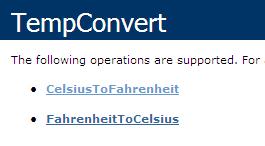
If you click any of the two operations there it shows you the form to input parameters required for the operation and invoking this will give you the result in XML.
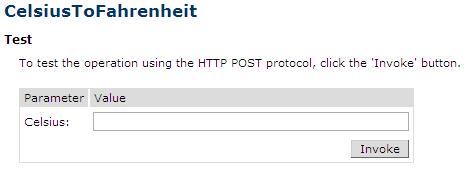
Just below the form you will see sample SOAP request and response, which is actually processed when the web service is invoked.
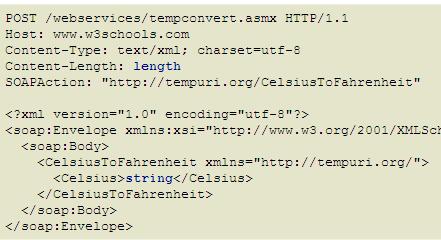
SOAP Request
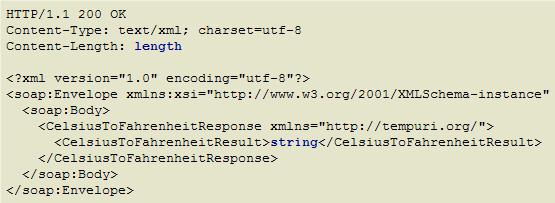
SOAP Response
The ‘string’ (in blue) that you see is actually replaced by the value that you process.
So now you must be ready to start testing this in QTP. We will see the various intricacies of web service testing with QTP in the next part.





I have to automate oracle coherance cache to get the values from it as well as to publish values to it. How can I proceed ?
Hi,
The above article is very interesting and gives clear picture on what is WSDL , webservice and its inter relation. But, i felt the above information will be complete if you would also speak about the webservice URL and its role along with WSDL.
Hi Saket,
Can you help me with this. I am trying to use the webservices Add-in.
Everything worked out good. It was a simple test case where it returns the price of an item.
I gave the expected price in the checkpointproperties. So when I run the test case in QTP, it first gives me
a run error “The request failed with HTTP status 505: HTTP Version Not Supported”. When I close the test case & run it again,
it returns a Passed response. I think it is something with the HTTP version thing & I am not sure where should I be changing what? Any help would be greatly appreciated.
Hi Saket,
Nice to see a wonderful article on the basics of Web Services. I have been working on automation on UI and DB using QTP. Now, I have to work on web service automation and wanted to check out some good articles for the same. Although I have worked with web services before, these article is a good refresher.
Thanks for Sharing!
Thanks & Regards,
Kazim
Thanks Kazim
Hi,
I want to create a class for Window, a class for Button etc and then instantiate a window class object, a button class object. Using these instances want to automate the testcases. We had done the framework like this in Silk test. Is this possible in QTP? Please throw light.
Shanthi
How to test the restful webservices testing using QTP
If you have any related DOCs, please provide me the doc
Hi,
i tried to download the QTP AddIn, but the downloadlink seems to be broken.
I searched for it in the downloadcenter but i only found the new standalone Web Service Testing Tool.
Did the take the QTP AddIn offline to support their new tool?
Best Regards,
Stephan
GREAT ARTICLE on Web Service Testing and QTP. It is well written, clearly explained and sets the stage for the articles to come.
After testing SOA with all sorts of tools for the past 6 years, this article is good because it can help those beginning to learn the testing process and integrate the learning with known tools such as QTP and QC.
I am looking forward to your upcoming articles on this topic.
Thanks,
Bill F.
Hi,
im trying to do webservices automation: using url:http://www.w3schools.com/webservices/tempconvert.asmx?wsdl.
Im getting popup requesting – username/password/domain to access. Can anyone help me
Hi Vishnu,
first check if the connectivity to server is proper, else I am not very sure, but it seems this could be an issue of SSL certificate. recreating the SSL certificate should solve the issue. you can refer KB article http://support.microsoft.com/?id=962928
update me on how it goes.
Hi Saket,
I was trying to connect to Microsoft Dynamics crm web service using qtp and I was using the fetch method in it. I am unfortunately getting this error “Authentication failed because the remote party has closed the transport stream”. I gave all the necessary network credentials in the security options. Please help me if you have any idea of the issue.
Hi Rakhi,
by resrful webservices, do you mean RESTful web services?
I did not get any chance to work with REST. however I feel you wont be able to test it QTP now. know that qtp expects WSDL definitions and so any webservice having WSDL definition can be tested.
If you can provide a public restful webservice, I will see if we can work with that.
Thanks Saket for posting nice and need ful article.
Regards
Bhaskar
Hi Saket,
Thanks for sharing knowledge on web services testing via QTP. Eagerly waiting for further articles in the same.
good one…but can u pls tell me that whether we can use qtp to test resrful webservices or not……..
Hi All,
Can you please help me the below questions.I am giving the Paper presantation on this Topic “Web Services Testing using QTP”
1. What are the Advantages of Web Services Testing using QTP.
2.What are the Dis – Advantages of Web Services Testing using QTP.
3 Topic-Solution
Good article. Looking forward for more in this webservice – qtp series
Thank you Soumya, glad to see that you found this article useful.
Hi Saket ,
Thanks for this article. I was always looking for some good material on testing webservices via QTP. Looking forward for further articles in the same.
Thanks Suresh and Milind
regarding SMS alerts – I guess, Yes definitely we can go do that. thats a great idea. I will try look into this and get back.
Helpful info for QTP savvy ppl.
Can we post SMS alerts using any SMS webservice? This would be great for reporting! 🙂
good one for beginners…