
• Facebook
  • X
  • RSS
  • Blog
  • UFT Certification
  • UFT Training
Learn QTP (UFT)
  • What is UFT(QTP)?
  • What is OpenText Functional Testing?
  • Blog
  • Books
  • Resources
    • Downloads
      • Latest UFT Version
      • UFT Patches & Service Packs
    • Support Matrix
      • Windows Support Matrix
      • Browser Support Matrix
      • Complete Support Matrix
    • Definitions
  • Forums
Select Page
How to view result in case of an Incompatibilty Error?

How to view result in case of an Incompatibilty Error?

by Ankur Jain | Last Updated On Aug 7, 2014 | Some Common Errors/ Issues, Tips and Tricks in QTP | 10 comments

Usually this happens in large scale regression testing where the length of your script is quite long. In that case there are possibilities that your script stuck somewhere in between and exits abnormally. In that case QTP is not able to finish up the entire required things to populate the test result.

McAfee IPS not compatible with QTP

McAfee IPS not compatible with QTP

by Ankur Jain | Last Updated On Jul 5, 2013 | Some Common Errors/ Issues | 10 comments

We recently migrated to McAfee anti virus solutions. McAfee some with a host of security features along with Intrusion Prevention System (IPS). It seems IPS is not compatible with QuickTest. If you try to open IE7 while QuickTest is already open, IPS will kill the IE7 process.
In case your QTP crashes frequently… check this out…

In case your QTP crashes frequently… check this out…

by Ankur Jain | Last Updated On Aug 7, 2014 | Some Common Errors/ Issues, Tips and Tricks in QTP | 97 comments

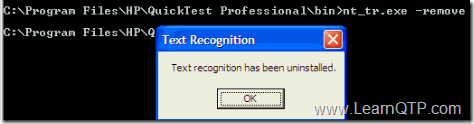
pal_drv.sys is the system driver that may be the culprit for your frequent QTP crash issues. This driver was developed was text-recognition mechanism that QTP doesn’t support now. You need to uninstall this driver and here is how:
What to do when QTP is not able to identify browse or upload buttons?

What to do when QTP is not able to identify browse or upload buttons?

by Ankur Jain | Last Updated On Dec 13, 2018 | Some Common Errors/ Issues, Tips and Tricks in QTP | 41 comments

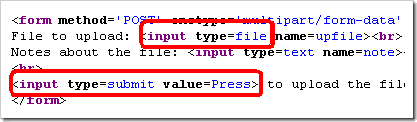
I am recording using QTP and for some reason QTP does not recognize any upload buttons. Use Web Event Recording Configuration to solve this issue.
If QTP hangs or freezes on new installation

If QTP hangs or freezes on new installation

by Ankur Jain | Last Updated On Jul 5, 2013 | Some Common Errors/ Issues | 6 comments

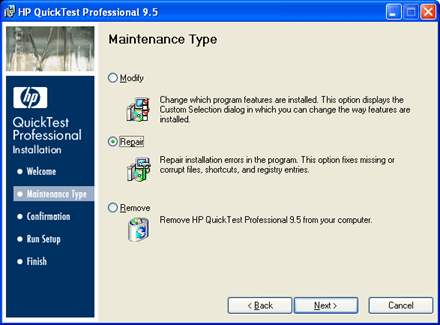
With QTP 9.2 and earlier, we use to run the .bat file present under QuickTest Professional/bin folder and it took care of the unregistered, corrupted DLL’s. In 9.5 there is no such bat file present under that folder.

Be careful while using SystemUtil.Run method

Be careful while using SystemUtil.Run method

by Ankur Jain | Last Updated On Aug 8, 2014 | Some Common Errors/ Issues | 19 comments

Be careful while using SystemUtil.Run method. Quick Test Professional (QTP) To open applications using QTP.


Next Entries »

UFT Tutorial

  • Tutorial 1: Getting Ready To Learn UFT

  • Tutorial 2: Introduction To UFT

  • Tutorial 3: UFT One Add-ins and Add-in Manager

  • Tutorial 4: All About UFT Menus

  • Tutorial 5: Ultimate Guide to UFT Panes

  • Tutorial 6: Record Your First UFT Script

  • Tutorial 7: Classes & Objects in UFT (QTP)

  • Tutorial 8: Native vs Identification Properties in UFT

  • Tutorial 9: Complete Guide to Object Repository in UFT

  • Tutorial 10: Complete Object Identification Process in UFT One

  • Tutorial 11: What is Smart Identification?

  • Tutorial 12: What is a Visual Relation Identifier?

  • Tutorial 13: A Complete Guide to UFT Insight


Online UFT (QTP) Training

Online UFT/QTP Training
Turbo start your UFT learning by joining our renowned online UFT/QTP training course.


UFT Certification
Mock Papers

QTP Certification Mock Papers
Master UFT and get yourself certified on UFT with these mock UFT questions!.

Useful QTP/UFT Guides

  • Guide: What is QTP?
  • Guide: Step by Step QTP (UFT) Tutorial
  • Guide: Descriptive Programming in QTP (UFT)
  • Guide: Regular Expression in QTP (UFT)
  • Guide: Checkpoints in QTP (UFT)
  • Guide: Working on Database with QTP (UFT)
  • Guide: DotNetFactory with QTP (UFT)
  • Guide: Object Identification in QTP (UFT)
  • Guide: Microsoft Excel and QTP (UFT)
  • Guide: Learn VB Script for QTP (UFT)
  • Guide: XML and QTP (UFT)
  • Guide: Webservices and QTP (UFT)
  • Guide: Automation Object Model in QTP (UFT)
  • Guide: 4 Ways To Capture Tool Tip in QTP (UFT)


Writers Job Application Form

Beginners

  • What is QTP? - A complete reference
  • Step by Step Guide to learn QTP for beginners
  • New Features in UFT/QTP 11.50
  • 21 QTP (UFT) Tips Every QTP Engineer Should Know
  • Optimize QTP: 19 Ways to Enhance QTP (UFT) Performance
  • Get trained on UFT/QTP
  • UFT120-12.5-ASP: UFT Certification Details
  • Contact Us

Recent Posts

  • UFT One 2023: Top 11 Features and Enhancements
  • UFT One 2022: 13 Top Features and Enhancements
  • UFT One 2021 R1: 14 Top Features and Enhancements
  • UFT One 2021: Top 5 Features and Enhancements
  • What is: Tech Preview Mode
  • UFT One 15.0.2: Top 7 New Features You Should Know

About Me

Ankur Jain (@ajonit) is the founder of Ajonit Technologies and chief editor at LearnQTP, a widely read QTP blog with integrated Q&A forums since 2006. Read more about him.

Contact Us

About Us
Send us an article
Advertise with us
Contact Us

Trending Articles

  • UFT One 2023: Top 11 Features and Enhancements
  • UFT One 2022: 13 Top Features and Enhancements
  • UFT One 2021 R1: 14 Top Features and Enhancements

Powered By

Monitored by Sucuri Hosted at HostGator Cloud
CDN by MaxCDN
LearnQTP Uptime Status
  • Blog
  • UFT Certification
  • UFT Training
  • Facebook
  • X
  • RSS
Jobs | Sitemap | Privacy Policy | Terms | Copyright Ajonit Technologies
🡸
🡺

