
Q: What are the prerequisites to connect QTP with QC?
A:
- Check Allow other Mercury products to run tests and components present under Tools > Options > Run in QTP
- If you are running the tests on the same computer where you have QC client installed, then you will need:
- QTP Connectivity Add-In
- QTP Add-in
- If you are running the tests on the different computer than where you have QC client installed, then you will need:
- QTP Add-in where QC client is installed.
- QTP Add-in and QC connectivity Add-in where QTP is installed.
- QC connectivity can be found at QC server URL > ‘Add-Ins Page’ link > ‘QC Connectivity’ link > ‘Download Add-in’
- QTP Add-in can be found at QC server URL > ‘Add-Ins Page’ link > ‘More QC Add-ins’ link > Download and install QTP Add-in according to its version.
Q: How can we connect QC with QTP using Automation Object Model (AOM)?
A:
Use TDConnection Object.
Example:
' Create the QuickTest Professional application object.
Set qtqcApp = CreateObject("QuickTest.Application")qtqcApp.Launch 'Launch QTP
qtqcApp.Visible = True 'Make it visible
'Connect to Quality Center

'qtqcApp.TDConnection.Connect <QC Server path>, <Domain name that contains QC project>,
'<Project Name in QC you want to connect to>, <UserName>, <Password>,
' <Whether 'password is entered in encrypted or normal. Value is True for encrypted and FALSE for normal>

qtqcApp.TDConnection.Connect "http://QualityCenterServer/tdbin",
"FR", "Flights", "learnqtp", "welcome", False
Q: How can we automatically connect QTP with QC on start up?
A: Go to File > Quality Center Connection. Check the box marked Reconnect to server on start-up.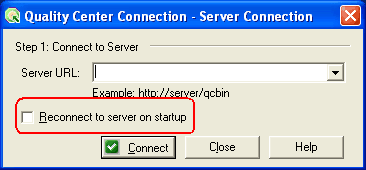
Q: What if QTP tries to connect with QC automatically but QC login credentials had changed?
A: Change the following properties from 1 to 0. They are present in mic.ini file under QTP installation generally found under C:Program FilesMercury InteractiveQuickTest Professionalbin
- LoginAutomatically=0
- ReconnectToDB=0
- ReconnectToServer=0
Q: How can we access Quality Center Open Test Architecture (OTA) using AOM?
A: Using QCUtil object (AKA TDUtil for QTP 6.5 and backwards). You can find details of all associated properties like CurrentRun, TestRun, Current Testset, CurrentTestSetTest, IsConnected, QCConnection under QTP Help > Quick Test Object Model Reference > Utility Objects > QCUtil Object.
Q: Where can we find all methods and properties present under TDConnection Object?
A: Refer QTP Help > QTP Advanced References > QuickTest Automation > TDConnection Object.
Q: How can we upload QTP scripts to QC using AOM?
A: Once connected to Quality Center, open the test using AOM and save it to QC.
Example:
qtqcApp.Open "C:TempProjectQTPTestScript1", True
' Get the Test object
Set qtqcTest = qtqcApp.Test
' Use the SaveAs method to upload the test to Quality Center
qtqcApp.Test.SaveAs "[QualityCenter] SubjectFolderNameQTPTScript"
Q: Which version of QTP is compatible with which version of Quality Center?
A: QC 9.0 integrates with QTP 8.2 SP1, QTP 8.2 SP2, QTP 9.0, QTP 9.1 and QTP 9.2. To check the compatibility of your QTP version, check out the ReadMe that comes pre-installed with QTP
Q: Can we record Quality Center operations with QTP?
A: Yes, only with QC 9.2 and above. Use .NET Add-in.
Q: Can we schedule a test run from Quality Center?
A: Yes, use ‘Test Run Scheduler’ utility that comes with QC.
Q: Is there version control in QC with QTP?
A: Yes, QTP 10.0 provides you the version control feature under the name of Quality Center Version Control present under File Menu. Earlier versions of QTP can work with 3rd party version control tools.
Q: I am a beginner to Quality Center. Is there any help available?
A: Yes. Check this site on Quality Center. It has many step-by-step articles to Learn Quality Center.





Can we import UFT(12.02) scripts to ALM(12.01) without ALM.
Can I Refresh QC Using QTP Script ?
My requirement is save run time test data in QC Resourse and Use the Same Test data for next Iteration….
Now, Data is Saved corectly in QC Resouces, BUT I HAVE MANUALLY CLICK ON REFRESH
BUTTON IN QC…………… Any sugestion
I tried .Refresh & .Post
Guys i want to add some comments in Block Description column of the test case in QC ,from QTP with scripting (Test case id will be passed from the script)
Can Anyone help me on this ….
Hello
I am unable to connect QTP 11.0 with QC 11.5. Getting the below error mssage.
1 WebClient.dll
the system canot find teh path specified
2.tdclntui.dll
Acess is denied
3.OTAClient.dll
The system cannot find the path specified.
4.tdclient.dll
Access denied.
Close all connections to HP ALM Server and try again
Hi Ankur,
The article about QC connection is good. But i need more information.
Lets say, I have developed some script and I connected QC with QTP with the above options mentioned. Now When I run my script in QTP, Will that Pass/Fail the test case written in QC ? Or how it works?
Please clarify.
Thanks,
LakshmiNarayana
Hi Ankur,
Can we import BPT Test Resources(Data Table) from QC to QTP Data Table.
i wrote the below code but its not Working.
DataTable.ImportSheet “http://eqc10.jpmchase.net/qcbin\[Quality Center\Resource]Resources\BPT Resources\Libraries\Data.xls”,”Global Sheet”,”TestLogin”
Is Not Working……………….
DataTable.ImportSheet “http://eqc10.jpmchase.net/qcbin/start_a.htm\[QualityCenter\Resource]Resources\BPT Resources\Libraries\Data.xls”,”sheet1″,”TestLogin”
Is Not Working…………………
DataTable.ImportSheet “http://eqc10.jpmchase.net/qcbin/start_a.htm\[QualityCenter\Resource]Resources\BPT Resources\Libraries\Data.xls”,”Global Sheet”,”TestLogin”
Is Not Working
Thanks,
Rahul Jain
can we install QC in win7?
Hi,
Can we install QTP 11 and ALM QC Starter Edition 11 on same Windows 2008 SP2 server?
Is there any procedure to do above said installation? I’ve installed QTP 11 on server and tried to install ALM QC, I’m unable to start Server Configuration Wizard. Any help on this will be greatly appreciated.
Thanks,
Anil
Hi Ankur
Do u have any idea on VAPI integrator? heard that this can be used for third party testing tool integration with QC..but i did not get any relevant info on this on google..Can you help me out?
Good One
I want to save the contents of run-time data table to an xl sheet attched to QualityCenter in Testplan module. Please let me know how to achieve this
Will QTP 11.0 supports LabView controls or not ? I have QTP 11.0 with .NET and java addins. When I am recording the application that is developed with LabView Controller, controls are not recognizing by QTP 11.0.
what needs to be done ? Do I need any Add-ins ?
Hi,
Anyone has encountered problem when running QTP Scruipts through QC – Test set- only selecting few tests from set and Run.
(QC11 – QTP 11)
Problem:- its running multiple times for 1 test script
Let me know if anyone has faced similar issue,
Thx,
SAM
Hi all,
I have opened a script from qc(qc is connected).
I want know the username and Password for QC
How to send email of my test case from my Mercury Quality Center? I’m on my VM player and I’m trying to save it on my regular desktop but it won’t work. I just started to take a course of this at my college so please help me im a beginner.
I have a client who uses QTP
He wants me to view some of the recordings he has done
I cannot afford to by the QTP Suite
Is there a simple reader –similar to Adobe Player or Mathmatica Player
Thank you
How can i make my QTP , to quickly identify my scripts which are stored in QC? i have followed folder path… already
http://mercuryquicktestprofessional.blogspot.com/2008/05/how-to-run-qtp-scripts-at-scheduled.html
hi,
i have a test set with 1000 test cases in it.
i need to mark these test cases as passed, mentioning the log file name in the test case run.
Is there a way i can automate this using QTP
can any one help me get a job in sw testing
Hi,
Can any one let me know how to export test cases from QC 10.0 to Excel.
HI,
how to launch qc in QTP with scripting statement
plz replay me
Hi All,
Can anyone let me know how to upload the test cases results from Excel into QC?
Is it possible to link test cases with requirement in excel and upload the data in QC, so that we dont have to create it manually through QC.
not able to connect between qc 9 and qtp 9.5 getting error enter server full address
Hi ,
please let me know how to install QTP 11.0 trail version.
I have a question. My QTP got connected to QC. When QC got connected i am not able to see any menu options , for example: if we select Help i am not able to see any options in QTP. How to get the menu options in QTP when QC is connected
Hi Atul,
I have placed all the scripts in a Shared Folder and each script there is having different Actions Calls that sits externally to the Driver script. And all these scripts are then mapped to QC Tests. These scripts works perfectly fine for my Login to a system whether for Remote execution or for Local execution. But I am currently facing the below issues with these QTP Scripts when I login to a system (Computer) with some other login Id, I never encountered earlier:-
1> When I try to execute these scripts through QC, after logging-in to the system with some other login ID: I am always getting an error “You don’t have permissions to execute test”, and to resolve that I have to reopen that script in QTP and will have to always click on Check box there in QTP test Options “Enable to connect with other HP tools”.
a. Even after doing this when making second attempt to execute, I am getting the Execution error in QC as “Tool can not be opened”
2> When I manually try to open the same script From QC after logging-in to the system with some other login ID, the script is failing as automatically I am getting the value for Reporter.RunStatus =1 even before the script starts execution.
Due to these issues, the entire scripts have become my login Id dependent but I wished all these scripts to work independently of any one logs in to system.
Looking for help
When raising a defect in QC, I would like to add standard headings (e.g Issue:, Expected Result, Actual Result, Steps to Replicate:) to appear each time a defect is raised. I have looked at the script editior under “defects module script but cannot determine where to update this. Hope this makes sense
Hi Ankur,
Please help me, how to capture the test data from graph(QC live analysis graph), and put it into an excel sheet.
Thanks in advance.
Hi
I am looking for some assistance writing functions in hp QTP 11. I am trying to write a function that will recognize the difference between three values (YES, NO, Maybe). The function should call the other functions with the correct value and follow the step for each accordingly. I would really appreciate any assistance on this matter.
Thanks you.
Hi Ankur,
Really you are doing great work in helping others for learning QTP.
Thanks & Regards,
S.Santhosh
any new features come send those to my mail.already provided one is very good
HI i was trying to identify the QC objects using QTP 10.0, but i was unable to identify those even though i am having .net addin and java addin. can u please provide me the solution for this..
Regards,
Vijay Kumar P.
I am using QTP 10.0 and recently client gave QC tool access which is installed at client location. We are accessing it from offshore using URL provided by the client. Anybody please help me how to connect QC 10.0 with QTP 10.0.
How to connect to QC from my laptop that too from my home and connection is wireless??
Thanks in Advance!!
Cheers, Arun
Hi Ankur,
Thanks for all above info its really Use full.
Apart from That I need the AOM sample script for Associating the Resources[like Obj Repo,.VBS,.QRS etc] to the scripts from QC to the Scripts.
Note:In this case u have to rake care of Connecting to QC,Taking the Test script with name from Test Plan of QC,Doing Check In Check Out,and then Associating the Resources to each Script.
Plz reply ASAP.I am critical need of that.
Very helpful thank you
Whenever i try to execute an automation script remotely from QC…i get ‘The RPC server is unavailable’ error….QC is in my local sys, QTP is in the VMware…when directly i try to ping to the VM ware from my local sys it opens….so is there still a possiblity for a firewall issue ??
Thanks for the good articale,
Can you please assit, how to connect qc without using qtp like using vb programming.
thanks Ankur. The Article is very informative.
I got a question. can we record Quality Center 9.2 work actions using QTP script. ie to automate the work flow script functions in QC. Eg: Create test case and particular user group is not able to pick a value in drop down.
i am looking for queries like how to upload scriptfrom QTP to QC and how to import a script from QC to QTP
and
how to export and import test cases from QTP to QC vice-versa
can i ask something about QTP? im using qtp10 doing functional testing for a website.. i doing the recording well but after run the test i came out with this problem “Cannot identify the object “All Events” (of class Link). Verify that this object’s properties match an object currently displayed in your application” why did the run time error msg came out, suppose qtp already capture all the object properties etc during recodrding?? that software fail or test application fail??
i will write more next time but help me fix this problem first…… thank you 🙂
This link is very help full for me.
how to install QTP 9.2 at home and use for long time
Ankur, Thank you so much for posting these details. Its really helpful.
Great Ankur,
Today we just migrated to qc 10 which is first experience to me, so there weere many questions in my mind.
This article not only answered my questions but has more info.
People like you really helping us to ovecome hurdles in our day to day job responsibilties and in developing knowledge.
Trust me, these exp’s really builting up confidense that we can go any place , any project to work on and gain knowledge as we go on explore things.
Thank, Thanks, Thanks a lot.
God bless you.
whats the probable launching date of QC 9.0 Can anybody focus on it?
Hello Ankur, can u plz tell me what to write in Server url area in the above . As I am new to testing plz do me a favor…
Thanks & Regards,
Charo
very good article …Thanks!!
Good stuff, Thanks
Very good arrticle… Thanks Ankur Sir
Getting below Error when i try give run from test plan using QTP10.0
Test :
BAd DAta
please suggest some solution
Its really a knowledgeable artical…
Hmmmmm gr8! Thnx Ankur
This is very useful article
hi all
please inform me any testing jobs in your companies.
i have 3 yrs of exp .
Hi Ankur,
Its gud.thanks for the info
Dear Ankur,
Please help me how to learn QTP/QC with tutorial & ppt study material for the certification .
Thanks & Regards
Raghavendra
Hi Kapil,
first of all i want to say thanks for your wonderful comments. i am regular reader of your blogs.
i am download QTP(9.2) and work on basics.basically i have 4 years exp i manual testing now i want to learn more so pls tell me after basics of QTP what is next step. i urgently need a job in top MNC. so pls help me…
Waiting for your reply
Thanks in advance
Ankur
I’ve all the data(Libraryfiles, OR,TestData in the Quality Center) how can i import the data table from QC while running the script in QTP? I mean what path i have to mention? DataTable.ImportSheet ?
Thank you very much Ankur, This is really helpful.
Dear Ankur, it is good article and also very useful to every one, thanks for posting
Regards
Adi
Hi Ankur,
Thanks Ankur for sharing your knowledge. I have a request, I am a beginner and I am getting lot of calls but everywhere they are asking more about networks and server side questions. Where ever I am working they are not intersted in explaining about these so how can I get more/indepth knowledge about the mobile application.
Please guide me how to get the domain knowldge like pharma/validation, finance….etc.
Thanks,
Kerrthana.
thanks Ankur for the information…
Hi Ankur,
Thanks for this info, In my current project we are trying to insert defect in TD through QTP (AOM) but we didn’t succeed.Do you have any idea on this
Great ankur, this is good contribution to QTP family
Its really a nice and informative article. Thanks Ankur for this info….
thanks ankur, to post the very informative artical.
Its is really very useful
this is useful
Nice article.. thanks ankur for providing this informative article.
Thanks,
Nidhish.