
This question was asked by Suresh in the comments field.
I am recording using QTP and for some reason QTP does not recognize any upload buttons. For example, start the recording at this site: http://cgi-lib.berkeley.edu/ex/fup.html
Click on the “Browse” button. Notice this click is not recognized by QTP. Please provide some feedback why QTP is not able to recognize this button. Thanks
This is an interesting question and not a typical object identification issue. I thought I will take it up on the blog to make it available to the wider audience.
If you go on the link mentioned above, you will see QTP is not able to record the click on Browse web button. Web buttons are generally associated with input type=submit object but if you see the source of the browse button, you will notice input type=file object.
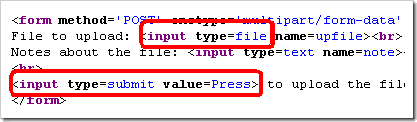
Now According to Microsoft help, input type=file object creates a file upload object with a text box AND Browse button. Notice the AND. So, in case of input type=file, the text box and browse button are considered part of ONE object. There are no separate objects for QTP to identify.
What can we do to solve this issue?
Enter Web Event Recording Configuration.
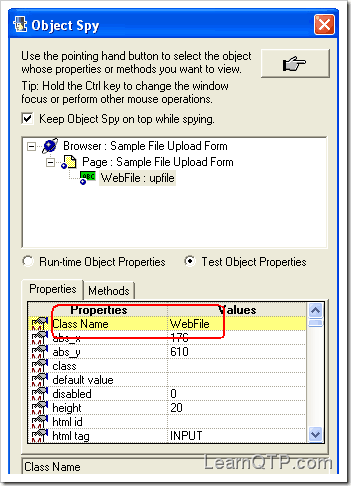
- Object Spy on the text box/ browse button object reveals that it is a WebFile type Object.
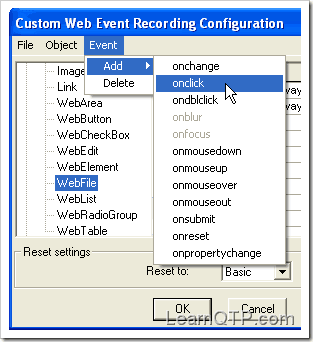
- Using Tools > Web Event Recording Configuration, go to WebFile (under Web Objects tree). Add onclick event.
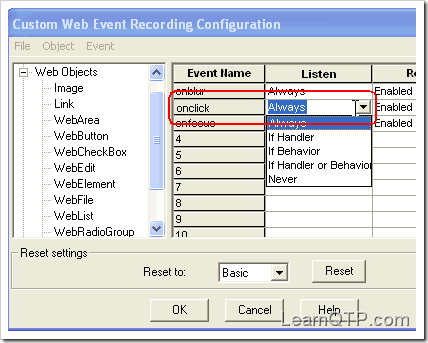
- Set the onclick event settings to Always. Click ‘OK’.
- Done!. Record the click on browse button, now QTP should be able to identify the click on the button.






I am unable to Automate the Web Button (Submit Button) via UFT. In the Results sheet the Step is getting Passed but on the Application, the button is not getting Clicked. Also the Web Object that i have captured is getting identified via Object Spy.
Please suggest how can i Automate the Web Button.
Hi
How to upload an image in the web application by uploading image from the system.
Hi,
Is it possible to Keep Browser and page in Shared Repository and Object belong to this resides in local repository?
Regards,
Rajesh Kumar
HI Ankur
wow its works thanks 🙂
Hi,
I am beginner in QTP.
I have installed QTP and Actitime application in my system(Windows XP). But when i tried to spy Actitime application actual link is not getting spyed but simply firefox.
Kindly advise i need to open QTP or Actitime application in order to spy correctly.
Thanks in advance.
Mohan
Hi Ankur,
I had a question. I am using descriptive programming to write a script and in one of the screens there are drop down fields I used parameterization for that but all dop down fields when i select doesn’t change the values in the screen but when I clcik in one particular one webcheckbox appears so how do I write that in QTP so it changes.
I am facing the same prob as kashyap. pls help
Thank you very much for the solution.
qtp is unable to recognize web objects…. i have checked web activex as well as visual basic addins .. but still qtp unable to recognize web objects . if spy the items it shows as win objects . reply if anyone can
regards ,
kashyap
hi,
I am trying to get date from gmail. But iam unable to recognise the date using object spy.
Please, help me anyone …
thanks in advance..
regards,
naveena
Hi Ankur..,
I have done the above required changes but still QTP is unable to detect the browser its shows “Windows”
I’m having QTP 11 and i also Turn OFF the user control…
Pls tell me how to fix this problem..
thanks
Hi Ankur,
I have same issue with windows appication. I have a WPFButton which will alow us to upload a file and not able to record it with QTP. Please advise.
Thanks,
Madhu
Hi All,
I m using QTP 10 version, when i try to identify object by object spy. It shows correct for some object and after that it shows as winobject for every object. I mean…
In login page, obj spy correctly identify the Username, password and Submit button field…. after navigating in to the next page the object spy not correctly identifies the object
It shows message as
WinObject:Internet Explorer server..
Plz guide me…….
Thanks in Advance
Hi Ankur,
I m using QTP 10 version, when i try to identify object by object spy. It shows correct for some object and after that it shows as winobject for every object. I mean…
Hi Ankur,
Thanks for the make of this blog.it is very helpful for the beginners like me .
Ankur i am faing some problem while recording the script for web links .Actually i am using QTP11.0 with IE8 and Window 7 and found that QTP is not recording anything i.e. niether the script getting recorded nor the objects .i tried by object py n all but it captures the whole page instead of the button and dit box with winEdit or WinButton class name .i also tried all the basics like
*Open the QTP with the admnistrative rights.
*Opens the browser after the QTP recording.
*Also try to record by IE32 bit.
but nothing gonnna works .
Please suggest.
Thanks in advance.
Regrads,
Ishu
Hi
I am not able to upload a file after selecting Browse button. QTP is able to recognize the browse button but it is not recognizing the path give to upload a file. is there any way for QTP to recognize the path an upload the file provided in the path using descriptive programming.
use the virtual objects if QTP is failed to recognized application objects, Go for Virtual Object
Navigation:-
TOOLS-VIRTUAL OBJECT-NEW VIRTUAL OBJECT-IT ILL CREATE OBJECT IN SCRIPTING
Nice Job Ankur , really works great…
Hi, I have been working with flex and QTP.. and some how the upload for lfex button seems to be an issue… Record happens fine but replay doesn’t work.
any help on this will be really appreciated.
Regards,
Sachin
Hi Ankur,
I was searching for the webfile usage and its functionality and atlast i found the solution here..Great effort and thanks a lot for helping me out.
Similarly, Can you pelase give a brief explanation on WEBAREA object with an example?
Thanks in advance,
Satish
Hi Harsh, Do yo get any solution for flexbutton on uplaod? I face same problem on QTP9.5. If you have solution for it, would you please post it or send a email to me.
Thanks
Xmen
I am facing problem with flex upload button. The replay is not working with the Upload button. It click on normal Flexbutton but with upload flexbutton it only highlight it.
there are no flex specific events in the event config. the webbutton has the onclick set to always.
Hi
I am not able to upload a file after selecting Browse button. QTP is able to recognize the browse button but it is not recognizing the path give to upload a file. is there any way for QTP to recognize the path an upload the file provided in the path
I am facing different issue. In my testing application, when we click on image button QTP can not identify any object, not even browser. (after clicking image button another windows opens which has same browser name as previous by calling ajax action methods)
I found work around as click on back of browser and then click on forward button of browser. Then QTP is able to understand all objects. Do not know is it application problem or QTP?
Please comment on this. Thanks!
Nice posting
I m not able to enter the content into webfile object
when i use .set property for Webfile nothing works
but when i use .click using the same object it clicks on the browse button.
I can browse to the content i want to using ths approach, but i have a scenario where i need to directly set the value into webfile editbox
Can someone please elaborate on this?
How to study QTP scripting in better and easier way send some links
I followed the above steps but in Tools there is no option for WebEvent recording configuration in QTP 9.2,can you tell me from where we get this option.
This is great example to show we can miss lots of functionality or options when we neglect to browse all available features
We dont have any option of Web Event recording in QTP 9.2,Can you suggest how to solve this.
Hi Ankur,
I am using QTP from past two years.,.
I am facing once issue..
one web page that I am testing is having webedit box.
In this web edit box content is seen at run time..
So I am not able to get any data from this web edit box.. I have tried all method getcelldata, GetROproperty..etc.
But I am unable to get data…
can you help me in this case????
In this web edit box content is seen at run time.. So I am not able to get any data from this web edit box
I didn’t understand this. Please elaborate and ask the question on forums
This is simliar to my situation, only I am getting an Adobe error when trying to run or record a script with Flex 3 objects…The error is “Adobe Flex 3 Plug-in for Mercury Quick Test Pro could not find the Flash Player within the HTML page. This can occur when the value of the OBJECT tag’s id attribute is missing or contains a period or dash.” When this error occurs, it precludes QTP’s ability to recognize (and thus, record) any Flex objects. A reinstall of QTP and the Adobe Flash Player 10, Flex builder 3 and Flex 3 Plug-in for QTP did not fix this issue. Any thoughts would be greatly appreciated! Thanks. steve@totalqualityphoto.com
@Steve: So did you check for period or dash in the ‘id’ attribute in OBJECT tag? I’m sure you already know how to find it, but just in case, you can find it by going to View > Source … For more info on Object tags check this article from W3C Schools
Hi Ankur,
I have one doubt.If we will record making the necessary changes you have mentioned,can we run this script on another machine where QTP does not have the similar set up for web event identification.
If yes then fine,
If now can you plz give a generalise solution to this problem.
Thanks in advance
hi
some objects like drop down list “select” is not identified by QTP
when i recorded the same operations, it was able to enter the value and correspondingly able to click on BROSER…
I have even given the descriptive programming of the same operations.it is also working fine.Have a look into he statements and let me know any issues
‘Browser(“title:=Sample File Upload Form”).Page(“title:=Sample File Upload Form”).WebFile(“name:=upfile”).Set “ramu”
‘Browser(“title:=Sample File Upload Form”).Page(“title:=Sample File Upload Form”).WebFile(“name:=upfile”).Click
Browser(“Sample File Upload Form”).Page(“Sample File Upload Form”).WebElement(“Sample File Upload FormNOTE:”).FireEvent “onmouseover”
Browser(“Sample File Upload Form”).Page(“Sample File Upload Form”).WebEdit(“note”).FireEvent “onmouseover”
Browser(“Sample File Upload Form”).Page(“Sample File Upload Form”).WebFile(“upfile”).FireEvent “onmouseover”
Browser(“Sample File Upload Form”).Page(“Sample File Upload Form”).WebElement(“File to upload: Notes”).FireEvent “onmouseover”
Browser(“Sample File Upload Form”).Page(“Sample File Upload Form”).WebFile(“upfile”).FireEvent “onmouseover”
Browser(“Sample File Upload Form”).Page(“Sample File Upload Form”).WebFile(“upfile”).FireEvent “onmousedown”
Browser(“Sample File Upload Form”).Page(“Sample File Upload Form”).WebFile(“upfile”).Set “ramu”
Browser(“Sample File Upload Form”).Page(“Sample File Upload Form”).WebFile(“upfile”).Click
How to capture the link urls from google search?
Scenario:
1.search for “test” in google.
2.Capture all link urls from search result page.
I have got the solution for the same, Please try below code.
Set oWebFile = Browser(“Home | Morgan Stanley”).Page(“Submit Edit Reference”).WebFile(“upload_file_text_box_Browse”)
x = oWebFile.Object.clientHeight \ 2
y = oWebFile.Object.clientWidth – 5
oWebFile.Click x,y
Excellent Ankur…………Very Good Idea 🙂