
Have you ever wondered about how to effortlessly transfer your QTP scripts from your computer to one of colleagues or may be from a drive of your computer to another ? Well, relative path is the answer. As promised in my previous post on optimizing QTP scripts, we “ll discuss what is a relative path and the benefits of using them in your QTP scripts.
There can be two types of path in your file System, absolute and relative.
A full path or absolute path is a path that points to the same location on one file system regardless of the working directory.
Example of a full path:
C:Program FilesMercury InteractiveQuickTest ProfessionalTests
while
A relative path is a path relative to the current working directory, so the full absolute path may not need to be given.
Example of a relative path: Say your current working directory is QuickTest Professional asshown above so the relative path for the folder Mercury Interactive which is one level up would be ….Mercury Interactive similarly folder which is on same level can be referenced by ..Some Folder
Now that the definition is clear, I think you can guess the benefits of using relative paths in QTP.
Suppose you have a test where you need to call a reusable action which was created in a different test. The normal steps we follow would be: Insert > Call to existing Action
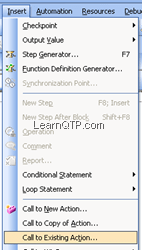
and then we select the reusable action from the drop down list.
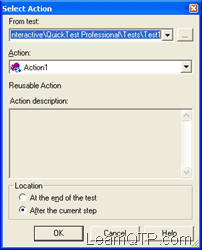
The major drawback with this approach is that if you need to shift your files to some other computer where the similar path is not maintained you will have to do a lot of rework and map the reusable actions all again.
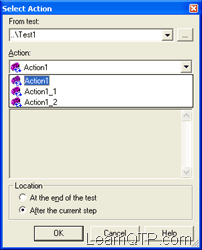
To get over this problem, we can use relative path. In the Select Action box as shown below instead of selecting the test just type in ..Test1. If there is a test named “Test1” in the current directory, action drop down box would automatically populate the list of reusable actions under it.
References: Wiki: Path





Thanks for this.
Hi,
How to execute a test from another test in QTP?
For Eg: I have created 2 individual test and saved seperately and i have write 3rd test and call those 2 tests?
Hi Ankur,
Can we use relative path in AOM. If yes can you please giv me example
i want books on software testing it available or not
Hi All,
I have few queries regarding QTP. Kindly guide me.
1) I have QTP installed on my machine and i have my
QTP scripts in my system.
I want to run this QTP script on 10 different systems
which do not have QTP installed on them.
Is it mandatory to have QTP installed on all the
10 machines to run the QTP script ( on my system )
2) I have QTP installed in my System, say, Server 1
and The AUT ( Application Under Test) is in
Remote machine , say, Server 2.
The machine in server 2 does not have QTP installed
on it. Is it possible to execute the QTP Scripts from
Server 1 in the AUT on server 2 ?
If yes , Kindly specify the configurations ( DCOM Settings ) to achieve the same.
Any help is heartily appreciated. Thank You.
Hello,
Can any one tell me How can I load the excel sheet present in the sharefolder. our test data will present in a path like this \\production\developmentshares\automationtesting\frameword\datatables
I tried to connect using this scrtpt.
set var=createobject(“excel.application”)
set var2=var.workbooks.open(the above path)
but it is not opening. Please assist regarding this
I cant even call the action from this path.
Regards
Umamahesh
HI,
If I open the QTP10.0, it’s opening but I couldn’t open the existing files from my local and also I couldn’t save any files/tests into my local. So can u please help me for the same soon.
How can I un-install the unnecessary patches in QTP?
Hello Ankur,
I am a follower of your QTP blogs. I really appreciate the amount of efforts you put into answering the queries.
Thanks,
hi,
i am not able to find reusable actions option in edit toolbar and so that i am not able to disable it.and when i keep the tool under recoding mode it is not recording any application except flight application as it is already available in qtp10 which i have installed in my pc.
please help me in resolving this issue
i got an micdetect.exe issue, with this the whole system is getting restarted including the qtp tool.
Please anybody can provide the solution
Thanks in advance.
Vishnu
wt is d diff’e b/n coockies and temporary files
where yhe addins are stored
Hi,
I have “action a” in “Folder A”. I copied the “action a” into “Folder B” and renamed the action-a as “action B” and did little modifications in action B, again I copied the same action-a in to “Folder B” and renamed the action-a as “Action C” and did little modifications… In a new action first I used “call to existing action” to call “Action B”, again I called “Action C” using “call to existing action” option. But it reflects in the new action as “Action B”… Can anyone help me to resolve this..
hi, I am not able to run the script, when i m giving path set statement.. it is showing file not found…
Hi,
I am sure, It is working fine in Qtp 9.5
Hi,
I am not able to save relative path in QTP 9.5, is it a bug of this version? Any idea?
Regards.
Tapash
8054919007
Q>>
Is it possible that if we specify “test1\recovery1.qrs”
whilke associating the recovery files through the script
qtp will search for that folder in the relative paths specified starting from the first path specified .
Q>>If qtp searches starting from from first path if the folder is there in both 2nd and 3rd relative paths my current working folder is in 3rd path how can I get it corrected in that case
Hi Ankur,
I wrote a “.vbs” file,Initial settings for Qtp i.e. setting libraries paths, Environment paths and Relativepath.
While calling at r un time, it’s showing error. Error is “Can’t add libraries at runtime” and one more thing environment(Xml) path not appered after successfully attached thorough .vbs file, at File–>Settings–>Environment———>Userdefiend
Hi Ankur,
I am from J P morgan Mumbai. In my projects i faced problems of object recognition where when QTP navigated to the concerned page with a calender,Navigated the calender to a specific month and click on a specific date .It completed the entire activity but didnt click on the specifed date.whereas in results it shows it clciked on specified date but actually not.
Only when i put wait ,it waited and clicked
Sync and exist(time) were also not working
But we say we should not use wait??
Can you please tell me where the bpt framework come into the picture.how we will justify the particular framework is ok for the application.
InvokeApplication “C:\Program Files\Internet Explorer\IEXPLORE.EXE http://www.google.co.in”
Now I want to use Relative Path for:-
C:\Program Files\Internet Explorer\IEXPLORE.EXE
How Can we do that.
Thanks,
Nishant
nice article
Can the relative paths can be used when my qtp scripts are stored in QC?
When ur scripts are stored in QC , no point in using relative path as u are esablising connection to qc either by tool or by using vb script – creation object to “Quicktest.application” .
Where is the point of relative path as u have established connection and u have build in metods to perform opration on QC from qtp.
Regards
Pratap H S
prataphs@gmail.com
absolute path is complete path , ex: if u have some file in C Drive and in ABC folder u give absolute path as
C:\ABC to acess data from this folder
Relative path in QTP : go to OPTIONS -> FOLDER -> then u will get a window where u can set relative path from current machine or from other machines to acess files
Ex: if u set the relative path by default the path will be pointing to the ABC folder .
Regards
Pratap H S
prataphs@gmail.com
Hello Ankur,
Well nice articles ,But can you explain more eloborately for relative and absolute path .
Thank you
sir,
I am who to count the no of actions ,send the script in by using object repository.
Hi,
I want to get the object properties Index, creationTme by using script?
Hi
Can the relative paths can be used when my qtp scripts are stored in QC?
Hi Ankur,
can u provide me some database related scripts..
Thanks
Sridev
This relative path thing doesn’t work if I am connected to QC. All my files and resources are located in Quality Center, I can’t then specifiy an Action that is relative because it won’t work for finding the action in Quality Center.
When searching for actions in the Action Window there is either:
or
[Quality Center]…
Do you have a solution for using relative paths when QTP is connected ie sync’d with QC ??
Hi,
Can anyone tell me limitations of QTP
Hi Ankur,
Iam trying to run the QTP Scripts created on another machine on my machine. The scripts and the shared object repository created on one machine was copied as is as a folder on to the network drive. I copied the same on to my machine and created the the same folder structure that was on the other machine.I tried to run the scripts and I have manually loaded the Shared repository. The script failed to recognise the objects on the application.What is that I need to do to make the scripts work.Please advice.
Set fso = createobject(“Scripting.FileSystemObject”)
print fso.GetParentFolderName(Environment.Value(“TestDir”)) ‘ this will give you the name of the parent folder
Use the above lines of code and see if it solves your problem
how do i traverse backwork in directory using QTP. I have used Environment(“TestDir”) to get the dirctory but if i use “..\\..\\” , it should work , but seems not. Can some one give me correct code
thanks
Hi ankur
can we use same pattern of relative path to access files
for example I need to access Testdata.xlsx file
for which can i create
set objworkboos = objexcel.workbooks.open(“..\..\tesdata.xlsx”)
kalluri
Hi,
I am new to QTP.I would like to upload photos in QTP.
I recorded the script with photo upload.But the QTP has not recorded the photo upload events.I have added the following Add ins
ActiveX
VisualBasic
Web
Please help me in this regard.
Hi,
I know the concept of Relative Path but not 100%. From my perspective we can go for environment variable..
we do have a built-in environment variable called “TestDir”.
This holds the path of your Test which is currently loaded in your QTP. using this we can get the path or append what ever path you want,
Hi Ankur,
I came to know that we can overcome the problem with absolute path using environment variable, which returns the path where QTP is installed.
Pls let me know how to use an environment variable in this scenario?
Hi,
I used relative path for Reusable Action and Datatable. When I open the script from QC, the relative path for Datatable is not working fine. The Datatable is blank, not reflected in Test script. Please clarify it.
Hi Ankur,
Can you please give me link for QTP trial version.
I tried the link that you have provided for demo version for QTP beginners but it’s not working.
please let me know it ASAP.
Thanks & Regards,
Steena Almeida
can i have the code for this.
Ankur,
Does relative path also work for actions stored in QC?
Thanks,
Manish
Hi Ankur,
I am very thanks full to you, I learnt many things in WMI 4m u.
And u clarified many of my doubts but still i hav some major doubts regarding Whole web application test by using QTP. Is there any simple logic for that??
Thnks&Regards,
Suma.K
Hi Ankur,
I am beginer to QTP and trying to look a job in QTP.
Sir, Is it possible for u to teach me online and what would be the fee and how many days it take.
Thanks, vuru
Hi everyone!
Is it possible to parametrize image field.Here i m using file upload control to upload image,so i want to upload 10 different images..so how can we acheive that with QTP parametrization technique?
Thanks in advance,
Cheers!
Hi Ankur,
I am using relative path in my project for the shared object repositories. but i am facing a problem, when ever i reopen my project in which i have used relative path for OR i get messages in resource missing panel saying the particular OR file is missing. But all the messages are gone when i just open the Associate Repository dialog and close it. There is no problem in the script execution. I don’t know why the Messages are coming when the OR files are present in the project folder.
Thanks in advance….
Girish.
How to count total number of rows which is not present in one page.(For ex. in one page only 10 rows can display and by clicking on next only other 10 rows is displaying but suppose that table contains 500row and i want to get that total 500 row count.)
Test1 Reusable Action Exists means its there in my directory but still action drop down box is not automatically getting populated with list of reusable actions under it.Its getting disabled.
After typing ..\Test1. Test1 Reusable Action is Exists but Action drop down box is getting disabled.Tel me the solution please.
Hi
I am new to QTP.
I am Usig QTP with window based application. but i am getting many problems. QTP does not recognize the objects like text fields, imgaes, edit boxes….etc for window based application.
I have choosen the add-ins as a vB.
Please solve my problem.
hi ankur
hw r u
my query is suppose i have some function defined is some other qtp script and i want to use/include these functions in the current then how to we do? i donot want to use functions so that i donot need to write the functions again in my script so how do i import it in the current scrip and use it as an how i want??
After running QTP current directory is set to C:\Program Files\HP\QuickTest Professional\bin. How can I locate test script directory? I mean folder where for ex. Default.xls is stored.
Thanks for answer. Standa
Thank you Mr Ankur
i am learning manythings.i want to know the realtime scenarious for differnt faltforms.and how will you handle the posted questions in your project
thanks®ards
sam
Hi Ankur,
I have created a reusbale action from scratch. I have taken that reusable action modify it and created another reusable action with different action name as well as test name.I put both the reusable actions on the same directory.
From another test (with in the same directory) I want to call those actions(By call to existing actions) through relative paths. First Action(Which I created from scratch)is added and also local sheets is added. But in case of second action(which i have created from that first action)it is not added and also data sheet is not added. It is showing that First action is again added.
This problem only happens when I want to call those actions together. If I call only second action then this problem not happening.
Can you please tell me why this thing happening? Is Second action use some ids or links of first action? What changes i have to made in second action so that in can called with the first action also.
Thanks,
Suman
Plz send me Link for trial version for QTP , i tried but failed in many links
Thanks
rahul
Ankur,
I am new to QTP. I am trying to run scripts in batch mode using Test Batch Runner. When I run the .mtb file after the first script runs the application closes. Is there a way to fix this?
Thanks,
Ted
Hi Ankur,
I am new to QTP and I am trying to script a client-server Java application.
I am not able to use .Sync function in the script and I have wait function. Can you please let me know what could be used instead of wait?
-Thanks
Shilpa
1) In example it is “Quick Test Professional” as mentioned
2) Yes, if you are in the current directory
3) Just try on your machine as I have written and you will understand.
Nice article Ankur.
But one point is not clear for me.
from your post “instead of selecting the test just type in ..\Test1. If there is a test named “Test1″ in the current directory”
1) here what does “current directory” refers to?
2) Do you mean instead of browing for the whole path “C:\Program Files\Mercury Interactive\QuickTest Professional\Tests\Test1” we can just give “..Test1” in Select action box?
3) I am not getting how can we give relative path for reusable test located at “C:\Program Files\Mercury Interactive\QuickTest Professional\Tests\Test1”
Sorry if understood in other way…please explain I want to use this feature in my tests.
Thanks,
Akhila