There is this little feature – Web Event Recording Configuration – sitting inside Tools menu of QTP. QTP help has this to say about it.
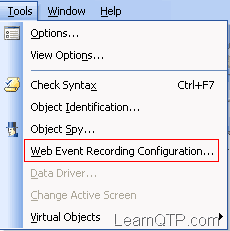
QuickTest creates your test by recording the events you perform on your Web-based application. An event is a notification that occurs in response to an operation, such as a change in state, or as a result of the user clicking the mouse or pressing a key while viewing the document. You may find that you need to record more or fewer events than QuickTest automatically records by default. You can modify the default event recording settings by using the Web Event Recording Configuration dialog box to select one of three standard configurations, or you can customize the individual event recording configuration settings to meet your specific needs.
I find it as one of the most neglected areas, as I have never received a single query regarding this feature on my blog or forums in the past 2+years! So , just want to know from you, have you ever used this feature in the past? If yes. Please let us know how it helped you with your QTP issues.
If you want to keep track of further articles on UFT (QTP). I recommend you to subscribe by email below and have new UFT articles sent directly to your inbox.



Bhagya says
I am not able to record browse button even after setting the ‘onclick’ event to ‘always’. Any help?
Ankur Jain says
@Bhagya: That works most of the times. As an alternate, try using
WebPackage("ReplayType") = 2just BEFORE the statement and change that back toWebPackage("ReplayType") = 1AFTER the statement. So your code would look like this.WebPackage("ReplayType") = 2 'Mouse Replay type....
WebPackage("ReplayType") = 1 'Keyboard Replay type (default)
Uma says
I have the same question, I performed the web event recording on the right click option, some times it is recording and some times not.
Could you please explain us more clearly?
Ankur says
@Uma – Did you check this post on How to record right clicks using Web Event Recording Configuration?
dhanraj says
I did the same as mentioned above for the Right Click recording, But not able to understand how it will be used while running the script.
For example i performed it on msn.com
Browser(“MSN.com”).Page(“MSN.com”).Link(“Careers & Jobs”).Click 55,7,micRightBtn
But while running the script it will not perform in RightClick operation on that, instead it will click on that link.
Then what is the use for including the RightClick because as per my understading it should for handling the right click operation on particular object.
Karthi says
I used this to avoid an error in my application by setting “onclick” event to “if available”. Otherwise QTP was trying to record “onclick” always and since it was not found QTP kept throwing error. this error was specific to that application.
Ankur says
@Diwakar: Good to hear that.
@Sumit: >> but the problem is if you enable webevent recording, then sometimes qtp hangs
Did you check on other machines?
>>Also, I think this feature is in 9.2and + versions only..
It was there in 8.2 also.
Sumit says
Ankur – This feature is not neglected.. but the problem is if you enable webevent recording, then sometimes qtp hangs (if the script size is big..
Also, I think this feature is in 9.2and + versions only..
correct me if i am not.
Thanks,
Sumit
Diwakar says
Hi Ankur,
I’ve used this feature. In my last project I need to record some menu bar that is activated once we move mouse on it..that time I used this feature