
Through this article I would like to throw an insight on an alternate and easy way to manipulate/automate variety of operations in PDF files using QTP. Please allow me to introduce an interface which will help you to easily working with PDFs. The focus of this API is relatively small, but interesting. Hope you will find this useful. – Saket.

The most challenging issue with PDFs is that it could be of any kind, not just a tabular data; it could have plain text, images or even forms to fillup. So this makes a tester’s life a bit difficult, never mind, we will definitely find an easy of do it…
Although there are already some better approaches we have to deal with PDF documents but I found many of us are facing so many difficulties using this.
There are lots of queries coming at QTP forums asking for an easy way of doing it with PDFs. keeping those in my mind I started creating this API mainly for comparing two PDF documents, and added few more features in it. We will see all of them later in this article.
LearnQuickTestPDF API works with iTextSharp. Sometime back when I was involved in a PDF project I found this really useful library which does a great deal to ease the burden of manipulating PDF documents.It provides all of the primitive functions necessary to create a PDF document. However,since all of the methods are based on primitive operations, it is easy to confuse the look and feel of a document without enforcing certain standards. Visit iText Home to learn more about iTextSharp.
Let us now see how we can use LearnQuickTestPDF
Download and run exe to extract file to hard drive, extract to “C:\LearnQTP”.
Open directory LearnQuickTestPDF and find the Install.vbs, this will make the API ready to use.
But before this, read the terms and conditions first and then execute the install.vbs file by double clicking it. Accept terms and condition by clicking on ‘Yes’ button and proceed.
That’s it you are now ready to use this into QTP.
Use this in the same way you do with other COM APIs.
Set oPDF=createobject("LearnQuickTest.ManipulatePDF")
Once we get the object, we can now proceed with using different methods to manipulate the documents.
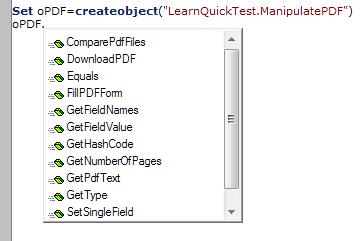
Let’s see one by one,
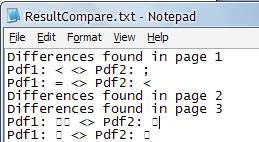
1. Comparing two pdf documents: Use ‘ComparePdfFiles’ method to compare two pdf documents. It returns true if your there is no difference in the two documents otherwise false.
parameters:
PDFFile1 – Pdf file path to compare with
PDFFile2 – Pdf file path to compare to
ResultFile – text output file to store the log/difference if any
FromPageNum – [Optional Parameter] Page number to start from
ToPageNum -[Optional Parameter] Page number to end to.
Example –
If oPDF.ComparePdfFiles ("C:\Actual.pdf","C:\Expected.pdf","C:\ResultCompare.txt") =True then
reporter.ReportEvent micPass ,"PDF Compare", "No Difference found"
Else
reporter.ReportEvent micFail ,"PDF Compare", "Files are different"
End IF
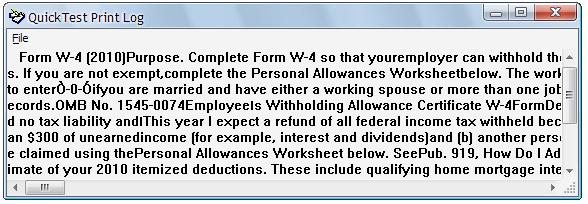
2. Retrieve text from pdf document: Use ‘GetPDFText’ to retrieve the content from the pdf file.
Parameters –
PDFFile – PDF file path
FromPageNum – [Optional Parameter] Page number to start from
ToPageNum – [Optional Parameter] Page number to end to.
Example
print oPDF.GetPdfText ("C:\fw4.pdf")
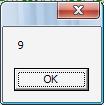
3. Find number of pages in the pdf document: Use GetNumberOfPages(“<<PDF File path>>”) to find out the number of pages in the document.
Example
msgbox oPDF.GetNumberOfPages("C:\ Expected.pdf")
4.Retrieve field names from the PDF form: Method – GetFieldNames
Use Parameters
PDFFile – document path which contains form
resultFile – text output file to store the Field names
example –
oPDF.GetFieldNames "C:\fw4.pdf","C:\ fw4Fields.txt"
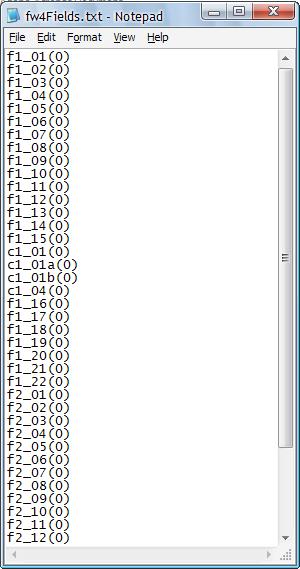
5.Fill the PDF form: Use method – FillPDFForm
Parameters –
sourcePDF – Form PDF path to fill
outputPDF – output pdf path for completed document
FiledNames – Name of the fields to fill in each separated with ‘,’
FieldValues – Values for the corresponding fields separated with ‘,’
LogFile – Path to store log for the action
Example
Fields = "f1_01(0),f1_02(0),f1_03(0),f1_04(0),f1_05(0)
,f1_06(0),f1_07(0),f1_08(0),f1_09(0),f1_10(0)"
Values = "1,1,1,8,0,1,16,28,Saket K, Test"

oPDF.FillPDFForm "C:\fw4.pdf","C:\fw4Filled.pdf",Fields, Values,"C:\\fillFormLog.txt"
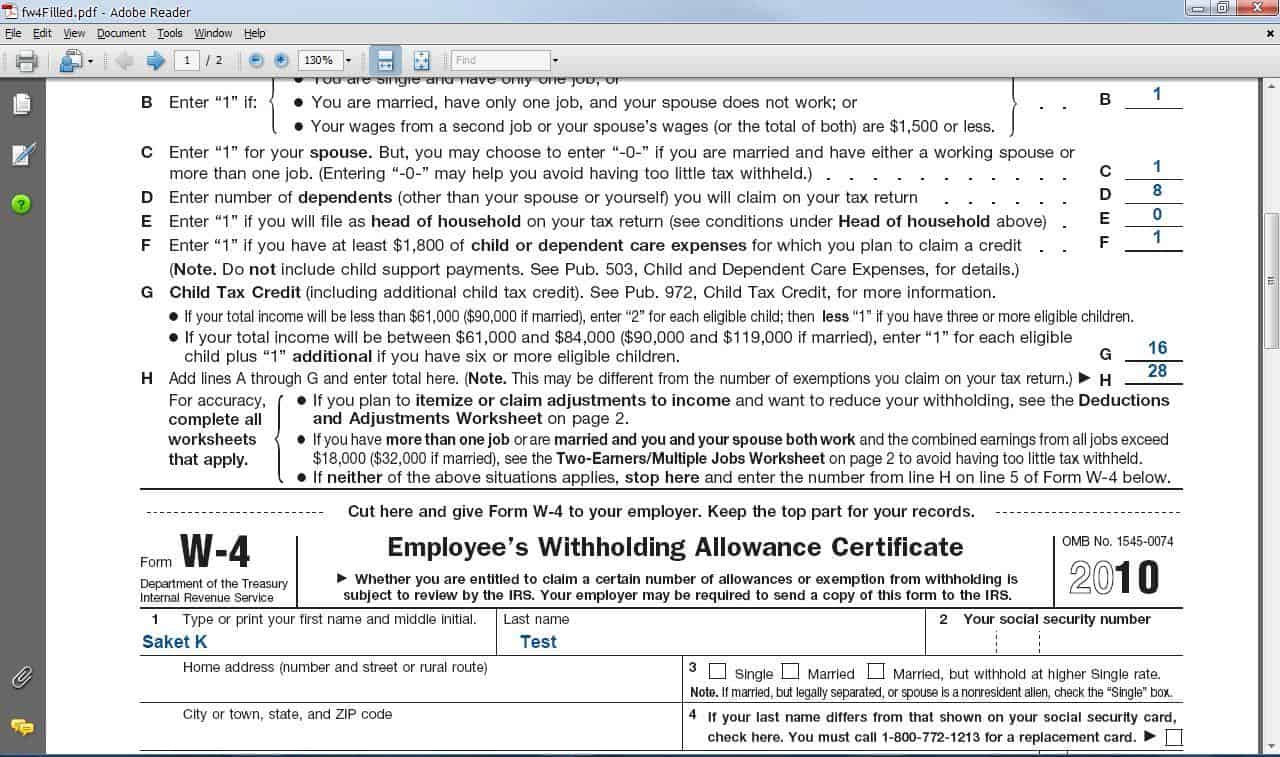
Apart from this we have some more methods to work with
6. GetFieldValue – to retrieve the value of a particular field in the acro form
7. Set SingleValue – to set the a single field value if required.
8. DownloadPDF – to get the document downloaded to your hard drive from a web location.
That’s all for now, I may update/modify this API if I find anything useful related and can be added into this. Please feel free to ask me at QTP Forums for any issues using this API.
[This utility has been successfully tested to work with QTP 10.0, Adobe 9.0 and IE 8.0. Please report bugs and issues here.]






Hi,
I am using GeetPdfText method but getting below error
External object LearnQuickTest.ManipulatePDF::GetPdfText has thrown the following exception:
Object reference not set to an instance of an object
The problem is I have written a code in which the PDF will be saved in a location and I’m using file content checkpoint to compare this two PDF, as of now I’m able to compare the PDF.
The problem is consider a line, line consists 3 characters which are dynamic and I’m passing two characters from the code and one more character is the problem that character i need not compare, How can i skip it. Any idea of Regular Expression???
Hi,
Need to know if we can copy the PDF whole data in the same format as it is in actual PDF with all font size, paragraph endings , font type etc.
I just want to copy text with same format as it .
Reply ASAP.
Thanks
Pankaj
Can you help me with code on how to extract text from pdf into excel using qtp
Dear Author,
Thanks for your post. i am new to UFT and your Tutorials is really impressive and quiet useful. I need to compare layout of PDF files . So i used BitMap checkpoint in order to validate. But When i execute the test i am getting failure message as Expected and Actual Bitmaps are of different sizes. Kindly let me know if there is any workaround for this, It would be really useful
Regards
Yogesh
Good Morning Ankur,
It’s an interesting article. I have one query.
Is it possible to get the PDF text properties like font, size & color of text in PDF. If yes, please let me know the possible ways.
Your help/advise is much more helpful.
Thanks,
Subbu.
Hi, I have a question. When you are comparing two PDF and you get some mismatches, from these Acrobat APIs is possible to get a screenshot where this mismatches appear? Or it support only text comparisons after PDF was converted to text?
Thanks.
The above infor on Pdf and q&A are really helpful.
Any link or any help to use API UFT for Read file or write to File ? Also need some help to set Variables and pass in to Query.
The above information is very useful. some how the download api link is not working properly. Is any one can help me by providing api to me.
Vasu: Download link is working fine for us. Kindly check again.
hi friends, i tried as per the steps given in main descritptions but still i dont see any overlaying drop-down box when I created an object like
Set oPDF=createobject(“LearnQuickTest.ManipulatePDF”) where i could select variables and/or metthods … I use UFT 11.5 and 12.0… also tried on QTP 10… ntohings works out… please help me …
I need compare the pdf layouts and images and graphs and contents….
for me important things are : Layout, Graphs and images
For Not working at all. Using UFT 12.01 OR 12,02 versions. Please let us know the necessary steps to be taken while configuring.
For Not working at all. Using UFT 12.01 OR 12,02 versions
Is this API support UFT 12.0
Hi Ankur,
I am unable to identify the pdf objects using qtp 10.0, I have installed the AcroQTP from Adobe and we are using adobe 11 version in my machine and registered but still it is not identifying the objects.
Can you please help me .
Regards,
Sreekanth Peetla
Hi Sanket,
I am using UFT and after installation of package I don’t get tbl file.What o I do now?Is there any other location I cant get this download from..
Thanks much for your help!
Inquiring about the licence
Hi Ankur & saket,
thank you for providing such a handy tool.
If I may ask, hope this utility is covered under open source licence and can be used as shareware in an organization. I’m about to implement a solution using this utility and would be required to answer this doubt/query from organization IT team about the validity of the utility
Hope to hear from you & Thanks again for a great utility
Regards,
Rahul
Hi Saket,
While working with PDF automation how much useful is PDF addin for qtp ? The AcroQTp plugin.. can you share any example of automating the pdf using the plugin .
Thanks
A simple script to read a pdf using dotnet factory
Set pdf = Dotnetfactory.CreateInstance(“iTextSharp.text.pdf.PdfReader”,”E:\QTP PDF\LearnQuickTestPDF\itextsharp.dll”,”E:\fw4.pdf”)
intPageCount = pdf.NumberofPages
Set exts = DotNetFactory.CreateInstance(“iTextSharp.text.pdf.parser.SimpleTextExtractionStrategy”,”E:\QTP PDF\LearnQuickTestPDF\itextsharp.dll”)
Set extractor = DotNetFactory.CreateInstance(“iTextSharp.text.pdf.parser.PdfTextExtractor”,”E:\QTP PDF\LearnQuickTestPDF\itextsharp.dll”)
For i = 1 to intPageCount
execute “print extractor.GetTextFromPage(pdf,”& i &”,exts)”
Next
Works perfectly fine with UFT 12.52. Thank you Blessan
Now that UFT is released, would this work with UFT?
Was trying it with UFT 12 and it is giving me error: ActiveX can’t create Object
Hi
Thanks a lot for this API. It is very useful.
One question. Can we do table validation in PDF using this API?
If So, Can you please help me on the code to be used.
Thanks
LavMike
After double clicking the install file what are the next steps. How do I get the pdf object into QTP? When I run QTP cannot create the oPDF object from the start.
Thanks
Justin
Does this work with QTP 11?
Hi,
I want to compare 2 pdf files which contains only image. Is there any way to do it?
Also, I thought of comparing it by opening the 2 pdf files and using ‘CaptureBitmap’ method in order to capture the image and then comaparing the bitmap using ‘IsEqualBin’ method. but there is no option in this API to open the file in local. Can you help me on this?
Hi ,
thanks for sharing a really helpful topic.
i have one issue ,
i have to download pdf from web url , for example “https://url……” and then save it to my local HDD and then run comparison.
when i use downloadPDF method for download pdf to local HDD , pdf is downloaded to HDD but issue is that its size is very less than original PDF , like original is 300 KB and saved size is just 7 kb and also i cannot open that downloaded PDF as well
Hi Saket,
Thanks for sharing API to us, However could you pls let us know which versions of QTP and which OS will support this API to test successfully…..?
Anticipated Thanks,
Sreedhar Reddy
Hi Saket,
I am also facing same issue as “ActiveX component can’t create object: ‘LearnQuickTest.ManipulatePDF’”
I am using WinXP SP3
QTP 11
Hi There,
Firstly Thanks for coming up with this API.
I downloaded in the above mentioned path.
Which running the script, I ended up with below error message:
Could not load file or assembly ‘itextsharp, Version=5.0.2.0, Culture=neutral, PublicKeyToken=8354ae6d2174ddca’ or one of its dependencies. The system cannot find the file specified.
Kindly help me out how to resolve this issue.
Thanks in advance.
Hi,
I found your library and seems to be very practical and useful, nevertheless it has some extrange bug.
This utility is cappable to call this method just once, I have these callings and only retreives information on the First Call, and the physical pdf file losts its information after the first call.
msgbox ( oPDF.GetFieldValue (“File.PDF”, “OtherCharges”))
msgbox (oPDF.GetFieldValue (“File.PDF”, “Fee”))
Im Using QTP 10 on XP 64
Similar to comment:
#39 Venkat on 11.01.10 at 13:53
Hi Saket,
Thanks for sharing. It would be helpful if you provide the Zipped file to use.
Hi Saket,
Please give me qtp metrial send me my mail id
Hi Saket,
I am also facing same issue as “ActiveX component can’t create object: ‘LearnQuickTest.ManipulatePDF’”
I am using WinXP SP3
QTP 11
.
Hi Saket,
I am also facing same issue as “ActiveX component can’t create object: ‘LearnQuickTest.ManipulatePDF'”
I am using Win7 64bit OS
QTP 11
can you please tell me why this error occurs , is it Win7 64bit issue? how to resolve this please help
Hi saket,
1.when i run script i am getting error “Active X component cannot create object : LearnQuickTest.ManipulatePDF” .
2.The TLB file “LearnQuickTest.ManipulatePDF” is also not createdwhen I run that VBS script inside the folder
Envi: Win 7
QTP : 11
please guide me.
Thanks,
Prasad
Hi Saket,
I have done with all steps and when i m trying to execute below mentioned code, i m getting blank screen(no data can be read by the code).
Set oPDF=createobject(“LearnQuickTest.ManipulatePDF”)
print opdf.GetPdfText(“C:\LearnQTP\LearnQuickTestPDF\Purchase_Order_87921761324[1].pdf”)
However when i m execute for the pdf file provided in same folder(fw4.pdf)it is working fine.
Please let me know what i have to do?
HELLO SAKET,
tHANKS FOR PUTTING THIS. I AM LOOKING TO VALIDATE FEW FIELDS VALUES FROM PDF FORM. WHAT METHOD I CAN USE. CAN YOU PLEASE PROVIDE ME WITH SAMPLE SCRIPT.
regards,
narinder
The TLB file “LearnQuickTest.ManipulatePDF” is also not createdwhen I run that VBS script inside the folder
Hi Saket,
First of all , thanks a lot for coming up with this API. I installed it on my machine (Windows XP) and I am able to perform the operations on the PDF files like compare, get text etc.
However, when I try to install it on a Windows 7 machine , I don’t see the methods of the object and i get an error message saying “Active X component cannot create object : LearnQuickTest.ManipulatePDF” .
The QTP version that I use in both the machines is QTP 11.0. Could you please help me ?
Thanks,
Arjun
Hi,
I Tried to use the above code to read PDF, which contains text in Japanese,i’m not able to read the PDF it is returning 1.
Hi Saketh,
Thanks a lot for this API.
Will this work with Adobe Reader free licence or do you need the full version Acrobat Writer?
What about compatibility with QTP 11?
Thanks
Where else can we dowload the API file? The link here is not working.
thx
Hi Saket,
First of all thanks a lot for developing this API. Good work!!!
I tried this API to compare two PDF files, Its comparing only the text. But i have requirement to validate the text/values in the Graphs and Charts.
Please confirm on below issues
1. Is that possible to compare PDF files with graphs and charts using this API?
2. Can we identify the text/values in the Images/Charts in PDF?
Please suggest me on above issues ASAP
Thank you
Hi Saket,
Seems like it is not compatible with QTP 9.
After registering the dll and pasting the below mentioned code in QTP i am getting general error. but it works fine when i pasted the same code in a small vbs file and double click it.
****
Set oPDF=createobject(“LearnQuickTest.ManipulatePDF”)
msgbox oPDF.GetPdfText (“C:\fw4.pdf”)
****
Also, I just wanted to know the minimal requirement of PDF readers… would it be fine if we have Adobe reader in our machine or is it required have Acrobat reader to work with the above API
I have a question, do we require Acrobat writer to work with this API or is it enough to have a Acrobat reader to work only for the PDF comparision.
Hi
Can you let me know, how we can save the contents of pdf file in text with wrap text … All the text is coming in single line.
Hi Saket,
Is that possible to compare pdf files with graphs and charts using this API.
1) vbscript to convert .bmp to .pdf.
2) My scenario is
In my application tr. are 3 levels for each level I need to capture screen shot and save all screen shots in one pdf
any one help me for above scenarios
Hi,
I have a rquirement, where need to read data from a table structure from PDF and validate the same against database. I have tried “LearnQuickTest.ManipulatePDF”, but not geting data in tabular structure and “GetFieldNames” returns a blank file.Is there any way to get data in tabular structure ? Thanks in advance !!
i am getting follwoing error when i use your API.
Rebuild failed: trailer not found.; Original message: PDF startxref not found.
Hi Saket
Great Work and Appreciated !!!
Its really helpful…
I also have the same question which Jalpa, Subh has asked on this post. What If PDF file has Images, Table and other Toolbar. As per the current compare function it only verify text.
I would also suggest that for reporting if we can get the details as well.
I must say, Awsome work indeed. Great. Keep it up.
Nice i am very happy see this..
i have implemented successfully and also read the all method in this dll
Hi Saket,
LearnQuickTestPDF API is very helpful and thanks for your contibution.
I’m trying to use the command “DownloadPDF” and when i try to open the destination PDF after execution, i’m getting an error: There was an error opening this document. The file is damaged and could not be repaired”
Syntax:
Set oPDF=createobject(“LearnQuickTest.ManipulatePDF”)
oPDF.DownloadPDF SourcePDFURL,”C:\Users\Desktop\test.pdf”
Not sure what exactly is causing this error.
Can you please help me on this?
Hello Sanket,
Thank you so much for the API.
The following is not working. If I compare 2 pdfs (file1 is copy of file2) I still get the message that there is difference. Can you please help me with this. Thank you so much for all your help.
If oPDF.ComparePdfFiles (“C:\Actual.pdf”,”C:\Expected.pdf”,”C:\ResultCompare.txt”) =True then
reporter.ReportEvent micPass ,”PDF Compare”, “No Difference found”
Else
reporter.ReportEvent micFail ,”PDF Compare”, “Files are different”
End IF
Hi Sanket,
this is utility sounds very helpful. could you list down all possible methods and also let me know if there is any method to validate tables or images.
Regards,
Subh
Hi Saket,
I tried this API and now it is working fine once I registered the dll.My concern is when we are using Compare PDFs method,it is not compared the values which are filled in the form with the original one.For ex., if we take your example fw4.pdf and fw4filled.pdf,when we compare it is passing the test instead of showing the differences with the values filled in fw4filled.pdf.Can you please let me know how can I get the differences in thsi scenario as it is something that deals with my real time job.Appreciate your help.
thanks Saket – all works. Indeed, nice dll! I didn’t get the agreement part about licensing, is there a paid version of this so we can purchase it to start using at work?
@art: Please check comment #16 by Saket above for T & C.
Does this API work for Adobe Reader also?
I downloaded the API and installed following the steps mentioned but neither .tlb file is created nor I am able to record.
Please suggest.
hi Saket, so to use this at work, we need to purchase a license? how does it work? Thanks
Hi Saket,
First Congrats saket.
I have extracted the dowloaded files to “C:\LearnQTP\” and installed the dll From “LearnQuickTestPDF” dir.
But its not working when I try to use the functions from qtp.
When i closely analysed, i came to know that “LearnQuickTest.ManipulatePDF.dll” is not registered , bcoz its not created the LearnQuickTest.ManipulatePDF.tld” file in the same location. Also When I debugged the code in Install its not assigning the foldername with “C:\LearnQTP\LearnQuickTestPDF”.
So can you please help me out to solve this issue? it will be helpful to me since my current project has lot of PDF reports to check.
Or can you please tell me how to register it manually???
I am trying to register this com dll to use it in QTP.But,it is throwing an error that module is not compatible with the version of Windows that you are running.Check if the module is compatible with an x86 or x64 version of regsvr32.exe.I am using Windows Vista .Can you please help me out with this problem?
Hi Saket,
Great Work… I am using QTP 10x version and dowloaded API into my local system…But I am not able to get the methods from the API.Do I need to call that API or store it in the same folder where QTP is in? And Can yo please share me the list of methods this API has? It would be helpful for me if you share it and Thanks a lot for sharing such a wonderful article
Hi Saket,
Can you please share me PDF methods or Properies related document.
Appreciate your help.
Thanks
Rama
Hi ,
I downloaded and tried to run the exe “LearnQuickTestPDF.exe” but got error below…
—————————
16 bit MS-DOS Subsystem
—————————
C:\Users\SHANMU~1.CHI\Desktop\LEARNQ~1.EXE
The NTVDM CPU has encountered an illegal instruction.
CS:0dee IP:0149 OP:63 6b 65 64 3c Choose ‘Close’ to terminate the application.
—————————
Close Ignore
—————————
Can you help me on this…
I am glad this was helpful for you. Thank you Mike 🙂
This is by far the EASIEST and most flexible little helper I’ve ever found for QTP.
What I needed to do was just verify that a PDF had been created. Using your API, I save the PDF as a text file, then set the text of the file to a variable, then get a substring of the text and verify its what I expect it to be.
THANK YOU! 🙂
@ Manesh – Try destroying the object at the end of your statements.
Hi Saket,
How to close the runtime Pdf which opens when getting a field value ?
First time when I run the script to get field value it’s working fine but when I run that again it’s getting null value because it is unable to open file as the file is not
closed proerly when we run this script for first time
Let me know if you have solution for this.
The API gives a comparison in a text form with page Nos.. but I have a requirement where in I want to highlight the differences in the PDF itslelf. I have explored itextsharp, I could read pdf and do comparison byte by byte but I am not able to edit the existing PDF to highlight differences. Please suggest if there is any way to it with itextsharp.
hi Manesh, click on the download link mentioned in the post above to download LearnQuickTestPDF api.
Rahull – the FormKey is the field/token which is in your pdf containg a value in it.
Hi Saket,
Will you please let me know the parameters for oPDF.GetFieldValue(sourcePdf, Formkey)
here Formkey means what?
Thanks
Hi Saket,
From where can I downoad LearnQuickTestPDF API?
Hi Saket! Thanks a lot for the API!!.It has helped me a lot.but the PDFs that i need to compare have images too. and the comparison that the API does is only textual. Can you help me with comparing PDF images?
HI
Can any one tell me how can I Set Iteration of number of rows for an Action via a script ?
Thanks
Great stuff Saket…. Wondering if the comparison results could be a little better i.e. show the differences in a third file say “Result.PDF” or “Result.doc”, highlighting the differences between the PDF’s like word does using he compare and merge.
I will surely update the fixes in few days, hopefully there should not be any limitations now for QTP versions.
for QTP 9.2 users – please note that Intellisense feature has been introduced in QTP 10, so you wont get the list of methods at the time of scripting same as using any other API, Please refer this post to get help on using methods.
Please let me know any issues (apart from those mentioned above) you are facing while using this utility, so that I can fix them as well.
I will surely update the fixes in few days, hopefully there should not be any limitations now for QTP versions.
for QTP 9.2 users – please note that Intellisense feature has been introduced in QTP 10, so you wont get the list of methods at the time of scripting same as using any other API, Please refer this post to get help on using methods.
Please let me know any issues (apart from those mentioned above) you are facing while using this utility, so that I can fix them as well.
Hi,
After running the install.vbs I am not getting the PDF utility options. I am using QTP 9.2.
If anybody have the solution please let me know.
Thanks in Advance.
Hi saket,
Really it to good presenation.which is very usefully to work on PDF files.
Hi Saket,
Do you have any updates on PDF utility for QTP 9.2
Hi Saket,
Thanks for reply…but i have tried both
set oPDF = Nothing
set oPDF = NULL
Even though its not working…..once it retrives the value from PDF successfully, second time onwards it shows blank value..when i tried to open the PDF it says “this file is in use”…after closing the QTP…then i tried to open the PDF, then it says like ” PDF is damaged or corrupted”
Regards
Venkat Reddy
Hi Venkat,
have you destroyed the object created? use
set oPDF = Nothing
It should work
It seems, this utility does not work properly with QTP 9.2. I am working on to fix it to work with QTP 9.2.
Hi Saket,
After running the install.vbs am not getting the pdf utility work with QTP at all.
Don’t know the cause I am using QTP 9.2.
Can you Please suggest me on this issue.
Hi Saket
Firstly, i wanted to Congratulate you for your work, Great job!!!! well done!!!!
I need to compare PDF files, i have followed the same procedure to install the API, but the methods are not listed for me in QTP.
im using QTP 9.2 trial version, colud u let me know what might be the issue?
Regards,
Naveena
HI Saket,
i have used the below method, its working fine, but the source PDF file is getting damaged . its showing message like “file is used by some other person or file damaged” PLz help me out.
Set oPDF=createobject(“LearnQuickTest.ManipulatePDF”)
strBOD=oPDF.GetFieldValue (“C:\Documents and Settings\Desktop\PDFForm_10152010_025806.pdf”,”PDFForm[1].txtGN_MeetingDate”)
msgbox strBOD
Thnx in advance
Regards
Venkat Reddy
My Questions is can you explain project architecture.
what is the difference b/w logical properties and physical properties of objects?
Hi Saket,
It is very helpfull while working with PDF using QTP. I have downloaded and worked with all methods which u have provided. But one method is not working “GetFieldValue” , its throwing an exception like “Invalid procedure call or argument: ‘GetFieldValue’ “. Below is the LOC i have used
1)Set oPDF=createobject(“LearnQuickTest.ManipulatePDF”)
2)oPDF.GetFieldValue “C:\Documents and Settings\tshiva\Desktop\IEP_9494”.
Plz send syntax for the below queries
1. Get Field Value – to retrieve the value of a particular field in the acro form
2. Set Single Value – to set the a single field value if required.
3. Download PDF – to get the document downloaded to your hard drive from a web location.
Thanking You
Bhanu
Hi Friends,
i am working as a software engineer, i am getting one problem that is using object spy or OR, then applicaton will close ,
After Click on the Close button I am getting below error.
In this problem I found below things
1. Some times object is not recognized
2. Objects are overloaded in the ORM and all objects are not Recognized in the ORM ( Object repository is not recognized the objects)
3. When ever open the qtp and open the application I am getting above message
4. Using object spy application getting above second screen short
Any one pls Provied for ans to me
@Rushi – yes the tlb should be there in the folder, dont delete that file
Hi Saket,
Thanks for reply.
1.I have deleted .tlb file there in the folder.
2.Re-installed, do you expect .tlb file again to appair in the folder?
3.Again I have deleted the same
4.Tried the
Set oPDF=createobject(“LearnQuickTest.ManipulatePDF”)
but
oPDF. Unable to see list of methods
just for your knowledge I am using QTP 9.2 v
–
Rushi
Hi Virendra,
very sorry for this, I have not tested this for 9.2. I will see, if I can figure out the issue and let you know.
hi RJ /Rushi – are you still facing these issues, not able to understand what is causing this.
do you see the .tlb file there in the folder. if it is there delete the file and carefully follow the same steps to install again. see if it works.
hi aashiq@hcl,
I think you can use this for your requirement. I beleive this should work. let me know if you find any issue.
Saket,
I am stuck in first place itself.
After running the install.vbs am not getting the pdf utility work with QTP at all.
Don’t know the cause but is it not compatible with older versions of QTP? Mine is 9.2.
Please suggest.
Virendra
Hi Saket,
I have downloaded the PDF API and using as per instructions given.
I am facing problem as –
1.It is not showing the list of methods. (oPDF.)
2.How do I get specific value from Pdf file.
Thanks,
Rushi
Hi Saket,
Here are the problem I am getting.
1.The Pdf object is not giving list of methods in QTP(9.5) after oPDF.
2.oPDF.GetFieldNames method work for sample file given but not for my Pdf file. it is generating blank output.
3.I am ultimately trying to get field value but its not coming due to pint 2 above. Also please explain syntax for same
what could be the problem
I have downloaded the version and indtalled as given in your doc.
Thanks,
RJ
@Saket Kumar
I just want to know the PDF compare property, I am working in Dialogue(tool for generating PDF) documents testing, where we will be having an exisiting PDF(no change) and the new PDF where text changes are made and some texts are eliminated , so will this PDF compare property in QTP help us to spot out the chnages that were made in the existing PDF…pls do reply me….asik.ali@hcl.in
Hi Bharat, I did not get your question. would you like to elaborate a bit?
Hi Saket,
If more than one system is used the same file is there any problem? Related to license?
Please visit this thread for more info on this http://www.learnqtp.com/forums/Thread-LearnQuickTestPdf-API
LearnQuickTestPDF API is Free for both personal/official or commercial use and may be installed and used by
on only one computer. However credit should always go to LearnQTP.com. Its component parts may not be separated for use on more than one computer.
This is provided “AS IS” without warranty of any kind, you must assume all risk of using it.
I will appreciate if you tell us the story of successfully implementing it 🙂
Hi Saket ,
Does this API is freeware ? In the term and condition i didn’t see any price or support price .Can you please provide some more information on it.
Thanks,Raghu
Hi Saket
It’s really useful…..
Thanks………………
Thanks all :), good to see it working for all of you. Keep suggesting any new modifications you need to have in this API.
Reva – would you like to elaborate it please, explaining exactly what do you need to work out with annotations. you may use our forums to post this.
Saket,
Our development team will benefit with the added API to ignore known differences in the PDF. We look forward to updates on this topic.
Thank you,
Parag
Hi Sankit,
Thanks for the very usefule article. I have a doubt, is it possible to work out with annotations(like crop, highlight,zoom) in pdf? If something could be done please let me know..
Regards,
Reva……
Thank you Saket. We look forward to your updates.
Our development team will defintely benefit with the added API to ignore specific and variable content while performing the comparison of content within the PDF document.
What a great article Saket.. Hats off to you!!!!!! it is really effective method to manipulate PDFs.
Cheerz,
Jenny
Thanks all, I am glad you found this useful.
Parag – I will definetely look into this for comaring that way and come up with the solution soon.
Saket,
The article is interesting and worth pursuing at our end.
Would it be possible to provide an API that would ignore certain locations of the PDF while performing the differences?
For example if we have two PDF’s that we know would be different at certain locations (a variable number) where we have a date field or a serial number field, we could provide references to these locations while performing the comparison.
It would be great if you could provide some pointers on the above requriement.
Thanks,
Parag
Excellent work!!!
Hi Saket,
This is very userful articale for me. Very good work. In our company, we deal with PDFs all the time, this will be really make our life easier.
Thank you,
Vipul Borad
Congrats Saket for disclosing effective method to manipulate PDFs.
Hi Saket,
Its good to see that someone has come up with the idea of working with the PDF file and its really useful.
This will make those programmers task more easy who have been stuck in manipulating with PDF file in QTP.
!!!Keep it up great going!!!
This is an interesting article on pdf document after reading, printing to pdf from the same website in the past.