
My inbox and QTP Forums are being swamped nowadays due to people experiencing various problems during installation of UFT. The #1 reason for these issues has been corrupt downloads.
For various versions of UFT (formerly QTP), the size of downloaded files is in the range of 1GB – 3.1GB. On a slower internet connection, this huge file size may result in corrupted downloads.
Here is quick method on how to verify the integrity of your downloaded QTP/UFT ISO(or a zip) file –
- Download and install this nice freeware called MD5 Check (Softpedia Link). Just choose the default options during installation. It’s lightweight and should install quickly.
- Browse to the location where you have stored the downloaded UFT ISO file.
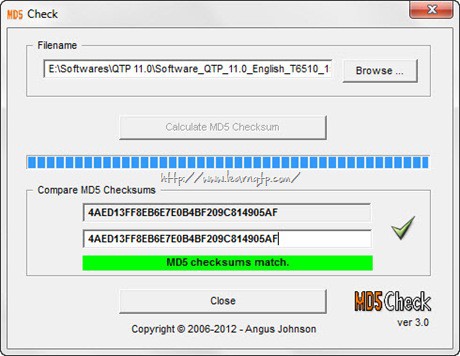
- Enter the MD5 checksum for the version of QTP you wish to check. List is given below.
Here is a list of MD5 Checksum for various versions of QTP/UFT and the corresponding downloaded file names.
- UFT 14.00: (ZIP) 9D16FDB2C18EB9984E729C97EA8530E4 (File name is HPE_UFT_14.00_DVD_Electronic_Release_UFT1400_DVD.zip)
- UFT 12.54: (ZIP) 79C7F4AF1324BD7174DDD95C4565B91D (File name is HP_UFT_12.54_DVD_Electronic_Release_UFT1254_DVD.zip)
- UFT 12.53: (ZIP) 00c0cafc061f9b7698f3aab3eca967bb
- UFT 12.53: (EXE) f7ff8e5dab5bdf592c5d5fab657c33ea
- UFT 12.52: (ZIP) e42711dbd1418d674d47c7411f0f3d4d (File name is UFT_12.52_DVD_Electronic_Release_UFT1252_DVD.zip)
- UFT 12.52: (EXE) db7f868e19a7a04c39fd9620377f9a0b
- UFT 12.51: (ZIP) daeb5a1e7a37a6d2046202414b3b2ec7
- UFT 12.51: (EXE) 28d24dc1bd38450aaa6511af0123fb17
- UFT 12.5: (ZIP) 7C0D8828A2FA23C669A5614F73F3AE8A(File name is Software_HP_UFT_12.50_MLU_UFT1250_DVD.zip)
- UFT 11.5: 32F56BD3F60CC4FAD15F403351C3B15C(File name is Software_QTP_11.0_English_T6510-15080.iso)
- QTP 11.00: 4AED13FF8EB6E7E0B4BF209C814905AF (File name is Software_QTP_11.0_English_T6510_15066.iso)
- QTP 10.00: BA1F404F7E2B860744D55964E703816E (File name is T6510-15063.zip))
Related: How to download and install UFT






sir, what is the md5 checksum for qtp 12.5 version…. i couldn’t find anywhere….
@mahee: Please have a look at md5 checksum section above. We have updated the list.
Hello sir,
When I am trying to open the Uft 12.02 after successful installation.its asking for enter valid license.I installed today only. Please help me to solve the issue
Regards,
Bhavani.p
HI Ankur,
i understand that there is no need of a license key for trial license; but wen i downloaded uft 12.1 from HP site n tried to launch the appln it says” Install license” I selected install license it prompted Seat n concurrent i selected Seat n it gave me locking code ; clecked on next it says enetre license key received via mail. But i did not receive anything as such so i Clicked on “Cancel” it says ” license type installed successful” n Finish but still appln des not open.. Plz help
@heetal: In that case, you may have installed a trial version already.
I have download UFT 12.01 trial version, but when start the uft, and cancel the license options, application uft close, please guide me and suggest solutions
Same problems above
Hi,
I encountered the same problem (2.7GB instead of 2.9GB for HP QTP 11 and 1.6GB instead of 1.7GB for HP UFT 11.5) after the files have been downloaded.
I did all the above steps. But the MD5 checksums is not matching for both the files. I compared for the compressed files with winrar extension. Please help