
With the introduction of QTP 11, it seems HP is keen to change many things. Earlier they used to come up with a new certification only after a gap of 2-3 years. QTP 11 was introduced in Sep’10 . In July 2011, HP has already announced the arrival of QTP 11 certification. QTP 10 certification thus becomes obsolete now. In case you are looking for QTP 11 certification read on…
What are the major changes between QTP 10.0 certification exam and QTP 11.0 certification exam?
In QTP 10.0 and earlier versions you need to take both QC exam(HP0-M31) AND QTP exam(HP0-M39) to get AIS certificate from HP. Starting with QTP 11/ALM 11, you just need to take one core exam that is HP AIS – Functional Testing v11 (Code HP0-M47) OR HP Application Lifecycle Management 11.x Software (Code HP0-M46).
Since you are reading a QTP blog, I assume you would want to take HP AIS – Functional Testing v11 (Code HP0-M47) exam. (Informally known as QTP 11 certification exam)
What to expect in HP0-M47: HP QuickTest Professional 11.0 exam?
- Number of items: 69
- Item types: multiple choice, drag-and-drop, and point and click
- Exam time: 105 minutes
- Passing score: 75%
[Source: HP QTP 11 exam preparation guide]
What is the syllabus for QTP 11 certification exam?
Please check the table below.
| HP0-M47 Sections/Objectives | |
| 10% | Automated test planning • Plan for general testing and automation. • Plan for QTP testing. • Identify and describe features and settings. • Explain QTP licensing and packaging. |
| 19% | Basic test creation and how QTP works with objects • Create the basic test. • Explain how QTP works with objects. • Add steps without recording. • Explain the purpose and operation of Smart Identification feature |
| 24% | Basic test verification and enhancement • Add standard and custom verification points. • Enhance tests with parameters. • Add custom checkpoints. • Add database checkpoints. • Add bitmap checkpoints. • View test results. |
| 11% | Modular automated test builds •Explain how to build modular QTP tests with Actions. •Use a Shared Object Repository. |
| 7% | QTP and ALM integration •Explain the QTP/ALM connection. •Define ALM management of QTP resources. •Explain versioning features in QTP |
| 10% | Automated test troubleshooting •Troubleshoot Object Recognition problems. •Use Recovery scenarios. •Use the Debugging Tool. •Measure System Performance. •Configure log tracking |
| 4% | Advanced QTP Scripting • Import and export Excel sheets. • Get and set object properties. • Identify descriptive programming to bypass repository. |
| 7% | Expert View • Describe Expert View features. • Describe dynamic object programming. • Identify and describe VBScript elements. |
| 8% | Web applications • Recognize Web Add-in Extensibility. • Describe Web event recording use and configuration. • Identify new web testing capabilities. |
How to enroll for QTP 11 certification?
To register for QTP certification exam with PearsonVUE, you need to have 1) HP Learner ID and then 2) you need to create an account with PearsonVUE.
Here are the step by step instructions on how to create HP learner ID and PearsonVUE account.
1. Go to HP ExpertOne Learner ID page
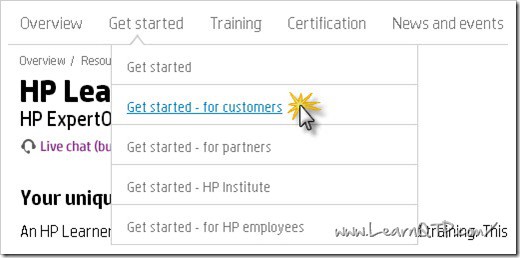
2. Click on Get Started on the top and choose one of the options depending upon you’re a HP customer, HP partner or HP employee. If you’re an individual seeking QTP certification, you should choose HP customer.
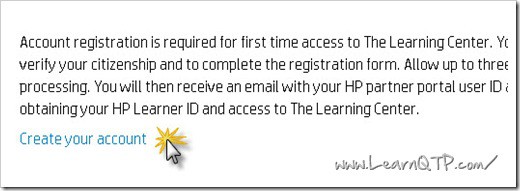
3. Click on Create Your Account
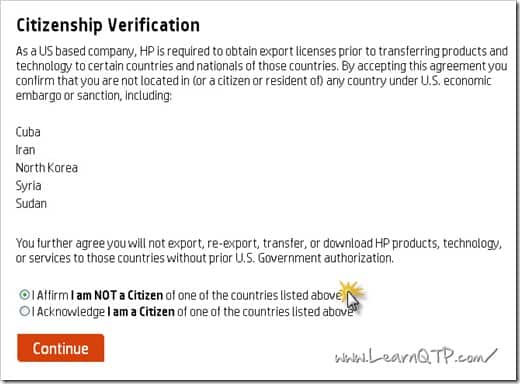
4. Choose an appropriate option under Citizenship Verification and hit Continue.
5. Fill in the necessary personal details on the next page.
6. You should get your HP Leaner ID within next 24-72 hrs.
7. Once you get the HP Learner ID, header over to PearsonVUE HP testing portal and click on Create Profile
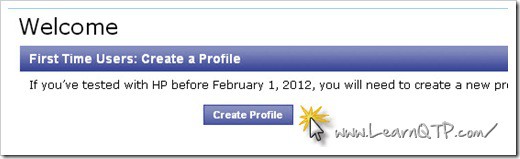
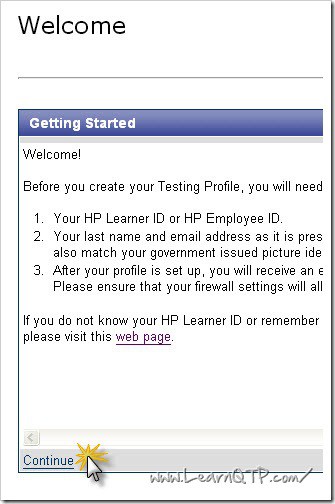
8. On the next page, click on Continue
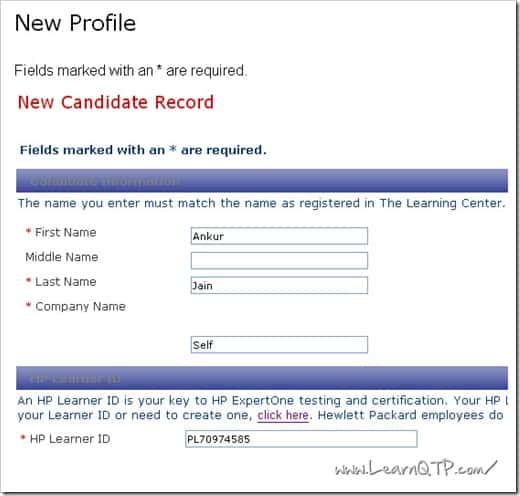
9. Enter necessary details. Make sure that First Name, Last Name and Company should match with what you have mentioned in your HP Learner ID account. If you’re unsure, check the acknowledgement email from HP which contains all the data entered by you.
10. As soon as you submit the form above, you will receive an email with a link and an authorization code. You would need to click on the link inside that email to activate your testing profile. Enter the authorization code and click on Submit button.
11. On the next page, enter your login details and hit Submit. Remember your HP Learner ID becomes the username for this portal.
12. Inside your candidate record page, click on Verify button. You profile will get updated.
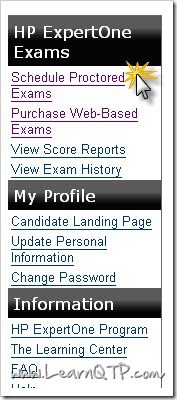
13. Click on Schedule Proctored Exam on the left.
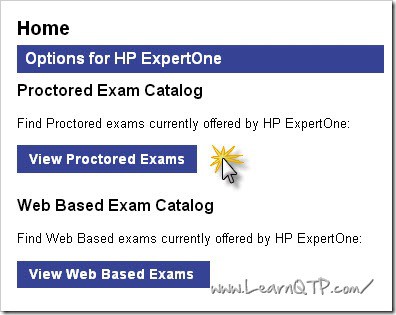
14. Click on View Proctored Exams on the next page.
15. Scroll down and click on HP0-M47 Hp Functional Testing 11.x software.
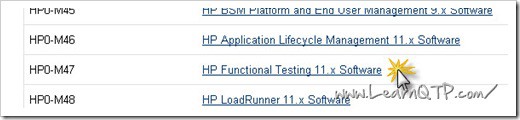
16. On the next page, you will find the details regarding cost and languages in which the exam is available. [This exam is currently available in English, Chinese Simplified, Japanese and Korean.] Click Schedule this exam.
17. Select the language of your choice on the next page and click on Next.
18. On the next page, select the date and time when you wish to appear for the exam.
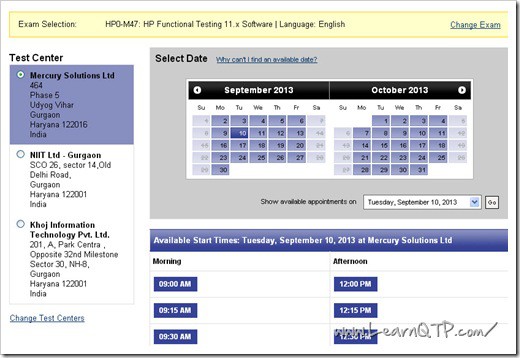
19. On the next page, you can select up to 3 test centers near your location. [They use Google Maps API to locate the nearest center to your given address] Click Next.
20. Click on Proceed to Checkout on the bottom right.
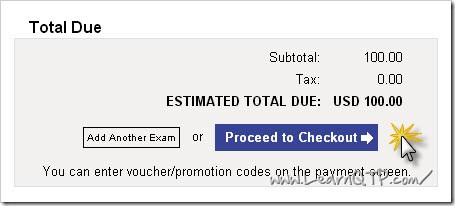
21. Confirm your personal info & Agree to Policies in the next couple steps.
22. Enter your payment details. You can pay for this exam using American Express, JCB, Master or VISA credit/debit cards. Click Next.
23. On the next page, Click on Submit Order.
24. That’s it. You have now successfully registered for the QTP certification exam.
How to pr epare for QTP 11 certification?
To prepare for QTP 11 certification, you can take help of our high quality QTP Cert mock papers. These papers are developed by experts of QTP in collaboration with www.LearnQTP.com
QTP cert is a set of 348 questions. QTP Cert will not only help you ace QTP 11 certification exam but will also help you get a firm grasp over QTP concepts. We have invested a lot of time and energy to come up with these questions and have tried to incorporate almost all major concepts of QTP and syllabus of QTP 11 certification inside these papers. Check more details here.





i can’t see HPE0-M105 in pearson..
Did the code change …
Plese tell me latest code
@rafi: HPE0-M105 is inacive now. The latest certification is UFT120-12.5-ASP. Check complete details here
Hello Ankur Sir ,
I want to go for HPE-M105 exams how should I prepare for the same.
HP is not providing any books nor there are any dumps available.
Regards,
Satyajeet Paygude
@Satyajeet: Check these mock papers for UFT Certification. At the bottom of FAQs, you can get some sample papers as well.
Hi Ankur,
I haven’t done any certifications before and i’m looking for one (UFT certification). On HP website i could see two certification as mentioned belwo:
1.HP ASE – Unified Functional Testing v12
2.HP ATP – Unified Functional Testing v12
What is the difference between the two certifications?
Is HP ASE is superior to HP ATP?
Please also share some info on the training material.
Thanks
@Satish: ATP (HP0-M102) is beginner level while ASE (HP0-M216P) is advanced level exam. You can find detailed info and material on this ATP HPO-M102 UFT Certification page. Don’t forget to check the FAQs on the same page. There you will also find way to access some sample Q and A.
Also, HP is going to replace the HP0-M102 exam soon. Beginning Aug 1st, 2016 it will be replaced by Exam HPE0-M105 – UFT Certification
Does the HPO-M102 certification have any expiration criteria. Do we have to renew or retake the certification when there is an upgrade to UFT and a new certification comes up. Please suggest
@Sudarsana: All certification exam with almost all major organizations work in that fashion. When their is a major upgrade to a version, the past certification becomes obsolete. However HP allows you to appear for the upgrade certification and pay half the cost of new certification takers.
In my experience I have seen, HP comes up with a certification upgrade in around 2-3 years time.
Hi,
Is there any Pre Req exam for HP0-102
Hi Ankur
I want to go for the QTP certification. Can you please tell me which is the latest certification. I mean the certification for QTP11 or UFT11.5
Thanks
Nidhi
@Nidhi: Certification for QTP 11 has been phased out and it is no longer available.
The latest is UFT 12 – HP0-M102 . Get more info on this page – UFT Cert
Hi Ankur,
I’m planning to take the QTP Certification. Is UFT certification out. If not, should I wait for UFT Cert to come up or can go ahead with QTP 11(HP0-M47). Please suggest.
Thanks,
Naveen.
Check this link HP0-M102 UFT Certification
Hi Ankur,
HP0-M47 certification has been inactivated on 16th Mar 2015 and a new certification HP0-M102 for UFT version 12.0 has been introduced instead. As this is new there aren’t any latest dumps available. Can you please let me know the textbooks and latest dumps to refer in order to clear this certification ?
Thanks,
Priyanka
@Priyanka: Check the mock papers/dumps here UFT Cert – Mock papers for HP0-M102 exam.
Hi Ankur,
I have appeared the HPO- M47(QTP 11) exam on 03-Jan-2015 under Pearson VUE, at the time of submit button clicked and displayed as score “68”.
Could you please assist me how and where I can able to view my exam score report for the same. Thanks.
Regards,
Lakshmanan
Hi Ankur,
I would like to appreciate your efforts for making such a wonderful site for learning QTP and maintaining it.
Could you please let me know what is the latest QTP certification being conducted by HP and When i can go for it and the what is cost of the exam.
@P Balkrishna Patro: Latest exam is HP0-M47. You can get all details here
HP0-M47 Hp Functional Testing 11.x software is stopped now
we have to take certification now on HP0-M102: HP Unified Functional Testing 12.x Software,please suggest
First of all i would like to thank you that tour website helped me to know more about QTP. Now coming to the point, I am having QTP 11 and IE-11 installed in my system. The QTP is a trial version. Now whenever i record and play the script it records as a “WinObject” instead of “webelement” of “Browser” though i try to record the object of web application.
I tried below solution after exploring internet :
a) I started QTP first and IE after i click record button [Obvious and basic rule for QTP]
b) Tried to repair QTP setup.
c) Turned off the security settings for IE and also have disabled all the add-ons in IE except the add-on for QTP from HP
Please do the helpful.
Thank you in advance. And appreciate your help. 🙂
I need a small help. Does QTP certification still exist? Can I able to take up the certification exam by this year?
If so, do you have any dumps or helping guide for preparation and passing the exam?”
Regards,
Priya
@Priya: It does. Please check QTP Certification dumps
So this HP0-M47 is still for QTP 11 version only right?
Hi,
Could you please guide me on how to prepare for thr ALM sertification or provide me with the documents.
After payment of rupees what is my next procudure will i get question paper for mock test as pdf or online acess for ur mock test?
@Shivnath: After payment, you will get your user credentials to login to our secured website to access the mock tests. Please contact us for any further info
Hi Guys,
I have written QTP 11.x HP0-M47 today but failed though.
If 3 ques have been correct…i would have passed.
Just wanna share few Info with u ppl.
Exam is set of 69 questions/110 minutes which appear in 11 Blocks.
Every Block is based on the % of every topic listed above.
After Every block you need to click on Submit button and u cant go back and recheck the answers. So guys be careful. “HP Certification exams often contain a small number of beta items for research purposes.These items are not scored and not calculated in your total exam score”.Not 69 but i have attempted for 76 questions but the score is calculated for 69.
Questions are not so tough ,basic questions were asked.
I dint get any drag and drop questions.
Practice dumps thoroughly and study user-guide provided by HP.
Practice on the tool makes lot of difference.
@Ashwini: Thanks for sharing your experience with us.
which version(UFT 11.5 or QTP 11) is good to practice to prepare for certification?
@JOhn: As of today, QTP Certification is only available on QTP 11.
As I did not get QTP 11 version for download in any of the sites, I practised in QTP 10 version. QTP 10 and 11 are a bit similar. QTP 11.5, UI is completely different.
Hi Ankur,
Could you please let me know if there is any practical exam
associated with UFT certification.
Also, it would be great if you can explain complete certification
exam structure.
Many Thanks….
Harsh kaushik
@Harsh: Check the exhaustive FAQs here
Hi everyone,
i am planning to write HP0-M47 certification exam. I need some sample papers for this exam. I would like to know what to prepare for this particular exam (i.e) the syllabus.I want to know the fee details as well.
@Saikiran: Check QTP certification FAQs at the bottom. It has answers to all your questions.
HI Ankur, I want to know what are all the Pdfs, from HP site can be considered as syllabus for preparing.
@Vidya: Please check the QTP Certification FAQ section for all your queries around Certification.
HI Ankur, Is it enough , if we go through the QTPtutorial.pdf and qtp _userguide.pdf(page numbers specified), which are available in HP website for clearing the exam?
Hi Ankur,
In latest QTP certification, does the exam include the questions related to UFT or not ? Please let me know the details.
Thanks in advance,
Srinivas.
@Srinivas: No. HP has not announced exam for UFT 11.5 yet.
Thank you very much Ankur….
Hi there,
I would like to get certificationin in QTP. Could you advise me about the exam fee for HP-AIS – Functional testing – HPO-M47 ? I am going to write in melbourne, Australia.Can you suggest me any site that shows exam fee for different regions including australia? thanks
I am planning to appear for HP0-M47, Can somebody help me with the study material and dumps which can be helpful for this exam?
Thanks in advance.
Hi,
Please tell me the cost of HP0-M47: HP Functional Testing 11.x Software certification exam.
In Pearson website it was given as 100 USD. Please reply.
Thanks!!
@Reby: For US region, it is $200 while for India region it is $100
Hi Friends,
Today I finished my Certification with 84%. Seems very easy and not a worth exam to find a QTP expert. Syllabus and Portion all are available in HP Expert one Website.
Mine $100 for one exam in chennai.
hi gopi, Can you please forward me dumps for qtp exams since I am planning to appear for exam
Hi Gopi
Congrats!!!
Can you please provide the online material so that by reading that even i am able to clear it.
Consider me as a beginner 🙂
Thanking you in advance,
Shikher Bhardwaj
Hi Gopi,
I am not an expert in QTP but still want to study and give this exam. Can you please guide and send me the required study material for preparation of exam. Here is my email id: Nisha.sangra@gmail.com
Thanks in advance.
hi gopi congrats, Can you please forward me dumps for qtp exams.
[Email Removed]
thanks in advance.
Hi Gopi,
I have a little bit idea about the QTP tool Knowledge. I’m planning to appear for the QTP (HP0- M47) exam. Could you please share me the exam study materials and dumps. Thanks in Advance.
Can you please suggest how to register for HP QTP 11.0 exam? I am unable to find the link. On pearson link, I am getting message no such exam exist. Please help.
Mail the info on abhinav.virgo@gmail.com
Hey All 🙂
I’m appearing for the certification.
Well regarding the fees, it depends on the region, it costed me around 100 USD + Service tax, so my cost in INR is 5470+230. Price may vary if the dollar rates increases or decreases.
Hope this was helpful.
I took the QTP 11.0 exam today and passed. I got the PASS score sheet as well. I want to know will I be getting any certificate from HP apart from this score sheet and if yes then how?? Plz help.
As of Feb 2013, NIIT people saying 6067 INR for QTP certification .. 🙂
Pearson vue website-charging of 100$..
Hope this is the latest fee for HP0-M47 certification.
Cheers
Venkatesh.
Hi,
I am planning to appear QTP exam (HPo-m47). I need suggestions from you all to complete this. Kindly let me know the process and send me the dumps if you have any.
hey Ankur, I have done the registration for obtaing learner id and i got the confirmation mail as well.But itz being 3 weeks and I didn’t receive dint any mail regarding learner id.Ideally HP takes 3 business days to generate the learner id.Plz help me out.
Where do we get that QTP certification book?
thanks ravi
@Rajesh: Hope these steps helps, before applying for the exam.
Step 1 :
You need to create HP learner ID before appearing the HP exams.
For HP exam versions, patterns & to create HP Learner ID, kindly check out following link :
( Click on “Get started” >>> Select “Get started for customers”>>> Create your account )
Step 2 :
After creating HP learner ID
Please follow the link &create your web login on following link which will help us to conduct your exam.
https://i7lp.integral7.com/durango/do/login?ownername=hewlettpackard&channel=hewlettpackard&basechannel=integral7
@ Kashinath: I got quote from Seed Infotech Pune Rs. 5750/- this is way above than what you said. Well lets dig out that is exact figure. Please let me know if you find, I will update if I find it. Thanks again kashinath for kyour updates, this really helps
@ Kashinath: Thanks for information. Cheers!!!!!
@Rajesh: No company name should be required. Freshers should be able to apply for the same. Did you follow the http://www.pearsonvue.com/ to get details.
Total Fee for QTP 11 Certification(HP0-M47) is 3600 Rs.
hi everyone.. i want to take qtp11 hp0-m47 exam.. i’m unemployed.. is it necessary to create account with hp partner portal.. its asking for company name.. could you pls help to get hp earner id…
http://www.pearsonvue.com/
I could find test centers in Maharashtra, there are many
http://www9.pearsonvue.com/Dispatcher?application=VTCLocator&action=actStartApp&v=W2L&cid=732
now need only fees for QTP v11 certification.
What is QTP v11 certification cost? I could not find it on Pearson’s site 🙁
Please let me know fees in INR and / or USD.
Also test center in Pune Maharashtra India if any one knows.
Thanks in advance,
Ravi
Fee is 6500/-
do you know about current fee in 2014
@asif: It has not changed. You can check FAQs at the bottom of this page
what is fee for writing qtp certification
@ramesh: Fee depends upon your geographic location. Check with the folks at Pearson VUE in your area. [HP has recently migrated its certification from Promteric to Pearson]
it seems Prometric has stopped to take any HP exam. Is there any other way you can appear for QTP certification?
@bhaskar: Yes, please check this update on the new vendor for QTP certification.
I am a HP0-M16 certified and here i want to know any difference between HP0-M16 and M47 except version changes.
Let me know if any certification is available in QTP to test coding knowledge.
Thanks in Advance.
but, on the prometric site, they are saying HP0-M47 is certification on “HP Functional Testing 11.x Software” .. is that correct?
May i know the fee structure for Certification..
Any one plezz
wt is the use of qtp rather manual testing
Hi,
Actually,if we want to be certified in qtp 10.0 we have to take both qtp 10.0 and QC 10.0.
But here what happened is I have written qtp 10.0 only, after that the version of qtp and QC is changed to 11.0.
Now can I write QC 11.0 certification to get certified in HP.Is it possible?
Hi,
Do we need to take QC along with QTP 11 certification?
@Yuvaraj – No.
I’m planning for QTP 11.0 certification.
Hi, any one can help with me sample questionnaire……
have any one taken the certification ? cud u give us ur feedbacks plz ? thx
please let me know how how to get qtp 11.0 certifications
@All: Check with PearsonVUE’s website. Select your region on the right side and call them for test center/registration details etc.
@lovely & ankur I too have same questions.
Unable to register on HP Partner Portal.. 🙁 It is asking for Location Id.
Can anybody please help me in this.
Thanks
Shalabh Dixit
Thanks Ankur.
One more question I’ve. While registering for the certification, if we have to provide company ID. I don’t have any company ID now, as I’ve quit the job. What should i do now. IS it mandatory to provide company ID, or we can do without it.
Hi Ankur,
i wanted to know whether QTP 9 to QTP 10 version certifications are still available or they no longer exist. Its just QTP 11 certification only now. Plz, let me know.
@Shayanti – Yes. QTP 9/10 certifications are obsolete now. Current certification is HP0-M47 for QTP 11.
Any one if having QTP 11.0 Syllabus in detail format. please proivde to me
@lovely i also have the same question
What is the fee for QTP 11 certification for candidate appearing in India
@Rajiv: Pricing varies by region. You may want to check with Promteric/HP.
Hi All,
Where i can get qtp 11 student hand book?please help me out.
hi ankur . i do not have any company id , and hence not able to register to the HP portal , as i wanted to register to take exam for qtp 11 cert . Can u suggest what i can do ?
What is the fee for QTP 11 certification for candidate appearing in India
Please let us know the fees charged for taking qtp 11.0 certification