
Note: Micro Focus has released a new version of QTP called UFT 14.50 in Aug 2018. Please check this article for step by step instructions to download and install UFT 14.50 on your machine.
Check the updated step-by-step instructions to on how to download and install HP QTP 11.
To download and install QTP 11, please follow ALL steps mentioned below carefully –
- Go to QTP’s new download location
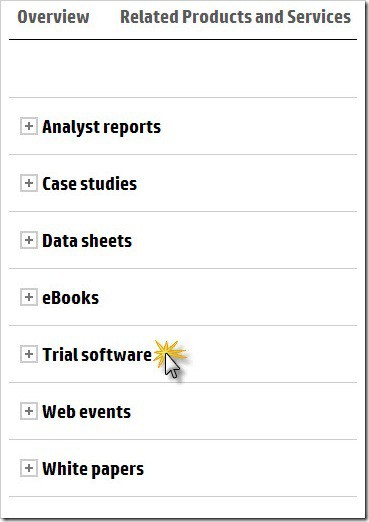
- Click on ‘Trial software’ on the page
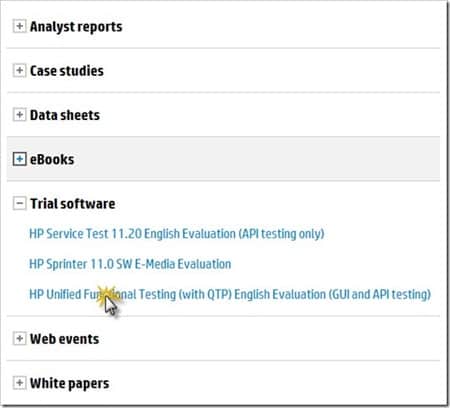
- Click on ‘HP Functional Testing 11.00 Evaluation’
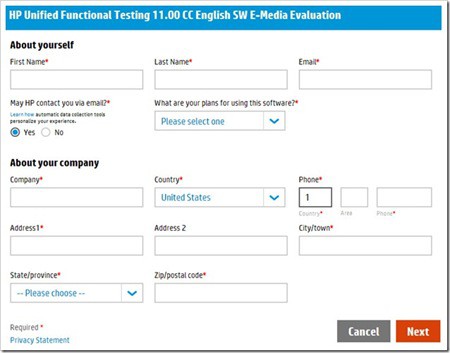
- Fill in your personal details and click Next.
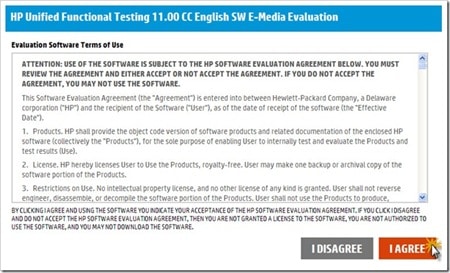
- Agree to Evaluation Software Terms of Use.
- On the next page, hit the download buttons to download the evaluation version of QTP 11 and its ReadMe file.
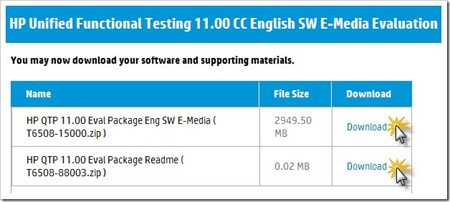
- QTP 11 evaluation is about 2.87 GB in size. It will take around 3-4 hrs to download (depending upon your internet speed)
- Once downloaded, you will get a zip file. Extract this zip file using your favorite unzipping software. (I prefer a nice and free utility software called 7zip which can be downloaded here. You can download and install this utility.)
- Once extracted, go inside the folder HP_QTP_11.00_Eval_Package_Eng_SW_E-Media_T6508-15000\QTP 11 Evaluation\QTP 11 Installation Files and double click on Setup.exe file.
- Choose default options on the next few screens.The place where it asks for QTP license keys, click on Cancel button.
- Remember You DO NOT need order number or license keys for the trial version. Check this video.
Let us know through the comments section below if this has worked for you.
You’re done. All the best!





i dont know how to use the method “comparebitmaps” in qtp ,please tell me which person i can contact with.The qtp 12.5 version checkpoint window about bitmaps always disable to click,i cant use the highsetting.(want to choose the comparebitmaps.)how to use qtp compare two pic by typing vbscript in ur action application.need u now …..please help me ,hope ur early reply .
I want to install QTP in my laptop. When i tried click on installation setup it showed nothing on screen. I have windows 8.1 in my laptop.
@Amruta: May be your download got corrupt. UFT is indeed compatible with Windows 8.1 Check all these tips too, if you are facing problems during installation/launching/object identification of UFT/QTP.
can we install HP UFT 12.51 on windows 10?
Hi,
I’ve downloaded HP_UFT_12.51_DVD_Electronic_Release_UFT1251_DVD.zip, and check sum is OK.
My computer specification :
Windows 8.1 Enterprise 64 bit
RAM 12GB
i5 Quad core 2.5GHz
When I tried to install, after I clicked “Unified Functional Testing Setup”, it shows nothing on my laptop.
But when I tried to install same copy of software to my colleague’s laptop, with different spec only windows, her’s is Windows 7, it works fine.
How could it be? UFT doesn’t support for Windows 8.1? If I backward to Windows 7, a lot of works need to be done on my PC :(..
C:\Users\PC\AppData\Local\Temp\Temp3_Software_HP_UFT_12.50_MLU_UFT1250_DVD.zip\DVD_Wix\Unified Functional Testing\MSI\HP\Unified Functional Testing/ChromeNativeMessagingStrategy.js verify that file exits and that you can access it
this alert is Coming please help
Hello Ankur
I’ve recently downlaoded HP QTP (12.0.2374.0) trail version as per given system requirement in HP website,but whenever i try to install from installation launcher it closes automatically after few seconds
My syytem requirement
ram 2gb
cpu dual core 2.5gh
windows 8.1
Pls check if the installation file is not corrupt. May be try downloading again!
Hi Ankur
i hav downloaded UFT 12.02 build 2374, as i open uft application from icon, it showed blank start page. i didn’t find any default flight reservation kindof to practice.
please help me out
This is the program path for Win 8 C:\ProgramData\Microsoft\Windows\Start Menu\Programs\HP Software\HP Unified Functional Testing\Sample Applications
For other OS , just go through Start > All Programs > HP folder
sir help me smoething how to download this QTP ?plz repley me
I am trying to Download the UFT but the web site is not proceeding from
Unified Functional Testing 12.02 Software Evaluation stage. Its showing a processing symbol for hours but not working…
Trying to install the latest HP UFT 12.02 software to for a trial run.
Now unzipped – Have a folder with all the files Software_HP_UFT_12.02_MLU_T6510_-15086
Not sure where to go from here or where the .exe is.
Your assistance is appreciated.
Thank-you!
I am getting blue screen error in PC while using checkpoints in QTP 10, Please help out
Hi Ankur,
I have pretty much worked well with QTP 9.2 and had a long break was into manual testing for 3 4 years but wanted to brush up my skills and prepare for interviews on QTP. What is best place/approach do you suggest for practice & get understanding of the latest changes? Please advise. thanks in advance.
it was 4 years gap on my above comments, typo of 3 4. Please advise.
Hi Ankur,
Thanks for your note. I have few clarification here.
Recently i have migrated to Load runner 11.52 and i could not view the Test results and its expecting Test Results viewer to be installed. So i have downloaded this QTP trial version and i believe the full version consist of Result viewer setup along with QTP. Will this solve my issues to view the .QTP preference file ?
id the software is 32bit or 64bit
@Mouli: 32 bit. It is safe to install on 32 bit as well as 64 bit systems.
Hi,
In UFT where is option to start/stop(checkbox) automatic script while Recording.
Thanks.
@Amol: Are you talking about the stop button?
Does HP UFT 12.0 works on Windows 8? Dint find anything concrete about it. Please help !! It’s urgent !!
@Mahesh: Yes, UFT 12 support Windows 8. You can check this QTP and Windows Support matrix for such information.
Hi ankur trying to download software, but after submitting my information i am not getting downloading links, getting message ‘your information submitted, will be evaluated and respond to your application’
please help.
@Priyanka: Can’t replicate it here. Can you re-check?
How long I can use this evaluation copy of QTP. What features are available. I would like to have record, play back functions in order to decide whether this will work or not to see it. I have a very complex desktop application with pop up windows, buttons etc. I just want to test it during the evaluation time and see if the product works for our system. Thanks.
@Sudha: A fully functional Evaluation/Trial copy is available for 30 days.
I have trouble installing QTP software on my system. I downloaded the evaluation version from HP site, installed it but when ever I try to open the QTP application, it is asking for a license key(Followed the installation steps provided on your website. The Run License Installation Wizard option was unchecked as mentioned). I haven’t received any license key in the email. I tried uninstalling and re-installing the software good number of times but that did not help in any way. Could you help me in fixing the issue?
In case you have already installed UFT on your machine earlier, you won’t be able to install the trial again.
Is it already past 30 days? Just ignore it and click continue.
I entered some other company’s name by mistake. what should i do now?
Hi,
I have installed essentials 11.0 and now we got seat license can i apply the license on this..
How many days this trail version is valid.
@Manjunath: 30 days
I have downloaded UFT 11.5 and installed on my window8 but i am not able to start UFT as every time there is some application on window 8 which is stooping it, Please suggest what to do now
Hi Ankur,
There is no video or any link to the video. Have you removed it?
Thanks and Regards,
Ank.
@Ank: Please check this link to download the newer version UFT 11.5 Along with the pictorial steps, there is a video down below.
I ‘m trying to install Qtp 11.50 trial version,I have installed all the prerequistes before installing qtp,but still i get the error “install Microsoft visual studio 2005 Sp1 run time components” I have downloaded the same and installed.but error is popping up still.Please anybody guide on above error.
How do I install the fight reservations Application on Windows 8?
Hi Ankur,
I already installed QTP 10 in my system, will it work if i install qtp 11 trial in my machine.
Is there any crack available?
@Biswajith: We don’t allow any discussion on QTP cracks here.
how i fully uninstall QTP 11 trial version so that i can install again. now when i reinstall trial version it showing license error.
samita….
while running give path of application
i.e Systemutil.Run”Path of the Flight Reservation” as First step
Hi Ankur,
I tried to install “HP Unified Functional Testing (with QTP) English Evaluation (GUI and API testing)” trial version but i dont see it under trial softwares…i guess its already replaced with 11.5 version, but QTP 11.0 Essentials is available. Now where do i download QTP 11.0 from
How may days does this licence valid. If in condition, this licence expires at some time, wat to do?
HI Ankur,
i tried ur steps but the setup windows is not answering specificly the unfied fuction setup….
PLZ help…am stuck..
Hi Ankur,
I was able to install the QTP 11.0 but the AddIns for ActiveX and Visual Basic re shown as licensed although for .Net and Java this is showing 30 days remaining.
Now when I try to record a test script from the sample Filght application this is not able to recognize the Date object as this is a ActiveX control.
Please help
Hi
I followed the steps as in the video. I do not find a ‘Continue’ button while I try to open HP QTP after installing it. There are buttons ‘Install License’ and ‘Cancel’. On clicking cancel the operation is cancelled and QTP is not opened.
@dennis: It looks like you are trying to install the trial version on a machine where you had previously installed QTP. The trial version of QTP works on a fresh install.
is there any way to extending the trial version of software
Hi Ankur,
My QTP 11 Trial version got expired. Is there any way to reinstall it ? Pls show me some solution…I want to explore QTP thoroughly.
Thanks Ankur!!!
You have explained it very clearly.
Thanks ankur , you have explained it so clearly. I could install the software.
hi,
my qtp 11 trial version is going to expire, can somebody help me in extending the trial version time period?
I’ve never got to step 6. after agreed on agreement, all i got is a message “restricted user”. whats going on about this piece of free trail software? Can anyone help?
i tried to download Trial version QTP 11.i received mail from HP..the Mail stating that Transaction information, Ship-to address and Sold-to address.
my worried is they ask Amount or Its Free.
Please help me anyone.. how to cancel that order if its not free asap
Hi,
I am able to install with the given steps,now ill have to start learning it:)
Hi I am trying to down load but after agreeing to terms page I am getting a blank page with restricted user on it, why? I am not getting the down load page
I am using QTP to Automate .Net Application but DevExpress Controls are not getting detected by QTP properly.
Plz help.
If this site is guiding please guide with troubleshooting also. I followed all steps but lot of steps are not added here. I am not able to get ‘setup.exe’ only ‘setup’ file. After installation QTP_11 when clicking QTP desktop icon, getting ‘license Error’ if ‘Cancel’ that it cancelled, if ‘install license’ it asks for ‘Seat license’ option, click Next asks for ‘Want to install a new license code? Please guide…
Is QTP 11 is compatible on Windows 7 home premium ?
From where i can download QTP 10 trial version
Hi Ankur, ihave 10.00 licen…Whilw upgrading this type of error is coming what will i do..error follows like this
“C:\Documents and Settings\HP\My Documents\Downloads\Compressed\HP_QTP_11.00\QTP 11 Evaluation\QTP 11 Installation Files\QuickTest\MSI\bin\Templates\BusinessComponentTemplate10_Atlantis\Action0\ObjectRepository.bdb” like this….wat iz the cause
?
Error 6 (net::ERR_FILE_NOT_FOUND): The file or directory could not be found.
getting this error while clicking on download link after agreeing terms and conditions. what to do?
Thanks, These instructions worked for me. But be sure to follow his post on how to handle the license issue. (You must not select to install the license wizard when running the installation! That’s the trick)
Thank you for sharing this
Hi
I am unable to download the QTP v11 – trial software. After clicking on ‘I Agree’ button in ‘Agree to Evaluation Software Terms of Use’. The next window as a text message which displays ‘ Restricted User’.
Kindly tell me how to download the trial software.
Regards,
Dinesh
Hi,
I have gone through the above description,but i got empty folder when i was extracted.i dont know why?
Cool!! the installation steps work… for win7 also
thnx..
Hi,
I had installed QTP11.0 & this is the 1st step in my S/W testing learning. When i perform any action in the QTP, blue screen occurs & PC is getting restarted automatically.
This blue screen occurs whenever i perform any action in QTP .. pls assist .. …….
Hi,
This is the 1st QTP (V11.0) installed in my PC. when i perform any actions in QTP like record/open/run, blue screen appears & PC automatically getting re-started. This is hapening whenever i perform any action .. i need Assistance on this please..
Hi
Blue Screen appears & auto-restart is done when i record in QTP 11.0 and getting blue screen error whenever i start working in QTP11.0. Its been an hindrance for my learning Please assist on this issue …
I can successfully download and install the trial version. without any issue. Thanks a lot for the steps.
though the download took 7 hours.
Comment: As, I rememberbe ankur said earlier in a link that:
while installing winrar select the option: ISO, i.e select all the zip file formats.
which will help unzipping QTP.zip and will be a successful installation
Hi have followed the steps and successfully installed. But When I tried to launch QTP, I have selected Seat License and cliked on Next button where it is asking for License Key which I dont have. Please help me on this. Thanks.
i tried to download Trial version QTP 11.i received mail from HP..the Mail stating that Transaction information, Ship-to address and Sold-to address.
my worried is they ask Amount or Its Free.
Please help me anyone..
I need trial version of QTP to test loading testing of my asp.net application.
It seems to be a problem with the .iso; please help mee
Thanks for the info it helped me…
could not open ArgsEditor.dll getlasterror 1073741701
error while install
reasons?
thanks
Hi Ankur,
Is it possible to Re install the trial version Of QTP 11 after removing it completely and cleaned the registry as well…i have tried but it didn’t work…Can u help me in this regard.
Regards
Bilal
after I received a mail I click for download it,
It reflects me new browser page with following url and something is running there, is it downloading ? but I can’t see the status as well there is only blank screen
Please help me.
Hi,
I am not able to find the HP Functional Testing 11.0 Evaluation on the link that u have mentioned. Can you please check the link and revert back please
In the HP site under resources the HP functional testing 11.0 evaluation is not available only HP Service Test 11.20 English Evaluation (API testing only)
HP Sprinter 11.0 SW E-Media Evaluation
HP Unified Functional Testing (with QTP) English Evaluation (GUI and API testing)
So which one to download in these
I am facing some problems while installing qtp 10.0. Plz explain me installation process step by step( send on my mail id)
I have downloaded the iso file. but it can not be opened by 7zip. it showinmg an error “Can not open file….”. Can any one please help me. Also the file size is 2.46 GB(not above 3 gb).
i dont know abt others..but this was fairly simple…got no errors…nothing unexpected..
i am downloading this…HP QTP 11.00 Eval Package Eng SW E-Media….
is it correct??
Hi, Ankur.
I’m using the latest firefox and I’ve even tried google Chrome. When I click the link to download, It asks me to accept the agreement which I do, but then nothing happens. After clicking on the agreement, it loads something at the bottom but then it returns to the same page where I clicked the link for download. Please help!
Nothing is showing up anymore. Did HP take it down?
@Philip: It’s fine at my end. Can others confirm if the above link is working fine?
Hi ankur
I had tried several times but not able to download the whole zip file .it is always 1.6 GB
Can u help me please to download whole file
I think the link you have provided is hacked..some suspicious Facebook content is seen on it..can you please help? Thank you.
@Shree: The above link is working fine for us.
Thanks ,Arthur!
QTP installed successfully but After recording script does not display for Web in expert view/keyword view both. But for Windows application, it works fine
followed your steps but it is showing licence error please help me out.
Thx! really helpful and works
hello friends,
whenever trying to get qtp download, it drives me to fill the form, after this work , it shows me, ur content is not available like. how i downlaod it plz do any need full.
Hi Ankur, I am having good speed of internet but can you please suggest why i am getting the image file instead of exe file? It shows 34-36 hours to download but then completed in approx 35-40 minutes. Then asked to be burnt in cd. And that too is not working.Can you suggest anything on this?
Thanks in advance
I have tried to load the trail software 3 times.every time i get this error and i had to quit the installation.Could you please help me with this.
error message:
AcxCmnObjs.dll failed to register HRESULT-2147024703
Hi Ankur
I am trying to Install the QTP as per the given Instructions but I am getting the Message HP server not available I am trying since Last three days can you Please provide any other way for the Installation
@Rajesh: Try using Chrome or laytets version of Firefox.
Not able to dowload the QTP as showing a large time to download approx 34 hr for 3.16 gb 🙁
Please suggest.
@Jyothsna: Yes, you need a fast internet connection to download QTP because of its size.
I am not able to download QTP 11 from HP site. I followed the process shown here but through this an image is downloaded, then it is asked to burn that to CD. I even burnt it into DVD but even then its not working. Can anybody suggest anything on this.
Thanks in advance.
This was very helpful. Thanks Ankur!!
Hi Ankur,
Even I am getting License Error when I try to start QTP. What should I do now?
I tried with hp functional qtp 11.0 trial version. After downloading, it is showing 99% , popup message as launching qtp 11.0 ,and then it stops, unable to install
While installing QTP 11.0 I am getting Visual Studio office 2010 error. Can anyone guide to solve this issue.
Hi,
I installed QTP once, then i used to get “general error” when I try to save a test..I uninstalled it and downloaded again n followed your instructions, but it says licence error now..Is that because QTP was installed once on my machine? Pls help
Hi Ankur,
Where do I get QTP 9.5 or version 10 trial software? There’s only version 11 trial software available.
please help.
Hi,
I was able to register but after the basic information it went to another screen where it was asking for Cell no. & address.
My Question is : Do we need ti fill these many information on this page.
Regards,
Shweta
@Shweta: Yes, I think that is mandatory info required by HP.
Hi,
how can I install JAVA add-ins to the trail version. The only add-ins that appear are web,ActiveX,Visual Basic and Web
Hi Ankur,
I was able to download iso file and install it. But the QTPro.exe didnot get installed. When I clicked on it nothing happened.
Can you please let me know what could be the reason.
Thanks in advance,
Sapna
hi ankur..
cn u plz help me out to downoading qtp tool… i m a fresher n hv a lots of confuzn in real-tym prjct..how n where i ve to write test case or test script.. how i ll execute it?? plz help me out in dis regards..
thanx
kirti
hi,
my qtp 11 trial version is going to expire, can somebody help me in extending the trial version time period?
Assuming your evaluation is successful then it is now time to purchase the software. Please note the license for evaluation is good for only that, not for training purposes or production use. HP has available a training license for purchase which is not licensed for production.
Hi Ankur,
Should we pay amount for the downloads.
hi Ankur,
I have tried to install QTP 11 as shown above. But its throwing some error “file qt_exec.cfg not found” at the end of the installation.
Hi, I am not getting the links of the files. Instead, on the download page, I get the message- ‘Sorry, there are no items to download at this time’.
Please help!!
am using QTP 10.0 with windows 7 OS but not able to record actions done by QTP , pls suggest me what are the pre requisities before record a test
Hi guys there is one location where u can get QTP 10.0 version
When I try to identify objects using QTP11.0 its not identifying. Can anyone help me
Hi Ankur,
The QTP 11 trial ver. is taking too much time to download. It is showing 1day remaining, 55 hrs remaining, etc,. i started from morning 12.30 but still showing 9%…. hope it wont take 1day… any other option to download…?
@Akshata – I don’t think there is any other download location provided by HP. Since the file is huge I would suggest you to initiate the download on fast net connection with a download manager like “Download Them All” plugin for Firefox.
Is QTP 11 compatible with Window 7???
@Bhupesh – Yes. Even QTP 10 is compatible with Win 7.
HI Ankur,
How do we write test scripts in qc?? we use first in excel and then we upload in qtp?
Hi,
My ATP 11.0 trial version expiring. Is there any way I can extend or get an another trial version
Thanks
Anu
Thank you very much Ankur. Telling about the licenses is helpful.
This saved my time in finding the right things.
Thanks ,QTP installed successfully but After recording script not display in expert view. please help
when trying to download qtp 11.0 version and when ran the setup file i.e install sheild got a pop message message as RMS License manager 8.3.0 msi is not found. what to do
Hi Ankur,
we do have a concurrent license server installed at Onsite. We were not able to access the same from offshore. Onshore claim they were always able to access. An Idea what could be the reason? Please hemp in this regard.
I followed your steps for installing, but while recording “Flight Reservation” I am only getting the script recorded for first step only i.e. “Open login window”.
Please Help.
Hi Ankur,
I got a little confusion. I’m not able to find the difference between Functional Testing 11.0 and QTP Essentials 11.0. Can you please let me know the difference?
Thanks in advance 🙂
i followed your steps but it is showing licence error please help me out.