Micro Focus has released the latest version of Unified Functional Testing – UFT One 2023. The trial/licensed version of this software is available for download now.
Here are the step-by-step instructions to download and install UFT One 2023
Download
-
- Go to UFT download location
- Fill in your required details and click
Start Free Trial!button. 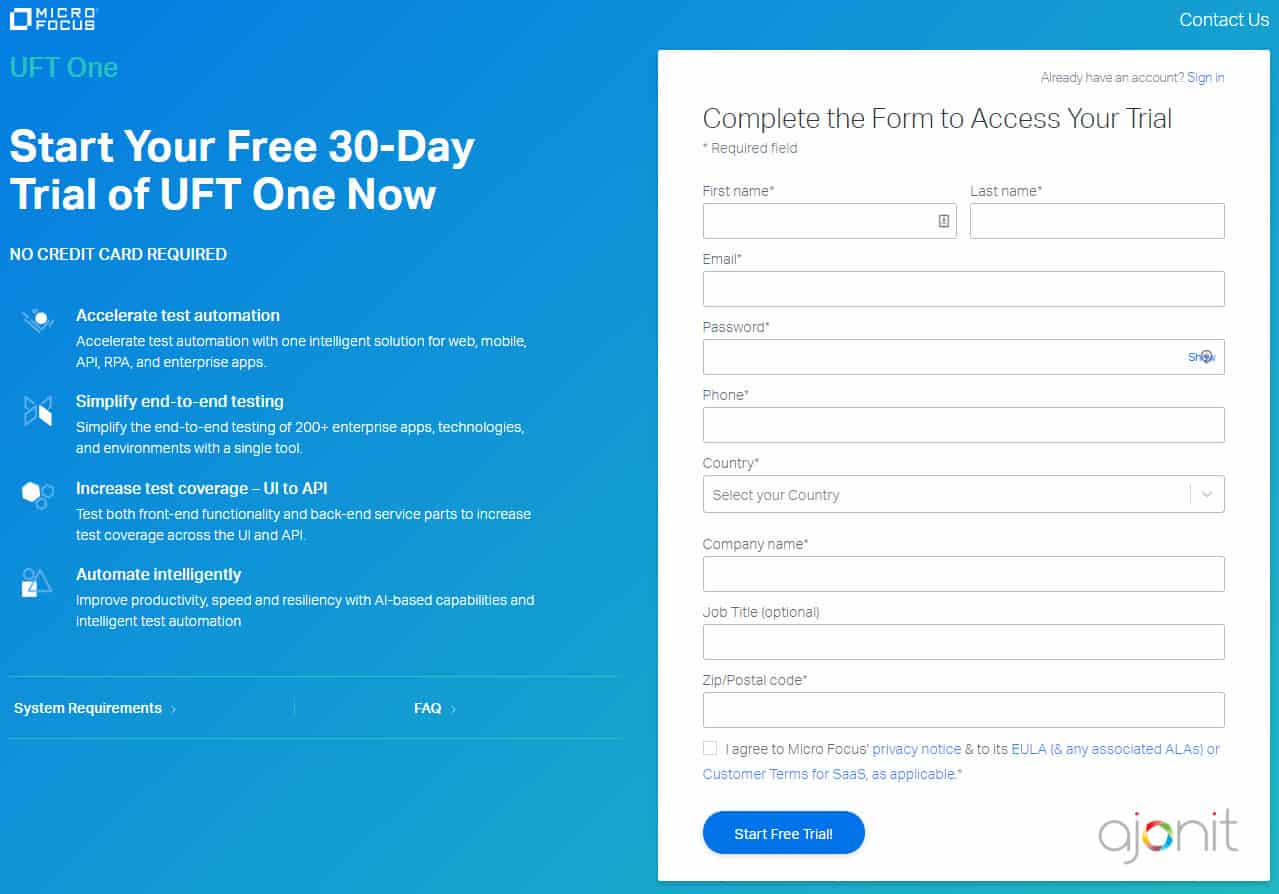
- You will be redirected to a Thank You page. You will receive an email on how to access to UFT trial version. Verify your email and go to the download link in the email. [Pro Tip: In some cases, email may take sometime to arrive.]
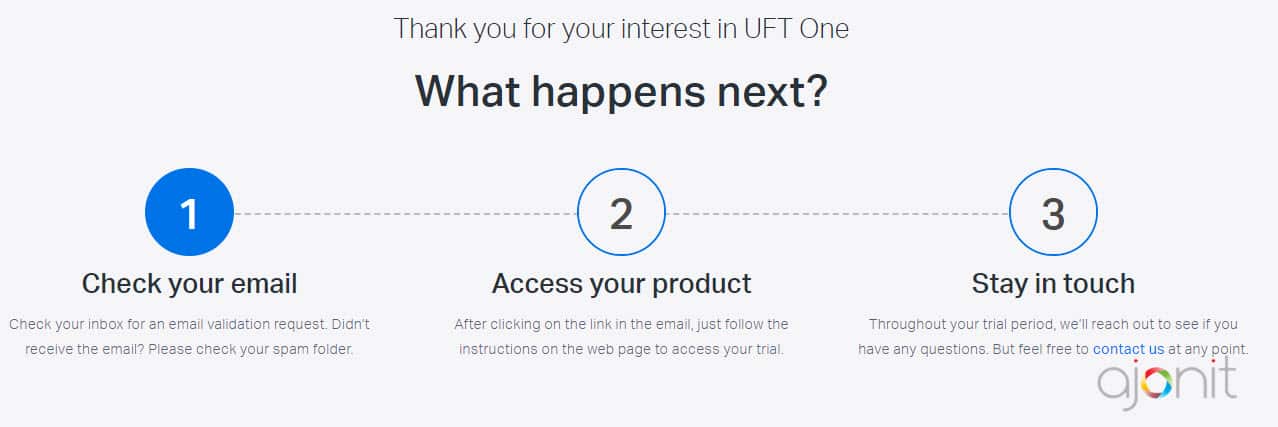
- Click the
Downloadbutton.
- It will take you to
UFT One Downloadspage.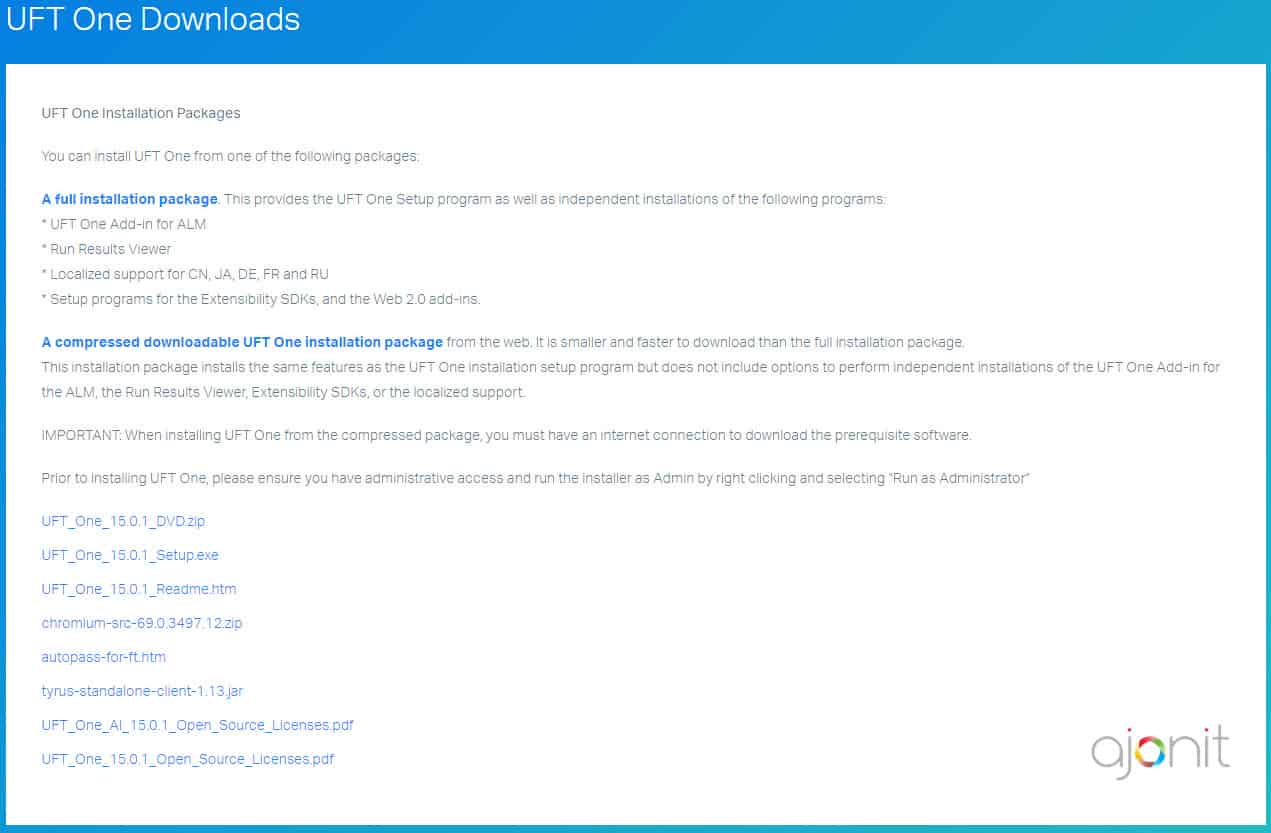
- There will be two options; first one is ‘A full installation package’ and second one is ‘A compressed downloadable UFT installation package’. Choose the first one ‘A full installation package’ and click on the link.
- The full installation package is nearly 6 GB while the compressed downloadable is around 6 GB in size. It may take 10-60 mins to download (depending upon your internet speed)
- Once downloaded, you will get a zip file.
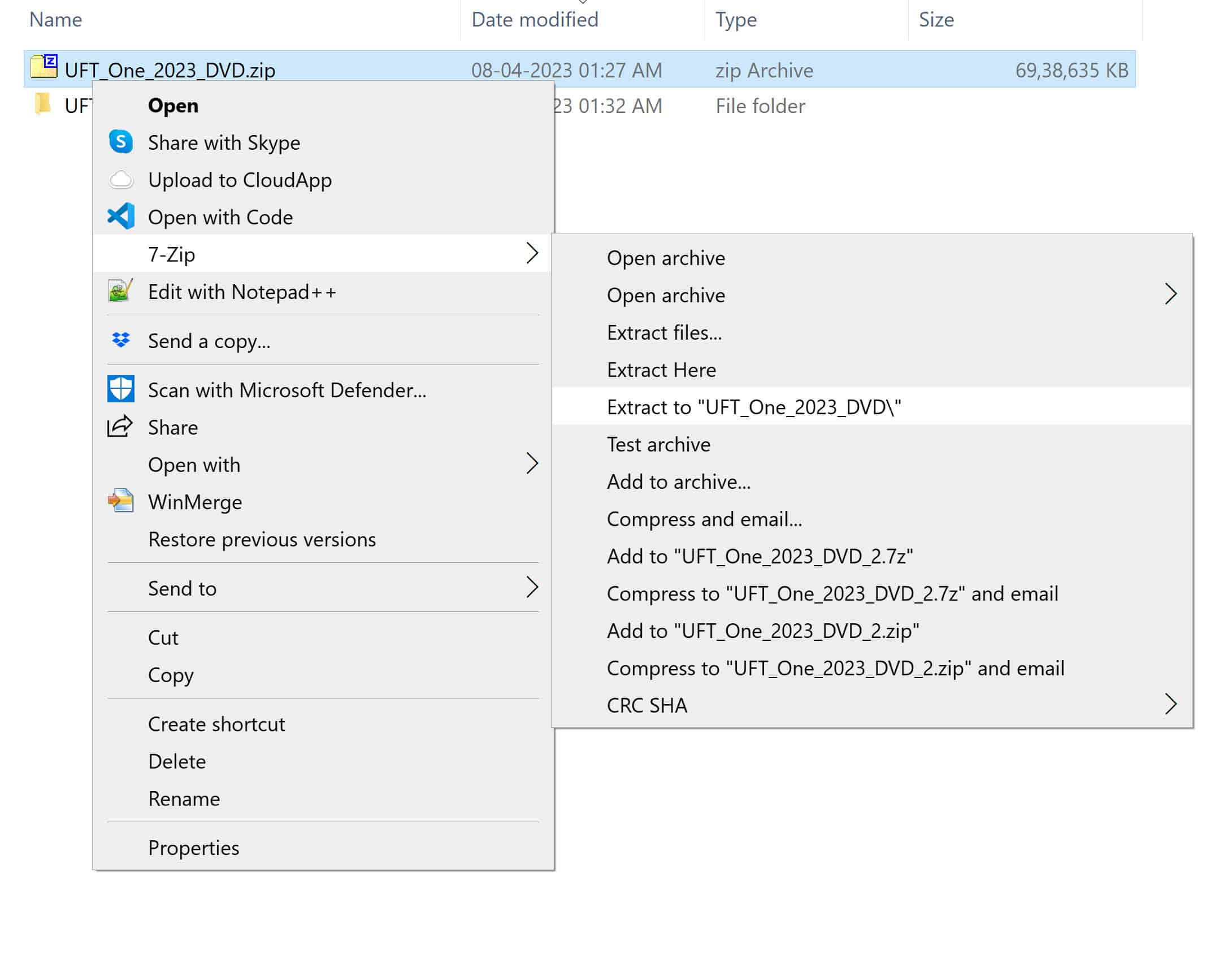
- Use your favorite unzipping software to extract files. We prefer a free and robust software called 7zip which can be downloaded here.
- To extract contents, right click on the zip file –> 7-Zip –> Extract to “UFT_One_2023_DVD\”
Installation
-
- Before you start with installation, make sure that –
- You have administrative privileges on the drive where you wish to install UFT.
- You have a recent version of Internet Explorer installed on your machine.
- You have at least Windows 7 SP1/Windows 8.1 on your machine. [Check
UFT_PAM.pdffor the complete list of compatible software. This pdf is available under the same folder where Setup.exe is present] - If you’re upgrading from QTP 9.5 or above versions, then the installation process will automatically uninstall the older version and install UFT. If you’re upgrading from QTP 9.2 you need to manually uninstall QTP 9.2 before upgrading to this version.
- If you are installing UFT Developer (earlier known as LeanFT), you must first install Node.js 8.8.2 or later.

- Once you have extracted the contents as shown in Step#11 above, go inside the folder UFT_One_2023_DVD and double click on Setup.exe file to start the installation.
- Click
UFT One Setup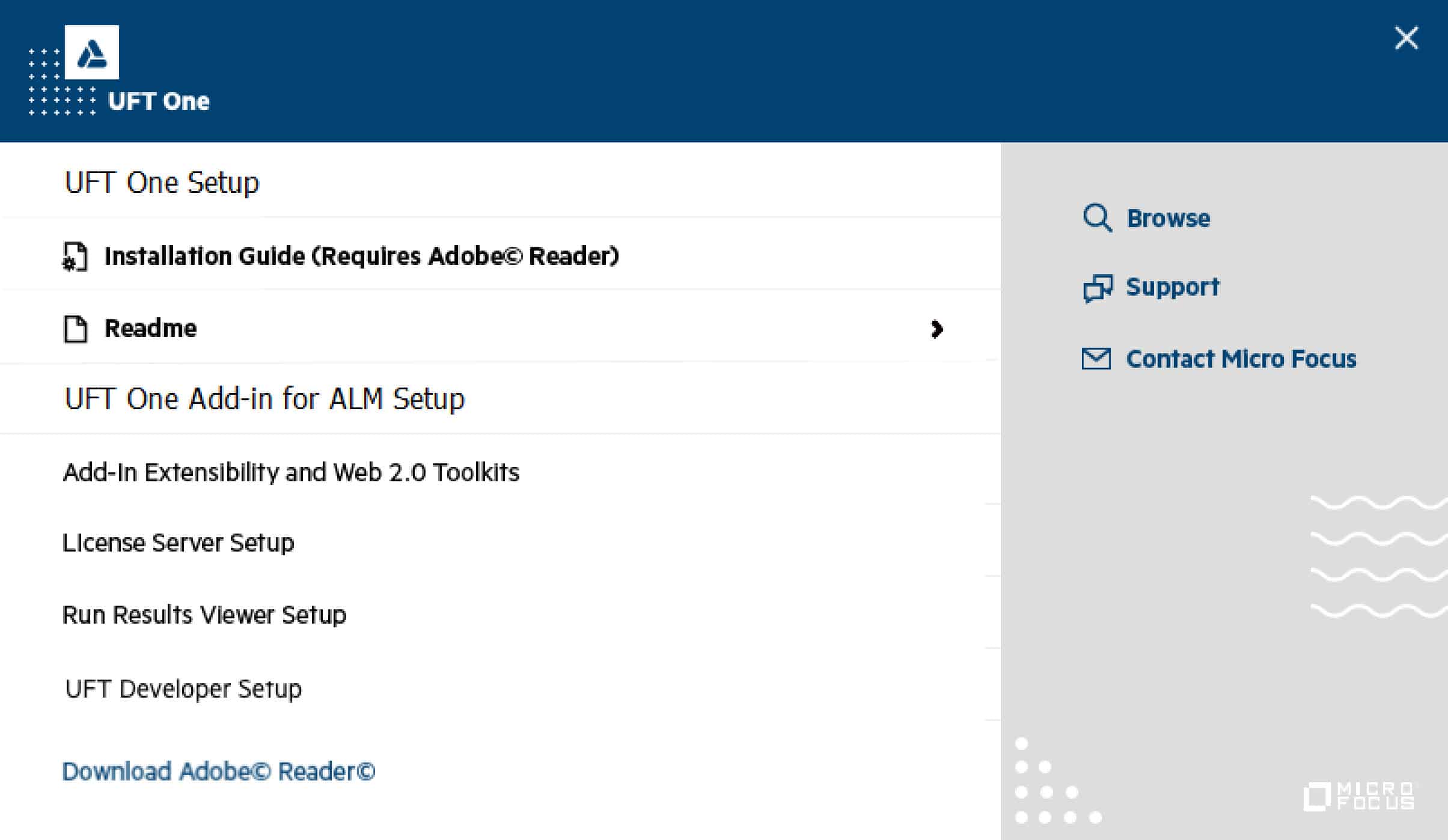
- If you don’t have the necessary prerequisites installed, you will see a dialog box asking to install them. Simply click OK.
- Choose default options on the next few screens. [Note: Along with default Active Add-in, Visual Basic Add-in and Web Add-in, UFT One 2023 setup comes with the following 13 add-ins which can be installed per your requirement: Delphi, Flex, Java, .NET, Oracle, PeopleSoft, PowerBuilder, Qt, SAP Solutions, Siebel, Stingray, TE, Visual Age]
- The place where it asks for UFT license keys, click on Continue button.
- Remember You DO NOT need order number or license keys for the trial version. Check the video for the complete download and installation process.
- Before you start with installation, make sure that –

How is your experience with the new tool? Do let us know in the comments section below.
If you are looking to learn UFT in depth, you are at the right place. Check out our super high quality online UFT training program perfected over the years by Team at LearnQTP. Online UFT Training program
If you want to keep track of further articles on UFT (QTP). I recommend you to subscribe by email below and have new UFT articles sent directly to your inbox.



Radha says
Can i Install UFT on windows 10
Ankur Jain says
@Radha: Yes.
Vijay says
Unable to install UFT 14.5 version tool. Getting the message: “microsoft office access database engine 2016 is missing” even though i installed MS Access 2016.
Could anyone resolve this issue (or) can anyone provide UFT 14.0 version/prior version link to download the tool for trial version
Ankur Jain says
@Vijay: It should have installed the dependencies automatically. Didn’t it happen in your case?
When Micro Focus releases a new version , the public link for previous versions are no longer available for download. However, if you have a contract with them, contact your Micro Focus rep. He should be able to guide you to the internal download links for previous versions.
Also, we have removed your email id from the comment text field to protect you from spam bots.
Shyam says
Hi Ankur,
objConnection.Open “Driver={Microsoft ODBC for Oracle};Server=XXXX;UID=XXXX;Password=XXXX;” is not working in UFT 14. Any help would be of great use.
Sagar says
Currently I am using UFT 12.02 with licence. I want to install the latest version of UFT trail version in my machine to do some POC.
Question is If i install the latest trail version of UFT, will the UFT 12.02 automatically uninstalled?
I want both(UFT 12.02 and UFT 14.03) in my machine, is it possible?
Thanks in advance!
Ankur Jain says
@Sagar – With the introduction of UFT 12.5, UFT licensing mechanism changed from Sentinel to Autopass.
I don’t think two versions of UFT can co-exist on the same OS.
Leelavathi says
Hi….I am getting source file not found exception during installation
G:\Leelavathi\UFT_14.03_DVD\Unified Functional Testing\MSI\HPE\Unified Functional Testing\bin\ArgsEditor.dllVerify that the file exists and that you can access it.I checked in the specified path. that file is not present. Could you please revert back soon
Ankur Jain says
@Leelavathi: Looks like the download got corrupt. You may want to download UFT again.
senthil Kumar s says
Will UFT support Creo application . When I tried to identify objects the objects are identified as winobjects.
Barry says
Hello Ankur,
I downloaded the trial HP UFT 14.01, and it has been working well until I started trying to build the object repository for the Find Flights page. The learn function appears to work, but when I try to record, most of the objects are not recognized. I imagine on real applications this is common but should it work on the tutorial? Using Windows 10 if that makes a difference. Advice appreciated
Ankur Jain says
@Barry: Are you using WPF add-in?
Ekta says
Hi Ankur,
I installed UFT 14 on my system. I have license for UFT 12.01.
Can I use this license for UFT 14? Do I require extra cost for it?
How Can I extend the same license for UFT14?
Ankur Jain says
>>Can I use this license for UFT 14?
No.
>>Do I require extra cost for it?
Yes.
>>How Can I extend the same license for UFT 14?
Not possible. You would need to upgrade your license. Check your HPE/Micro Focus sales rep.
Satya says
Hi Ankur,
I have installed 12.02 in azure and we were tried to connect to on prem licence server where we had faced issues where licence server doesnot support for NAT. So i kindly request you is there any solution where i can connect Azure to on prem licence server??
Kindly suggest me how could i proceed here??
sharique says
Hi Ankur,
Have installed UFT 12.0 and have included sap addins while installing.
Client side and Server side scripting is also enabled.Still it gives me an error that API scripting is disabled.What could be the other reason.
Veeraraghavan S says
Hi All, Currently i am working on the manual testing platform. But now the industry is changing from manual to automation platform. Nowadays there are lot of automation tools. Kindly assist for which automation tool is better for job and career prospects.
Kay says
Hi Ankur,
If I have UFT 11.53 and want to upgrade, how do I upgrade? Do I have to get 12.5 first, or when I upgrade to version 14 will it cause problems? What’s the process?
Thanks for all your great information.
Ankur Jain says
@Kay: Since you’re on UFT 11.53 you’re safe. You can directly upgrade to UFT 14. It is only for people on version earlier than UFT 11.5, they need to uninstall QTP and then install the latest version of UFT. UFT 14 install guide has some good instructions for the whole process.
Also, you need to get a new license for UFT 14.
Arvindra chaurasia says
Hi Ankur,
I was using trial version UFT 12.5 in my windows 8.1 machine, Now trial peariod is expired . if i uninstalled UFT 12.5 version and down load UFT 14 version then it will work for my machine. because as per HP rule you can not insttalled UFT again if the trial pread end. please suggest me.
Thanks,
Ankur Jain says
@Arvindra: Yes, the new trial version won’t work if you have used-up all your trial days for earlier version.
Jitendra says
I am unable to download UFT 14 , after doing all steps , on last download URL it says
Not Found
The resource could not be found.
Please suggest
Shweta says
I also faced the same problem. This is working fine for me.
https://ftp.ext.hpe.com/hprc/home
Login:
uftPassword:
2zy^WD8bJitendra says
thanks a lot Shweta ,
i also got reply from HP support with login for same.
Thanks again
mrunal says
hey i have installed UFT version 14.00 for windows 10 there is any user guidance for that..??if any than please drop link here
Ankur Jain says
@Mrunal: Yes, you can start with UFT tutorial 1 applicable for UFT 14 on Windows 10.
vijay says
I have installed UFT12.54 but I am facing issue in IE browser in WebTable columncount ,it is comming 0.But actually column count is 5.this is working fine chrome and firefox it is working fine.
Ankur Jain says
@Vijay: What’s your IE browser version, Windows OS?
vijay says
Hi Ankur,
I am using IE11 and Window7.
Shyam says
Vijay/Ankur,
Any update on the above issue, i am having the same problem.
priya gupta says
hi , i installed UFT, can u please tell me the id and password for flight gui and from where to start the qtp application
Ankur Jain says
@Priya: This tutorial has answers to all your questions. UFT Tutorial #2: UFT Basics
priyanka says
Unable to install UFT 12.54. After Clicking on Setup it is not responding. Kindly help me with this.
Ankur Jain says
@Priyanka: Check MD5 Checksum to see if the download is not corrupt.
Also check these UFT tips
Swapnil says
Hi,
I have installed UFT 12.54 on my windows 10 machine.
is there any user guide how to use it??
Ankur Jain says
@Swapnil: Are you looking for an indepth UFT tutorial? Start here – Tutorial 1: Getting Ready to Learn UFT
john says
Hi,
Is there a way to reinstall UFT 12.53 trial version on same machine once the trial period is over?
Naresh says
I am already using UFT12.02 ,If we want to upgrade to UFT 12.53 version ,do we need to buy License for this ?
Please suggest me on this.
Reards
Naresh
9032386956
Ankur Jain says
@Naresh: Check with your HPE rep. UFT Licensing has changed since UFT 12.5
Naresh says
Hi Ankur,
Thank you for Quick reply,
So Can i use both Lean FT and UFT 12.53 at time in same machine?
does this Tool is suitable for Micro Service Automation ..? If yes Please guide me on this
Ankur Jain says
@Naresh: LeanFT and UFT both consume one license each.
suresh says
is there UFT 32 bit? or UFT 64 bit?
Ankur Jain says
@Suresh: Both.
antonio says
Do you have the link for download uft 12.01 or 12.02?
Ankur Jain says
@antonio: Since the current version as of Aug 2016 is UFT 12.53, you won’t find a publicly available prior versions like 12.01/12.02.
You can find the earlier versions of UFT on HP support portal though (you should have a valid SAID id)
suresh says
Hi ankur ,
How to know the Addin Versions For UFT 12.53
for example : i want to know the version Qt-addin in UFT 12.53
Ankur Jain says
@Suresh: Are you talking about the pre-installed addins? if yes, they don’t ship with the version number as such. May be HPE use them internally but haven’t seen any version numbers for Add-ins. Here is a screenshot from Help > About UFT > Detailed Info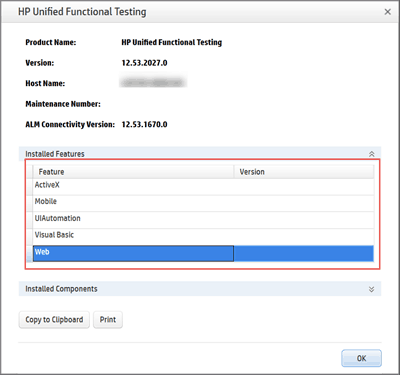
suresh says
Trying to install UFT 12.52 on Windows 7 Enterprise but getting an error say “current operating system is not supported to install this software package”
Did anyone faced this issue earlier.
Any help is appreciated
Ankur Jain says
@Suresh: As far as I remember you need to be on Win 7 SP 1. Please confirm with PAM guide for your respective version of UFT.
Shweta says
Is it possible to launch the Flight application that is part of UFT 12.53 in MFC mode to test visual basic and activeX add ins?
Ankur Jain says
@Shweta: Yes. I think they have moved away from the standard windows app for the sample windows app available with the installation.
kalyan says
We have to evaluate uft 12.5, and we have installed the trail version on 3-5 machines with out any issues. But, We tried installing on one more machine and after the installation and launching the uft error message pops up which looks for valid license and uft doesn’t work. Wanted to know is there any limitation on number of trail license installed in same network.
Ankur Jain says
@Kalyan: Trial licenses are seat licenses, they don’t have any thing to do with network. May be someone selected commuter license type while launching and it is trying to connect to the server which obviously doesn’t exist.
Adhikansh says
Thanks Amit for your early reply.
One more thing which i want to know is I am using QTP 11 on WIN 7 machine and also with WIN 7 VM(Virtual machine). But it is very slow and my scripts are taking longer time to execute.Please suggest me few tips so that i can improve my execution performance.
Thanks in advance.
Adhikansh says
We want to install firefox version 18 with QTP 11. The patch given by you is not working with it.Will you please suggest next steps.
Riona says
You can try Long Path Tool.
Johnny says
Hi, I am using Windows 10 . I downloaded UFT but instead of zip file it was in .exe format. Everything went well but installation stopped with “Failed to download and install Microsoft Script Debugger” pop-up. Plz help me.
Ankur Jain says
@Johnny: Check this link
strangerss says
I have installed uft 12.5 trail version on (windows 8.1) . I am unable to open it , shows a error that HP Unified Functional Testing has stopped working.
Even did a clean uninstall and installed it again, still the problem persists.
please help me out to get this issue resolved.
Thanks in advance.
Ikbal says
Hello,
While installing UFT 12.02 on Windows 7, I have this error message “Error reading the file … \ Quick Test HP.QTP.VbScript.EmptyFunctionLibrary.xft. Check that the file exists and that you are authorized to access”
Thanks to provide me any useful help.
Regards,
Ankur Jain says
@Ikbal: Check your machine privileges. Also re-download the package.
Karthik says
Hi Ankur
I have installed QTP 12.52 on windows 10 machine. After install, it always verifying license and not allowing to use QTP. Only options available are “install license” and “Cancel”. Clicking cancel exists from UFT window. Please help
shilpa says
does UFT 12 supports LeanFT? or UFT 12.5 only supports LeanFT?
venkat says
Hi Ankur /any one help me out on the following observations.
1.I have installed UFT 12.52 in windows 10 and alm 12.2 executions are good in ALM, But when i try to download the log report from ALM it is prompting a message as “Run results for this run session are not available in ALM,There may not be enough disk space in ALM server,Contact your site Admin”
2.Will MS office 10 works in UFT 12.52 with windows 10.Any compatibility Issues??
Please let us know your solutions for above observations..
Your help would be thank ful.
Thank you..
Ahamed says
Ankur,
Please tell me, where I can download the QTP version 10 trial version.
lavanya says
Hi sir,
I am trying to download new version of UFT 12.52 .But i am unable to find the link .I tried several times.Please send me the link for downloading it.
Thanks in advance.
auishwariyaa says
Hi ,
Also wanted to know whether , we can run automation scripts in windows 10 edge browser with latest versions of UFT ?
Is this possible?
I find in sites like edge browser is not supported by UFT 12.5 versions?
Thanks,
Auishu
auishwariyaa says
Hi .
Is UFT 12.52 is compatible with ALM explorer 12.5x?
when i try to access , i get a” class not registered” error.
Please help me?
Auishu
Sumit Gupta says
Thanks Ankur for sharing this information.
Teja says
Hi Ankur Jain,
My trail version 30 days of uft 12.5 has been expired. But still i have lot things to learn and not able to use it due to license issue even though i download again,.please suggest me some solution. I am very much intrested in learning uft. PFB my mail ID if u have any suggestions in personal for me.
Thanks & Regards,
Teja.
Ashwini says
I understand versions prior to UFT 12.05 are not officially supported on Winodws 10. However my UFT 12.01 seems to be working on Windows10.
Is anybody else using the same combo and is it working?
Should I expect any problems if I decided not to upgrade to UFT12.05 right now?
Thanks,
Ashwini
James says
Hello, I installed UFT compressed downloadable file, and after finishing the installation the application is unable to start. I checked the HP installation check tool and it showed two errors.
1. SAP GUI is missing
2. Allow other HP products to run tests is DISABLED (it seems that this option should be enabled for the application to run)
Please help me in resolving those two issues
thank you
Prasanth says
Hi,
I just want to know whether I can download older UFT version anywhere.
I am looking for UFT 12.2 or 12.02
Thanks
Prasanth
Koti Garlapati says
Hi Ankur,
The following statement is failing with UFT 12.51 version. It was working fine with UFT 11.53 version. Is there any work around for this such that it works on both the UFT versions?
device.MouseClick getX,getY,LEFT_MOUSE_BUTTON
Thanks,
Koti
Fazeela says
I cant get flight reservation package with UFT 12.5.how can i get it please help me .
Usman says
Hi Ankur,
I downloaded and installed the latest verison UFT 12.51.
It is not recording actions either on windows/web objects.
I have tried the following things, still it is not recognizing the objects.
1. Opened qtp first
2. loaded all the relevant add-ins
3. disabled ‘protected mode’ in IE (for web)
could you advice on the same.
Thanks
Usman
saima says
HI Ankur !
I really respect your knowledge .
I downloaded trial 12.5 uft. during trial period I had the chance to correct my system date. After which I was unable to open trial version stating ” this machine doesn’t have valid license….”.
That license experied now. I did send a ticket to HP but no reply.
Then I downloaded another copy of that but still same problem.
Can you help? I even didnt use trial for 10 days.
JAZZ says
Hi Ankur,
We have QTP 11.0 Licenses can we use UFT 12.5 ?
Thanks
JAZZ
Ankur Jain says
Jazz: You would need to upgrade your licenses.
Alexander Leinweber says
What I have to do, to upgrade my licences. I used UFT 11.53.
Adhikansh says
Hi,
We want to upgrade QTP 11 to UFT 12.02 by using the same concurrent license.Please tell me the process for it.
Also, i want to know that whether all the features will work in UFT 12.02 if we are using the same license.
Ankur Jain says
@Adhikansh: Please check with your HP/HP partner account rep.
satish says
i need to upgrade uft licince
sats says
Hi,
Please help me, I am trying to download UFT 12.5 for my windows8 laptop. I have created HP account, from there I am trying to download but if I click the download link getting below msg.
Whoops! Something is wrong here.
Error: Request unsuccessful
even I stopped my antivirus also. couldn’t able to trace the problem.
Elavarasan M says
I want to upgrade 12.5 version from 12.2 version. how to upgrade this ? need to install the above 12.5 or any other way to upgrade ? can you please share.
Thanks,
Elavarasan M
Naresh says
Hello,
I was trying to install the HP UFT 12.50 software on windows 10 and i am getting the following error.
“Error Reading from file: ChromeNativeMessagingStrategy.js Verify that the file exists and that you can access it”
It will be great if someone can provide your expert comments
Ankur Jain says
@Naresh: HP has not declared official support for Windows 10 yet with UFT.
Naresh says
Thanks Ankur for Getting Back. I tried different options and finally i got it to work. Below are the steps i followed.
1. Disabled my anti virus
2. Modified the user account controls settings(UAC) when opening the set.exe file to disable.
Ankur Jain says
@Naresh: Good that you were able to install UFT 12.5 on Windows 10, just be aware that a CR is raised and HP has not yet officially declared any support for this version.
Kent says
This happens on Win 7 as well.
Abhisek says
I have uft 12.01 concurrent license for lifetime but when I am giving it for uft 12.5 it is not validating it. Can you suggest me what is the necessary things I need to do.
Now uft have a port number what is that?
Ankur Jain says
@Abhishek: HP has moved to AutoPass from Sentinel, you need to do a configuration for AutoPass now.
Abhisek says
Thanks for the reply Ankur,
But how to configure AutoPass now, please help me out.
Ankur Jain says
@Abhishek: Difficult to explain that in comments 🙂 Please check the exhaustive documentation that is available with UFT 12.5 download.
Jitender says
Hi Ankur,
Thanks for the fantastic information and your efforts.Huge Appreciation.
I have installed UFT 12.5 on Win 8.1 Machine. Now i am trying to run few of my older test cases(UFT 11.5 based). But it is not doing anything thing(literally). I pressed Run Icon and wait, Its starts and then go back to test without executing any step.
Has the structure of tests changed in UFT 12.5? Or it is something else that is causing it.
I have checked for the folders and locations to make sure tests are placed at intended location and UFT have all information it needed for these.
Please help 🙂
Thanks and Kind Regards,
Jitender
Ankur Jain says
@Jitender: Thanks for your kind words.
Scripts developed in UFT 11.5 should work without any issues in UFT 12.5. Please see if any of the points mentioned here can help you 17 tips for UFT
Jitender says
Hi Ankur,
Well, it seems like one will need to restart the computer after the UFT upgrade from version 11.5 to 12.5.
I restarted the system and it started working.
Thanks and Kind Regards,
Jitender
Ankur Jain says
Ok 🙂
Gomathy N says
For UFT 12.5 trail version for the first time, is License keys need to be generated mandatorily?
Ankur Jain says
@Gomathy: For trial version you don’t need license keys at all.
Nidhi says
My uft 12.02 Trial version got expired. How can I reinstall it.
Ramu says
change os and install qtp or otherwise buy license of qtp
Virender says
Not getting Installation Wizard(where in we do Next Next to get it done) while Installing UFT 12.02 on Windows 7(sp1) machine.
It stops after installing “Microsoft Visual C++ 2010 X86 Redistributable – 10.0.40219” and
“Microsoft Visual C++ 2010 X64 Redistributable – 10.0.40219”.
Any help would be highly appreciated.
Ankur Jain says
Check PAM guide for yur OS support. If that is fine, you may want to check if the download is not corrupt.
saravana says
Hi Ankur,
Could you please tell me the exact licence period for UFT trial version? is it 30 or 60 days?
Ankur Jain says
@saravana: Looks like HP has incorrectly mentioned 60 days trial on one of the download pages. UFT 12.02 comes with 30 days trial only.
Firdous says
Hi Ankur,
I have installed the UFT 12.02 trial version successfully, but on starting, it is saying “This machine does not have a valid Unified Functional testing License.”. I have windows 8.1 machine. please guide how to make it work
Amandeep singh says
I have uft 12.02 installed on my wnidows 8 o.s .
It has installed but everytime it is giving runtime error .
That ” parent to webedit i.e webrowser cannot find.
And in second line parent to webedit i.e page cannit be found ..and so on to eveyline .
But same scipt is running in windows 7 properly on my 2nd laptop.
What is the solution..??
I cant install window 7 as ..i bought a new laptop with original windows installed with one partition ..just 5 days back!!!
Poease help me!!!
Wade says
Hi Ankur. I installed UFT 12.02 on windows 7 professional SP1 for evaluation purpose. The installation completed. However when I started the UFT, I got a License error “This machine does not have a valid unified functional testing license. For more details, please refer to …. you must install a valid license and then restart UFT”. I click “Cancel” button, the application closes itself. I noticed other people also asked the same question but I can not find the solutions posted here. Please help if you can. Thanks in advance.
Payel Mandal says
We installed UFT 14 trial version on our system and ran into the “License Error” described above. We could see the “Install License” and the “Cancel” buttons on the error page. We could not find the “Continue” button that was needed to start the trial version without the need of a license. Then we realized that we had downloaded the installable as a “A compressed downloadable UFT installation package” from the HPE site whereas the best practice is to download “A full installation package” (Available on the same page).
Once we realized this nuance, we uninstalled UFT, downloaded the “full installation package” and installed it. The newly installed UFT provided the “Continue” button on the License page and ran like a charm thereafter.
Raj says
Hello Ankur,
While installing UFT 12.02 SEAT license on Windows 8.1 machine(VMware client) we are getting below error message.
“Failed to install license key.
Error[143]:Failure in accessing the license file.
Are you aware of this issue? any resolution.
ssp says
Hi ,
I am preparing for UFT 12.X certification (HPO-M102). I am trying to practise flight GUI application. i see UFT 12.00 is recordsing the objects only as windows the child/parent objects (like dialog,winbutton,edit etc) are not being identified . Can anyone please let me know why it is happening?
Thanks
diamond says
Make sure to launch UFT before launching web browser.
Good luck
rashmi says
I got an error of missing MicMFClibU.dll file while installing QTP in my laptop.I am not getting this dll file fom internet also.So,What should I do?Plese help me to solve my problem.
Nathan Bala says
I have installed UFT 12 trial version. I have set the seat license to proceed with 30 days trial. I got message that the license type set successfully. But when I restart my application, it again looks for license. I am able to open UFT at all. Any help would be great help
anupam shukla says
HI,
can we uninstall licensed version of QTP 11.0 and install QTP 12.0 trial version?
I am getting license key issue for it.
Ramu says
first u have to change os on ur system and install uft 12 or otherwise it will not work
Naba says
I am using UFT 12.02 and as I was going through the tutorial it says about the Sample flight application. Going through the exact path I find no Sample Flight Application being installed only. I went through similar comments here where it is instructed to run as a administrator. ‘Running as a administrator’ – what and how exactly it is done. I am using a licensed version – please advise me how to make the Flight application available with its test scripts/code..
sarayu says
hi, go to C:\Program Files\HP\Unified Functional Testing\samples\flight\app
and here you can find flight3a,4a and 4b. Just select in which u want t use. Make a shortcut to Desktop and start using it in UFT 12.02
Eric says
I can’t seem to download the trial, the HP form is broken on the state/province menu.
Kondal Nookala says
Hi Ankur,
I had installed the UFT 12 trail version and used it for a month and now the trail period has come to end, I tried downloading the latest version of UFT from HP but it doesn’t allow me. Requesting you to please help me with a viable solution.
Thanking you in Advance!!!!
Vinod says
Hi Ankur,
I downloaded the trial version of UFT 12.02. While trying to run the set up file, I was stopped saying no VC++ components and Microsoft Access DB engine 2010. I was able to download the VC++ components but unable to download the Microsoft access db engine. I am currently working on windows 8 machine. Please help
Thanks,
Vinod
Liam says
Hello Ankur
My company uses UFT 12.01 at the moment and have encountered impediments with UFT 12.01 and Firefox not being good friends. I read that UFT 12.02 will be compatable with Firefox. I have only been able to find the Trial version. Do you happen to know when the full release and download of UFT 12.02 will be available.
Thanks in advance
Liam
jotsna says
Hi Ankur,
I have downloaded UFT 12 on my windows 8 system and it is not working. Please suggest how i can do that as i can see people with windows 8 could do that.
Georgiana says
Hi. I’ve just installed UFT 12 and I can’t open the Flight Reservation application. If I go to Start -> UFT there is no sub menu to choose from. If I open Flight Api directly a pop up comes up that says “HP Flight Service is Running” and below I have 3 Service URLs.
Can you please help me out with this?
anju says
UFT 12.02 is not at all recognizing flight application objects
anju says
Could you please tell will changing date will extend the expire period for uft12.02?
Ankur Jain says
@Anju: No
vinoth says
while instaling UFT 12.02 i am getting “Error reading file”
Icons.16*16.FormerDesigner.DecreaseHorizontalSpace.png ,verify that the file exists and that you can access it ,
Please some one help on this- Thanks.
Swathi says
Hi Vinoth,
I am also getting the same issue…Is your Issue got resolved..?
if its resolved can you please assist me on the same.
Thanks,
Swathi
Mukti says
Hi Ankur..If I upgrade from qtp 11 to uft 12 and again if i want to roll back to qtp 11 using same license, would be there any issues?
Mukti says
Hi Ankur, I have asked regarding the upgradation of QTP 11 to UFT 12.
Could you help me at the earliest!!
Do i need to buy a new license or i can use the same license.???
Ishani says
Hey Ankur,
You have got a great style of writing article – simple and straight. Great work..
I have a question – where do I get to download UFT 12.02 service pack upgrade. I need to upgrade the Report Viewer from QTP 11.0.
mukthi says
Hi Ankur, I have a QTP 11.0 life time validity license. Now i want to upgrade to UFT 12. Can i use same license for for installing UFT 12.0 or do i need to buy a new one. Please help ASAP.
mukti says
Hi ankur, i have a life time valid QTP11.0 license. I am now upgrading to UFT12.
My question is can i use the same license for installing UFT 12.0 or do i need to buy the new license!?
bharat says
HI sir,
Could you please guide me how to reset trail version of UFT 12.01.
Regards,
Bharat
asha says
hi,
Getting a License Error while tring to install UFT 12.01 trial version. Please help me to start successfully.
Thanks
Asha
asha says
Hi,
I have downloaded UFT 12.01 trial version and when trying to launch its giving License error. Please help me how to start UFT.
Thanks in advance
asha
Renee Bailey says
I download the trail version of UFT version 12. The record functions are grayed out and I can not use the record function. How do you use the record fucnitons on the trail version of the UFT software?
ManiTest says
Hi Ankur,
We are migrating from QTP11.0 to UFT12.0. are there any limitations?
Also how is sprinter works with UFT12.0? do we need to take care of few things.
Regards,
Mani
Nanshu says
Hello Ankur,
whenever i try to use FTP, it do not open the Internet Explorer. i tried IE 9, 10 , 11 but its not working on any of them. Even if UFT is opened, IE crashes always.
UFT is not working with any version of IE.
can you please help me with this. i made sure that IE settings were installed properly.
rajie says
I installed UTF 12 Trial version. When i started the UTF , it says “validating Licence ” and i get a information box saying
“Sentinel RMS:Oct 24 13:22:22:Process(11184):VLServerHandel, Line:92(0)”
The information appears continuously and am not able to proceed further. Pls help
Russ says
I have a couple of QA’s that recently installed UFT 12.01. When they restart their PC and while UFT is running, other programs have a delay when opening. Programs such as MS Excel or even a IE browser which has 5-10 second delay. We tested on couple of PC’s. I did not see much a difference in memory usage or CPU usage when opening these programs. Any ideas?
Yogesh says
Hi,
I have installed UFT 12.01 on my localhost and have started using it for learning purpose. I have a question: Can HP service test be used to validate a windows service? If yes, please let me know the process.
anand says
Hi Ankur,
I have installed UFT trial version on my system, but it asked me for license key. While installation i didn’t gey any window to uncheck “License related” check box.
Can you please help me to get from this ?
Thanks,
Anand.
anand says
Hi Ankur,
I have downloaded the software from the location suggested by you.
Hi i have followed all the steps you mentioned. But i didn’t get licence window while installation. After completion of installation, when i opened UFT Application, it asks me Licence key”. Can you please help on this ?
Thanks & Regards,
Anand.
Hemant says
Dear Ankur,
I need your guidance in connectivity of sample application with flight database. I am using QTP 9.2 and when Flight application is launched and I am not getting fly from and Fly to dropdown entries. It seems something is wrong with ODBC settings. I have uninstalled QTP several times and even MS office 2007 too but no success. Could you please help me in this as I am unable to proceed with practicing this tool.
Thanks
Hemant
9899196825
babucig says
run it as administraor it will work
Harish says
Hi Ankur, when I tried to install UFT12.01 on Windows 8.1, during registering component objects step, so many errors saying that the component registration failed for so many .dll files. If I skip them and then complete the installation, I failed to start the UFT. Any suggestions on how to resolve this?
Vinay says
Hi Ankur ,
I am able to downlaod the trail version 12.01 and success till only 3rd Step. I am not able to launch the tool . Please suggest me the solution. Earlier I was instslled the UFT 12.00 Trail and its version is expired now.
abdul says
I have download and install trial version of UFT 12.01,
When start the UFT, cancel license dialogue window, then UFT close, please suggest solutions.
Regards.
Shikha Aggarwal says
Hi Ankur,
Can we install UFT with IE 10 or IE 11? Or is it necessary to have IE 7/8/9
Regards,
Shikha
babucig says
for uft 11 and 11.53 use ie 10
Romesh says
in flight reservation system i am putting username=mercury & password=mercury
login is ok But problem is that one message can disply “Invalid attribute/option identifier”
pls give me solution on that probem
Ankur Jain says
@Romesh: Here is the solution
Ikbal says
Hello Ankur,
Please I didn’t have a solution to this issue.
When I want to install HP UFT Connection Agent.pkg, I have this error message:
“HP UFT Connection Agent.pkg ne peut être installé car sa signature numérique n’est pas valide.”
–Le paquet a été signé avec un certificat révoqué. Il est possible que ce paquet installe un contenu différent de vos attentes. Procurez-vous une nouvelle copie du paquet et essayez de nouveau–
Thanks,
Ankur Jain says
@Ikbal: Here is what the translation reads
Ikbal says
@Ankur: Yes, but what can I do for this problem please ?!
Thanks for your help;
Ankur Jain says
@Ikbal: Ok, to me it looks like Agent.pkg package is corrupt. You need to come up with more details regarding your OS, browser version used and what prompted this error. Please post a follow-up question on UFT forums.
Ankur Jain says
The issue was with the older version – I have responded to your query here
Bharath says
Hi Ankur,
Thanks for the wonderful Installation guide. We recently migrated from QTP 11 to UFT 12, and we are facing some strange issues like UFT will hang at breakpoint or when run error is displayed. I have to kill the UFT process and then open UFT again. Debugging has become very difficult. Any idea why this is occuring ? was my installation not proper ?
I am using Win7 64bit OS with 8GB Ram
Thanks
Ankur Jain says
@Bharath: Try a clean un-install of UFT. Also check these tips.
Ikbal says
Hi Ankur,
Please I want to know if UFT 12 is supported by Mac Os
I’ve download this last version but it doesn’t work on Mac OS
Best regards,
Ikbal
Ankur Jain says
@Ikbal: There is a limited support for Mac OS on UFT 12. Please check this post to find out more on Mac OS support.
Ikbal says
@Ankur: Yeah, my problem in fact that is I had .exe file when I downloaded UFT12.
So, this file cannot be installed on Mac OS.
Ankur Jain says
@Ikbal: You can’t install UFT on Mac yet. Rather you need to install UFT connection agent which is a service installed on your Apple Mac computer, which enables UFT to communicate with the Safari browser using the WebSockets protocol. You would also need to have UFT agent extension for Safari on your Mac machine. The code will be executed remotely.
adrika says
hi ankur,
1.when i click on insert output value, it automatically redirects me to insert object value properties dialogue box instead of object selection dialogue box. what can i do to get object selection dialogue box.
2. when i start recording, both windows application and internet explorer are getting opened and i could continue with the one i like(intial steps of none of these two actions are recorded). But what should i to open only the app i require and what should i do to record my initial step of opening an application.
Can you please help me
Ankur Jain says
@Adrika: Please open a thread on forums
Bhuvan says
Hi,
Downloaded UFT 12.0 trail version.However could not install on my sysem(OS:Windows XP, Service pack3).Getting message current operating system is not supported to install this software package
Ankur Jain says
@Bhuvan: The message is correct. UFT 12 does not support Win XP. Check the UFT vs Windows support matrix for detailed info on support.
Given that MS themselves have stopped supporting XP, I don’t think HP has any plans to support Win XP in future for the newer versions.
Jasbir says
I tried to look at the video on this page but it gives me the following error:
[Error]: An error is triggered during the ajax request! Text: error Forbidden
I have installed the UFT 12 trial software but when I try to run it I get stuck on the Install License alert. When I click on the Cancel button, it just takes me back to the Desktop screen and UFT never opens up.
Please help.
Ankur Jain says
@Jasbir: Have you installed a version of QTP/UFT earlier?
Arpit says
I also faced the same issue. Yes, I installed the previous version of UFT earlier but it worked by clicking on the Cancel button and I was able to use it for 30 days.
Could you please share your inputs.
Rakesh M says
Is there any way we can overcome the License issue while reinstalling the UFT 12.0 trial version
shilpa says
As soon I downloaded from link that u have provided,I got a mail saying the order for QTP is confirmed, along with the sold-to address & electronic delivery site info. What does that mean? I just want to use QTP trial version not buy from HP. Please clarify ASAP.
Ankur Jain says
@Shilpa: That’s a standard info they provide when you request a download, you can ignore that.
Bobby says
1. If you are using Windows 7 Operating System, and installed the HP Unified Functional Testing Version 12.0, this is way I got it working.
a. Right click on the “Flight GUI” in the Start > All Programs > HP Software > HP Unified Functional Testing > Samples > “Flight GUI”
b. Click on Properties
c. Click on Compatibility Tab
d. Under the Compatibility mode option (Tick) the Run this program in compatibility mode for and choose “Windows XP (Service Pack 3)” from the drop down list.
e. When you open this application, then choose the option yes to run as administrator
2. Similar follow the same compatibility setup for 2 (flight3a.exe & flight4b.exe) other applications in the below folder (or where ever you have installed this software):
C:\Program Files\HP\Unified Functional Testing\samples\flight\app
Koti says
Hi Ankur,
I downloaded and using UFT 12.0. I observed that when a breakpoint is inserted in QTP script or a library file, execution is not holding at the breakpoint. Could you please let me know what else I need to install so that debug works?
Thanks,
Koti
Shinde says
Hi Ankur,
I have installed UFT 12.0…When I try to run the sample flight application (Flight GUI) and enter the agent name and password (both as mercury)….Getting following error “Invalid Attribute/option identifier”.
Ankur Jain says
@shinde: I hope your install was not corrupt? The sample app is working fine at our end and we have not heard any such issues from others.
Olga says
I have the same problem. But if I open flight app as administrator it opens ok.
But in this case I have to click ok because Windows asks me to allow to make changes on my computer
vasvi says
Lovely it worked!!! Thanks vinod!
Vinod says
Hi,
For all those who face the issue like : ““Invalid Attribute/option identifier”.
while opening the “Flight Application” .., the reason for that error is because of admin privilege..,
we can sort this problem by following these steps…,
Right clilck on Flight GUI icon, –> Select Properties –> Click on ‘Compatibility’ tab –. Under ‘Privilege Level’ section –> select the check box ‘Run this program as an administrator’ and click on OK button.,
And then retry accesing the Flight GUI application.,
Hope that helps…, Thanks
Regards
Vinod
Lalitha says
Thanks vinod for this valuable info
Actually i did number of things to rectify this prblm.
Thanks a lot
KuMAR says
While installing QTP12 I have got an error. Error reading from file:unified functional testing\MSI\GlobalAssemblyCache\HP.ST.EXT.automationAPIhelpers.dll. Verify that file exists and that you can access it. How to solve this error.
Ankur Jain says
@Kumar: Check if your download is not corrupt.
Shahrazad says
Hello Ankur,
I need a patch for running the automation script on Firefox 28.0. it’s working on Firefox 27.X .. but i need it to work on version 28. =)
is there a way i can configure it to work on it?!
Please Help =D
Ankur Jain says
@Shahrazad: You can bookmark this page which is updated on a regular basis as and when a new patch is released. As of today, UFT 12 supports till Firefox v27 only.
Jason says
Hi Ankur-
I am facing an issue with QTP 12.0 and Flights application. When i launch Flights application and go to the main flight reservation window, it gives me an error “Invalid attribute/Option Identifier”. Dropdown menus are blank and there is no flight button.I have checked that I have copy of the database under sample folder etc..
Please let me know if you have resolution to the issue. There are alot of people affected by this issue. If this cannot be resolved please guide how i can install QTP 11.5 OR 11 on my machine.
Thanks in Advance.
Best REGARDS
Ankur Jain says
@Jason:
What’s your OS? There are few kinks with this new version like the various Start > Tools not available under Windows 8. I have raised a request with HP and waiting to hear from them.
Aparna says
Hello, I have faced the same issue when I installed UFT 12.00 on Windows OS7. Couldn’t work with Sample Flight Application. I get “Invalid Attribute/Optional Identifier” error when I log-in into the sample application. Has HP given any solution to this? It seems to be widely faced issue by everyone who has installed UFT 12.00
Is this issue related to some missing DLL or regarding some DLL’s registry?
Ankur Jain says
@Aparna: There has been no patch from HP after the release of UFT 12.
@All: For all those getting same issue, please mention your OS, Service pack of OS installed on your machine, IE version and QTP/UFT version.
Swapna says
Hi Ankur, I am getting same error with flight application .
OS: Windows 7 Home Premium
IE version: 11.0
UFT: 12.00 (Installed UFT for first time on my laptop and this is the version I could download).
pabbs says
Hi for error msg :Invalid attribute/Option Identifier.
1. go to folder where flight4a.exe is located
2. right click on it and select properties
3. click on “compatibility” tab
4. under compatibility mode, check the check box :run this program in compatibility mode for
5. select your OS
6. click apply and then ok
7. restart the application
babu says
system need to format,after trail period got expired in uft or QTP………………
could you please provide solution regarding without formating the machine……………
Ankur Jain says
@Babu: 1) As your organization to get the license keys 2) Request HP to extend the trial or else no solution.
Anitha says
Hi Ankur,
I have Installed UFT version 12 in my windows 8. I am unable to find test batch runner in my system. Can you guide me how to open test batch runner in windows8.
Thank you,
Anitha
Ankur Jain says
@Anitha: Looks like this is a common issue with people on UFT 8/8.1. While the help says all tools would be available from the start screen of Win 8 but none of them are available there. I think it will be better if you can raise a bug fix request through your company’s support system to HP.
sathya says
hi ankur
i have downloaded the latest UFT 12.0/11.5 version in windows 8 .i am unable to find where flight reservation application located.its getting hard to locate in windows 8 version laptop.
Ankur Jain says
@Sathya: You are correct. UFT 12 does not show the sample apps in start screen of Windows 8. This seems to be a bug. However as a workaround you can directly open the windows based app from
C:\Program Files (x86)\HP\Unified Functional Testing\samples\flight\appVamsi says
Hi Ankur,
I installed the UFT 11.5, during the installation, I failed to download the “Script debugger” due to internet Issues. Could you please let me know the way I can download it ?
Ankur Jain says
@vamsi: You can go to Start > All Programs > HP Software > HP Unified Functional Testing > Tools > Additional Installation Requirements and install debugger,
Vamsi says
Thanks for the Prompt response Ankur. It is working now. Thanks once again.
Puneet Samaiya says
Hi Ankur,
I have got trial version of the UFT but not able to open that Flight reservation system which is embedded with it. I want to know that what would be the username password of this application… if you know please share with me
Thanks & Regards
Puneet Samaiya
8055008609
Ankur Jain says
@Puneet:
username: mercury
pwd: mercury
That works across the desktop based and web based apps.
lakshmi says
i was downloaded the external download manager IDM . still i was getting the same message
Ankur Jain says
@Lakshmi: Please check the steps above carefully. Try not to use HP’s download manager.
lakshmi says
i was downloaded “HP Unified Functional Testing 11.50 CC English SW E-Media Evaluation”.after downloading the size of this file is only 1281kb. while opening this downloaded file i was getting this message
” Compressed(zipped) folder is empty
Before u can extract files,u must copy files to this compressed(zipped) folder”
please tell me what to do
Anil says
hiii.i have download 11.5. but i need a key for use it.
help me for key????
Ankur Jain says
@Anil: You don’t need a key for trial version.
NEHA says
AFTER INSTALLATION IT SHOWS MESSAGE OF eRROR LICENCE AND ASK TO INSTALL VALID LICENCE.
PLS HELP
Balu says
Hi Ankur.
When I’m inistaling UFT. It was Asking License.
Reshma A says
when I install QTP 11.5 showing this error message
Error Attempting to open the source file:
while installing uft 11.5 while coping file getting the following error: Testing\ MSI \target dir\data\resources\image\bitmapresources\Bitmapres ouces\-data\icons\16×16.forms.designer.increaseHorizontal space.png System Error code :3
Ankur Jain says
@Reshma: Check the pre-requisites before installing UFT. Also see in case the download is corrupt.
Arivazhagan says
Thanks for your meticulous effect MR.Ankur
Serdar Bolat says
Hi Ankur,
I downloaded and installed HP UFT 11.50 but when I try to start I am getting “HP Unified Functional Testting has stopped working” error. Before installation I gave all necessary permissions and disabled antivirus program. I run it as administrator. Do you have any idea about this problem ?
Thanks in advance.
Regards,
Serdar
Maruthi yadav says
Hi Ankur,
I was trying to execute multiple scripts @ time(Using Test Batch Runner), but am getting “QTP has stopped working” error. Please let me know, What is the problem and How to fix this issue.
Thanks in advance!!
Regards,
Maruthiyadav
Bilal says
Hey Ankur,
i want to know do i have to re-install window n QTP all over again to make it operational again?
my system windows 7
QTP version 10
please help
Thanks
Deepali says
Thanks again ANKUR for providing useful link and Info…
Mani says
hi Ankur, QTP installing steup video is not visible on page….it show the msg that first share the page then video will be visible..I shared the page..still video is not visible… Plz help…
Ankur Jain says
@Mani: Thanks for the heads-up. The issue is fixed now. Please check.
anil says
When ever i click on Trail verson in UFT 11.50 build in hp, i am getting this error “The server closed the connection without sending any data”..Please can you help me out.
Ankur Jain says
@anil: May be a momentary issue. Try again after some time.
BK says
So I followed the directions and filled up the form about personal details and agreed to the terms BUT it came up with a message that a link will be sent to me after some review and approval. What does that supposed to mean?
I entered all fake information accept for my email as I was gonna format my system after 30 days and download another trial.
sadapa says
Hi Ankur,
Are the upgrades free? WE currently have QTP 10. We would like to evaluate 11.5?
Just wanted to know if the upgrade to 11.5 is free
Ankur Jain says
@Sadapa: No. The major version upgrades are never free.
vigor says
We have a UFT 11.53 licensed version with us. Right now we do not have any running support agreement with HP. Can we still upgrade it to UFT 12. Will our 11.5 license would work here?
Ankur Jain says
@vigor: AS Vijay has reported here, looks like UFT 12 will work with your current license of UFT 11.5.
vigor says
Thanks a lot Ankur for your comments
Amit says
Hi Ankur
very well written and easy to follow steps. But I got a mail saying the order for QTP is confirmed, along with the sold-to address. What does that mean? I just want to use QTP trial version not buy from HP. Please clarify ASAP.
Ankur Jain says
@Amit: That’s how HP processes your download requests. You can ignore that.
juhi says
heyy cn you forward the exact link to download qtp and the seenium complete package?
Ankur Jain says
@Juhi: QTP and Selenium are two different tools. For QTP, please check the download steps above.
Amit says
I would like to know if we can get the patch to update 11.5 to 11.51.
Ankur Jain says
@Amit: Instead of 11.51, download a patch for 11.52 which covers all patches released prior to it. Check this QTP Patches link.
Vijay says
@ Antony
Right click on that link and open in a new tab.you will see the registration page, from where you can continue the downloading. chose Advanced mode for easy downloading.
Vijay says
Hi..
Now the file size for UFT 11.50 Eval software is reduced to 1.71 GB 🙂
Antony says
Hi,
When i’m clicking on this link “HP Unified Functional Testing 11.50 CC English SW E-Media Evaluation” from trial softwares, my system dosent seem to do anything. Downloading is not getting started. Is there any time limit to download, or am i making any other mistake. Can you help me on this please.
Pravesh says
Hi Ankur, after installing UFT 11.5, recording Flight GUI , at replay time/run time I am getting error as Not able to find the Agent Name
Sujata Bhattacharya says
Hi Ankur can i install qtp 10 in windows 8??
Rajesh says
You can able to download on windows 8.
G says
Hi Ankur,
I am having this problem with the UFT 11.50: I can play back all my old scripts created with previous versions of QTP but I can record nothing but the sys util actions with the UFT. The Object Spy recognizes objects and adds them to the object repository. I am using Record on any open application option. Even after adding objects to the repository with the Object Spy and then creating script manually, I am unable to play it back.
Thanks,
G
Shubha Sridhara says
very well written and easy to follow steps. But I got a mail saying the order for QTP is confirmed, along with the sold-to address. What does that mean? I just want to use QTP trial version not buy from HP. Please clarify ASAP.
sri says
Hi Ankur, I have installed UFT 11.5 as detailed but when launching in Windows 7 (64bit) it says HP UFT has stopped working with Debug and Close program buttons. in the background, UFT’s splash shows Validating license…
I have clicked cancel when it asked to select license option.
please suggest if you know solution…
appreciate your help.
vyas says
how to upgrade qtp 9.1 scripts to qtp 11.5 ? pls help me.
Ramesh Nistala says
Thanks Ankur I am able to download this.
Sekar says
Is there any way we can overcome the License issue on overwriting the earlier version and evaluate the UFT 11.5 version?
Vishwas says
Hi Ankur, I really appreciate your efforts for providing the QTP 11.5 details. I am successfully able to download it.
Thanks,
Vishwas
Ankesh says
Hi Ankur,
It is asking for license.
Rgds,
Ankesh
Ankur Jain says
@Ankesh – If you have already installed a version of QTP earlier and installing UFT 11.5 overwriting that version, UFT will ask for license.
Kripal Datt says
Thanks again ANKUR for providing useful link and Info…
Suresh Bhandari says
Thanks,
was looking for the same.